New Participant
July 7, 2022
Answered

Cant fill color to object, only the lines

  • July 7, 2022
  • 3 replies
  • 338 views

Hi... Im trying to learn theis illustrator stuff..


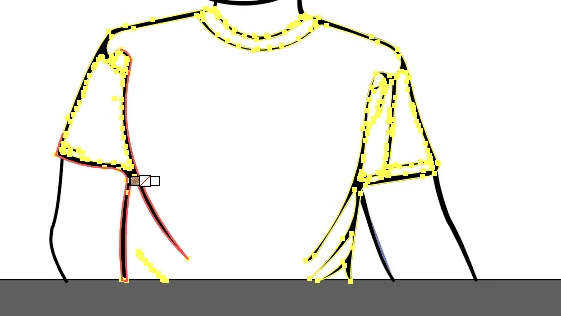
ive got an object now, but somehow i cant fill color into it when selected. only to the black lines surrounding it.

What can i do?
 

This topic has been closed for replies.
Correct answer Doug A Roberts

It looks like you're using live paint, in which case you may need to draw some no-stroke boundary lines where your drawing is open at the edges of the artboard, and add them to the live paint group.

3 replies

Bill Silbert
Community Expert
July 7, 2022

Could you please explain how you created this drawing? In addition to what Kurt and Doug said it also looks possible to me that you have one big compound path which would explain why the areas of the shirt can't be filled because they are actually clear areas. Try putting a color object behind the drawing and see if its color shows through. If that is the case then that would actually be the way to fill those areas—putting a color shape behind the areas that need color.

Doug A Roberts
Doug A RobertsCorrect answer
Community Expert
July 7, 2022

It looks like you're using live paint, in which case you may need to draw some no-stroke boundary lines where your drawing is open at the edges of the artboard, and add them to the live paint group.

Kurt Gold
Community Expert
July 7, 2022

Which version of Illustrator are you using?


What tool are you using to fill the areas? Live Paint? The Shape Builder tool?


Can you share this Illustrator file?
