
Participating Frequently
December 26, 2012
Answered

Center point missing from shapes in outline mode

  • December 26, 2012
  • 10 replies
  • 37409 views

I seem to have lost the center line cross hairs in Illustrator CS6.

I draw some shapes, then go to outline mode and the center lines are now missing. They used to work. Still have them in CS5.

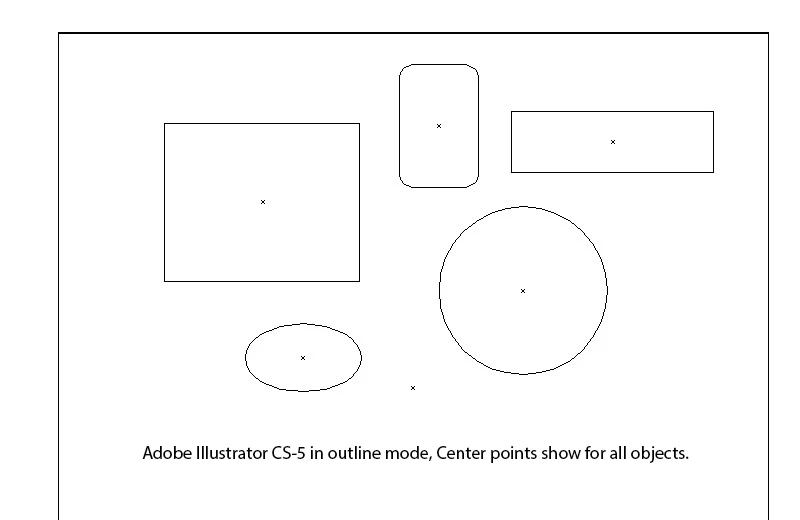
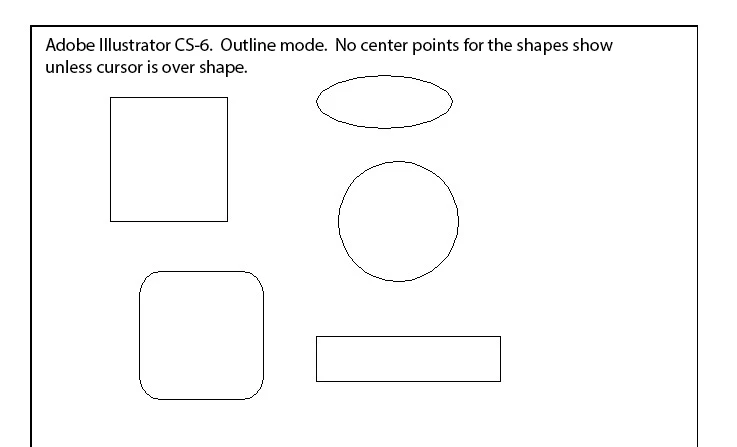
Here are a couple of images that show what I mean.

Here in 5 you can see the center points in each shape
Here is a similar picture from 6 with the center points missing.

The center points do show up if I put my cursor over the shape.
    This topic has been closed for replies.
    Correct answer The Invalid

    Hi there. I was having the same problem until I stumbled across a (new?) option in the Attributes palette.

    There are two little boxes, one with a dot in the middle. Select that one, and all your problems will be solved. Hopefully.

    10 replies

    Participant
    October 7, 2019

    Go to the View panel, enable Show Bounding Box.

    Participating Frequently
    November 30, 2021

    No, that doesn't work. The circle is set to show center point, and Show Bouncing Box is on (but the bounding box does not appear in this screen shot).


    MarkSR
    Inspiring
    April 18, 2019

    Same issue.  Center-point is missing from guide objects (boxes and circles turned into guides).  I've done everything recommended and the center-point still won't show.  Object-guides used to show the center-points now they don't.

    Monika Gause
    Community Expert
    Community Expert
    April 18, 2019

    MarkSR  schrieb

    Same issue.  Center-point is missing from guide objects (boxes and circles turned into guides).  I've done everything recommended and the center-point still won't show.  Object-guides used to show the center-points now they don't.

    Please post this to http://illustrator.uservoice.com

    MarkSR
    Inspiring
    April 18, 2019

    Done.

    DrTc
    Inspiring
    February 27, 2017

    Is there a way to set Show Center by default in preferences or else? it is really annoying to have to go each time in the attributes panel to check the show center box

    Participant
    December 2, 2018

    I am struggling with the same problem.  This really needs fixing by Adobe ASAP

    If I draw a shape then change to a guide you don't have a centre point showing and no way to do this even with attributes.

    To have to change attributes every time just adds time to projects.

    I really don't understand why this has changed in the latest software CC2019

    Adobe please help us!!

    The Invalid
    The InvalidCorrect answer
    Participant
    November 22, 2016

    Hi there. I was having the same problem until I stumbled across a (new?) option in the Attributes palette.

    There are two little boxes, one with a dot in the middle. Select that one, and all your problems will be solved. Hopefully.

    fayew
    Participant
    December 16, 2016

    Attributes (show all) and select the box with the dot in it - fixed it for me - THANK YOU!

    The Invalid
    Participant
    December 20, 2016

    You are very welcome!

    Participant
    September 26, 2015

    Hi everybody, I think in new version, Adobe have moved center point to another tool. Like that

    You can use it to turn around, transform, move shape by this tool.

    Participant
    May 6, 2021

    Problem fixed ! thank you so much !!

    saritt_nair
    Participant
    August 13, 2014

    Just go to menu 'View' and click on the Show Edges. And in Window>Attributes make sure the show center button is on. Hope this will make your issue solved.

    Known Participant
    October 24, 2013

    Same issue. Windows 7, Service Pack 1, AI 17.0.0 CC. Recently switched from Mac to Windows under pressure from IT, and at first I thought it was fine, but I keep running into annoying issues like this which evidently Adobe is very slow to address. How hard could it possibly be to fix something like this? And it IS a HUGE annoyance not being able to find centers on anything unless they're selected. C'mon Adobe...

    Participating Frequently
    August 14, 2013

    I am having this same problem on both CC and CS 6 using windows 7. It does not happen on CC on the mac version.

    Attributes show center point selected. It is kind of annoying not having this work. Any other work arounds?? Tried the reset through holding cntrl-shift-alt on CS 6.. not fixed.

    I don't think it ever worked for these two versions on Windows for me. I noticed this problem before but kind of ignored it until I saw it working on mac.

    Participating Frequently
    August 19, 2013

    Okay. So I ran the CC cleaner, I uninstalled and reinstalled, etc ... this problem is still happening on my windows 7 computer. It does not have this issue on the MAC or on my laptop with windows 8 installed.

    Adobe Illustrator CC and CS 6 both. Surely someone has a fix? This is a very annoying issue that may seem little to some but I do rely on it a bit.

    August 27, 2013

    Is it a Smartguides issue? Have you tried making those visible? They normally show the centerpoint relation to other elements.

    Participant
    June 2, 2013

    I had this same problem. Fortunately, I only had to close AI and restart and the centerpoints were finally visible. I am using Win 7 Pro, 8GB, 1900 X 1080 using AI creative Cloud version.

    Mike_Gondek10189183
    Community Expert
    Community Expert
    December 26, 2012

    If your atributes show center point weas off for every object that would happen.

    I doubt that is what happened as that would go away with a new document, and you mentioned the mouseover revels centerpoint. I only have CS5 here at work but hopefully my post helps you out.

    Try resetting your .ai preferences.

    DonsindAuthor
    Participating Frequently
    December 26, 2012

    Thaks for the reply, but I tried that and it wasn't the problem, and just tried again to make sure. 

    The new image below is in outline mode, no center points.

    I have checked all preferences, and they are set up identical in both 5 and 6, and 5 is fine.

    DonsindAuthor
    Participating Frequently
    December 28, 2012

    Anyone