Sayed Ali Mousawi
Known Participant
March 11, 2022
Answered

Change Placement Options of all PlacedItems

  • March 11, 2022
  • 2 replies
  • 900 views

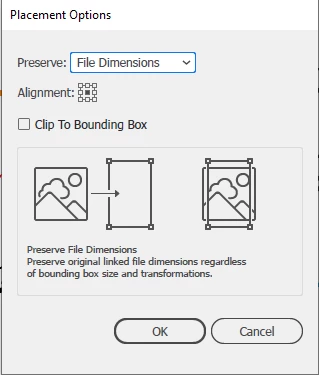
Hi, i have a lot of Ai files that each one of them contains many placed items, and i need to change the Placement Option of them to preserve File Dimentions. is this options accessable via JavaScript?

Thank you very much.

This topic has been closed for replies.
Correct answer m1b

Hi @Sayed Ali Mousawi,

I have written a script that will return all placed items in a document to 100% size with the option to position in relation to the placed item's frame (eg. the clipping mask rectangle). Will that work in your case?

- Mark


/*

    UnScale All Placed Items.js
    for Adobe Illustrator 2022

    by m1b
    here:https://community.adobe.com/t5/illustrator-discussions/change-placement-options-of-all-placeditems/m-p/12806572

*/


unScaleAllPlacedItems();


function unScaleAllPlacedItems(doc) {

    doc = doc || app.activeDocument;
    var items = doc.placedItems;

    for (var i = 0; i < items.length; i++) {
        unScalePlacedItem({
            doc: doc,
            item: items[i],
            positionToFrame: Transformation.CENTER,
            transformAbout: Transformation.CENTER
        });
    }

}


function unScalePlacedItem(options) {

    var item = options.item,
        positionToFrame = options.positionToFrame,
        transformAbout = options.transformAbout;

    if (options.item == undefined)
        return;

    // unscale the placed item
    item.resize(1 / item.matrix.mValueA * 100, -1 / item.matrix.mValueD * 100, undefined, undefined, undefined, undefined, undefined, transformAbout);

    if (positionToFrame == undefined)
        return;

    // get item's frame if it has one
    var frame;
    if (item.parent.constructor.name == 'GroupItem') {
        for (var i = 0; i < item.parent.pageItems.length; i++) {
            if (item.parent.pageItems[i].clipping == true) {
                frame = item.parent.pageItems[i];
                break;
            }
        }
    }

    if (frame == undefined)
        return;

    var centerDelta = differenceBetweenPoints(centerOfItem(frame), centerOfItem(item)),
        topLeftDelta = differenceBetweenPoints([frame.left, frame.top], [item.left, item.top]),
        sizeDelta = differenceBetweenPoints([frame.width, frame.height], [item.width, item.height]);

    // position the placed item in relation to its frame
    if (positionToFrame == Transformation.TOPLEFT) {
        item.translate(topLeftDelta[0], topLeftDelta[1]);
    }
    else if (positionToFrame == Transformation.TOP) {
        item.translate(centerDelta[0], topLeftDelta[1]);
    }
    else if (positionToFrame == Transformation.TOPRIGHT) {
        item.translate(topLeftDelta[0] + sizeDelta[0], topLeftDelta[1]);
    }
    else if (positionToFrame == Transformation.LEFT) {
        item.translate(topLeftDelta[0], centerDelta[1]);
    }
    else if (positionToFrame == Transformation.CENTER) {
        item.translate(centerDelta[0], centerDelta[1]);
    }
    else if (positionToFrame == Transformation.RIGHT) {
        item.translate(topLeftDelta[0] + sizeDelta[0], centerDelta[1]);
    }
    else if (positionToFrame == Transformation.BOTTOMLEFT) {
        item.translate(topLeftDelta[0], topLeftDelta[1] - sizeDelta[1]);
    }
    else if (positionToFrame == Transformation.BOTTOM) {
        item.translate(centerDelta[0], topLeftDelta[1] - sizeDelta[1]);
    }
    else if (positionToFrame == Transformation.BOTTOMRIGHT) {
        item.translate(topLeftDelta[0] + sizeDelta[0], topLeftDelta[1] - sizeDelta[1]);
    }

}

function centerOfItem(item) {
    var hasDocCoordinates = app.coordinateSystem == CoordinateSystem.DOCUMENTCOORDINATESYSTEM;
    var pos = hasDocCoordinates ? app.activeDocument.convertCoordinate(item.position, CoordinateSystem.DOCUMENTCOORDINATESYSTEM, CoordinateSystem.ARTBOARDCOORDINATESYSTEM) : item.position;
    pos[0] += item.width / 2;
    pos[1] -= item.height / 2;
    return pos;
}

function differenceBetweenPoints(p1, p2) {
    return [-(p2[0] - p1[0]), -(p2[1] - p1[1])];
}


2 replies

m1b
Community Expert
m1bCommunity ExpertCorrect answer
Community Expert
March 12, 2022

Hi @Sayed Ali Mousawi,

I have written a script that will return all placed items in a document to 100% size with the option to position in relation to the placed item's frame (eg. the clipping mask rectangle). Will that work in your case?

- Mark


/*

    UnScale All Placed Items.js
    for Adobe Illustrator 2022

    by m1b
    here:https://community.adobe.com/t5/illustrator-discussions/change-placement-options-of-all-placeditems/m-p/12806572

*/


unScaleAllPlacedItems();


function unScaleAllPlacedItems(doc) {

    doc = doc || app.activeDocument;
    var items = doc.placedItems;

    for (var i = 0; i < items.length; i++) {
        unScalePlacedItem({
            doc: doc,
            item: items[i],
            positionToFrame: Transformation.CENTER,
            transformAbout: Transformation.CENTER
        });
    }

}


function unScalePlacedItem(options) {

    var item = options.item,
        positionToFrame = options.positionToFrame,
        transformAbout = options.transformAbout;

    if (options.item == undefined)
        return;

    // unscale the placed item
    item.resize(1 / item.matrix.mValueA * 100, -1 / item.matrix.mValueD * 100, undefined, undefined, undefined, undefined, undefined, transformAbout);

    if (positionToFrame == undefined)
        return;

    // get item's frame if it has one
    var frame;
    if (item.parent.constructor.name == 'GroupItem') {
        for (var i = 0; i < item.parent.pageItems.length; i++) {
            if (item.parent.pageItems[i].clipping == true) {
                frame = item.parent.pageItems[i];
                break;
            }
        }
    }

    if (frame == undefined)
        return;

    var centerDelta = differenceBetweenPoints(centerOfItem(frame), centerOfItem(item)),
        topLeftDelta = differenceBetweenPoints([frame.left, frame.top], [item.left, item.top]),
        sizeDelta = differenceBetweenPoints([frame.width, frame.height], [item.width, item.height]);

    // position the placed item in relation to its frame
    if (positionToFrame == Transformation.TOPLEFT) {
        item.translate(topLeftDelta[0], topLeftDelta[1]);
    }
    else if (positionToFrame == Transformation.TOP) {
        item.translate(centerDelta[0], topLeftDelta[1]);
    }
    else if (positionToFrame == Transformation.TOPRIGHT) {
        item.translate(topLeftDelta[0] + sizeDelta[0], topLeftDelta[1]);
    }
    else if (positionToFrame == Transformation.LEFT) {
        item.translate(topLeftDelta[0], centerDelta[1]);
    }
    else if (positionToFrame == Transformation.CENTER) {
        item.translate(centerDelta[0], centerDelta[1]);
    }
    else if (positionToFrame == Transformation.RIGHT) {
        item.translate(topLeftDelta[0] + sizeDelta[0], centerDelta[1]);
    }
    else if (positionToFrame == Transformation.BOTTOMLEFT) {
        item.translate(topLeftDelta[0], topLeftDelta[1] - sizeDelta[1]);
    }
    else if (positionToFrame == Transformation.BOTTOM) {
        item.translate(centerDelta[0], topLeftDelta[1] - sizeDelta[1]);
    }
    else if (positionToFrame == Transformation.BOTTOMRIGHT) {
        item.translate(topLeftDelta[0] + sizeDelta[0], topLeftDelta[1] - sizeDelta[1]);
    }

}

function centerOfItem(item) {
    var hasDocCoordinates = app.coordinateSystem == CoordinateSystem.DOCUMENTCOORDINATESYSTEM;
    var pos = hasDocCoordinates ? app.activeDocument.convertCoordinate(item.position, CoordinateSystem.DOCUMENTCOORDINATESYSTEM, CoordinateSystem.ARTBOARDCOORDINATESYSTEM) : item.position;
    pos[0] += item.width / 2;
    pos[1] -= item.height / 2;
    return pos;
}

function differenceBetweenPoints(p1, p2) {
    return [-(p2[0] - p1[0]), -(p2[1] - p1[1])];
}
Sayed Ali Mousawi
Known Participant
March 13, 2022

WOW!

That Worked in My Case Very Well, thank you wonderful @m1b.

really appreciate that.

m1b
Community Expert
Community Expert
March 13, 2022

Great to hear it helped!

- Mark

Sayed Ali Mousawi
Known Participant
March 12, 2022
var doc = app.activeDocument;
var myitems = doc.placedItems;
for (let i = 0; i < myitems.length; i++) {
    myitems[i]./*i don't know what*/    
}
CarlosCanto
Community Expert
Community Expert
March 12, 2022

it's probably not possible, not everything you can do in the UI is available to scripting.


you might need to do the adjustments yourself after updating the link