
peterr85773210
Participant
January 9, 2019
Answered

Change the corner radius inside of a path separately to the outside radius

  • January 9, 2019
  • 2 replies
  • 2804 views

How would I change the corner radius inside of the path separately to the outside radius?
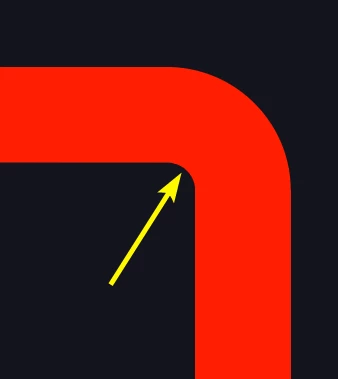
When I use the direct selection tool it only allows me to alter the outside radius.

    This topic has been closed for replies.
    Correct answer peterr85773210

    I found that by firstly deleting one of the two anchor points and deleting the handles for the remaining anchor point (therefore making the inside corner square) revealed the widget to manipulate the inside corner.

    2 replies

    peterr85773210
    peterr85773210AuthorCorrect answer
    Participant
    January 11, 2019

    I found that by firstly deleting one of the two anchor points and deleting the handles for the remaining anchor point (therefore making the inside corner square) revealed the widget to manipulate the inside corner.

    tromboniator
    Community Expert
    Community Expert
    January 11, 2019

    I think you will find that the two widgets are coincident, and that selecting one or the other, inner or outer, arc with the Direct Selection tool will show its own widget. Since the widgets appear in the same place on the screen, it is not obvious they belong to different paths until you move the one thus revealed; however, if your method does what you want then all is well.

    Jacob Bugge
    Community Expert
    Community Expert
    January 9, 2019

    Peter,

    For a Stroke there is only one curvature determined by the outer/centre/inner radius depending on the alignment (inside/centre/outside).

    You can also see it in the screenshot, the arrow hovering over the centre of the relevant circles.

    To have it otherwise, you will have to create a filled border as a Compound Path, setting the roundings of the outer and an inner paths as  desired.

    It could be done with the Width Tool of course, but it would be difficult/impossible to get it right.

    peterr85773210
    Participant
    January 9, 2019

    Thanks for the reply Jacob.

    https://forums.adobe.com/people/Jacob+Bugge  wrote

    To have it otherwise, you will have to create a filled border as a Compound Path, setting the roundings of the outer and an inner paths as  desired.

    How do I do this?

    Monika Gause
    Community Expert
    Community Expert
    January 9, 2019

    Your paths already are a compound path, right?

    You might need to go into isolation mode. Select only one of them with the direct select tool by clicking exactly on the path. Then right click and "Isolate this path" in the context menu. Please read about isolation mode in the Documentation.