
Changing Text using script
I am new to scripting and still learning so please bear with me. I have been working on a script that will allow me to update slug information on files that I work with on a daily basis. I use a combination of scripts and actions on my documents that clean the documents, as well as fill in specific information for each document. As I learn more about scripting, I have been able to consolidate my actions and scripts.
Currently, I'm working on selecting specific text frames based on what their note value is using this code:
var textFrames = activeDocument.textFrames;
for (var i = 0 ; i < textFrames.length; i++)
if (textFrames.note == "JOBNAME") {
var frameName = textFrames.contents = "JOBNAME";
}
Here is a small list of items that I would like to change
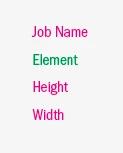
I may be going about this the wrong way, but my ultimate goal is to run a script that goes through each text field, and a dialog allows me to enter text, the text is then replaced with whatever is entered into the dialog field.
It may be easier to create a dialog that has all fields and allows me to enter in the value for each one, but like I said, I'm new to scripting and not sure how to do that.
I had tried entering information in my slug using the variable data, with spreadsheets, but I need to convert the spreadsheet to xml and I haven't had much luck with that. I've found that using variables in illustrator can be a little tricky.
Ultimately, I am just trying to streamline my work and make things more efficient. In the process, I would like to learn as much about scripting as I possibly can.
thanks
 AdChoices