
Participant
February 23, 2024
Question

Character encoding failed - NirmalaUI font

  • February 23, 2024
  • 1 reply
  • 915 views

The attached sample pdf does not pass "Character encoding" for the Accessibility Checker. Also the word is scrambled in "Content" and when copied and pasted.
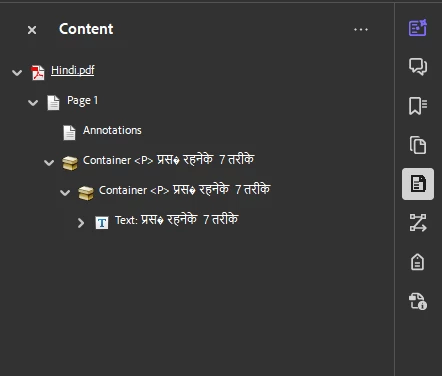
How to fix this issue? I have to use the same font - NirmalaUI or NirmalaUI Bold.

I'm using the most updated Adobe Acrobat Pro on PC.

1 reply

Wing2024Author
Participant
February 23, 2024

To add to the above, the sample pdf was originally created in Illustrator and then exported to PDF. 

Anshul_Saini
Community Manager
Community Manager
February 29, 2024

Hello @Wing2024,


Thank you for reaching out. To better assist you with resolving the character encoding issue in your PDF, could you please share the original Illustrator (AI) file from which the PDF was exported? Additionally, if possible, could you provide a screenshot of the export settings used during the PDF export process in Illustrator?


Furthermore, it would be helpful if you could share the fonts used in your Illustrator file.


Once we have this information, we'll be better equipped to assist you in resolving the character encoding problem.


Looking forward to your response.


Best regards,

Anshul Saini

Wing2024Author
Participant
March 5, 2024

Hi Anshul,


Thank you very much for your time in taking a look into this matter. I'm pretty sure this is a well known issue for any settings. Due to confidentiality, I can't share any actual document with you. However, please see attached a very simple sample file with the same issue. It's just a simple sentence in English and in Hindi (Google translated). I have hired many professionals over the past decades and the only solution to "fixing" the "character encoding" error is to post edit the PDF by "copy and paste". I know that there are a couple fonts that work for Hindi and Nepali, but as designers, we don't just use one or two fonts.


Anyway, instead of looking for just one solution to a specific set of settings and criteria, I would like to ask you or anyone from Adobe to show us step by step on how you generate an AI file with Hindi or Nepali text, and after converting it into PDF, it can pass the "character encoding" from the Accessibility Check. Please show us (I'll speak for all those who encounter the same issue for years) how you do that with Nirmala UI font and any one font of your choice that works. In other words, instead of trying to reproducing the issue we have, we want your help to show us how Adobe generate a PDF file with Hindi or Nepali content that pass the "character encoding" from the Accessibility Check.


I'm pretty sure a detailed step by step guide on this will make a lot of us happy, especially when we are paying a subscription every month waiting for upgrades that can actually solve our problem. 


*And also the same issue exist for Thai fonts too.