
Known Participant
July 6, 2022
Answered

Circle

  • July 6, 2022
  • 3 replies
  • 846 views

Hello, could you please help me with a very simple thing, but I can't do it, I've looked for several tutorials, but I haven't found anything that could help me.
I need to create some circles in these formats, and I don't have much experience with Ilustration, if you can help me I'll be grateful.

 

This topic has been closed for replies.
Correct answer Ton Frederiks

Could you please demonstrate this with Illustrator open, how can I change this?


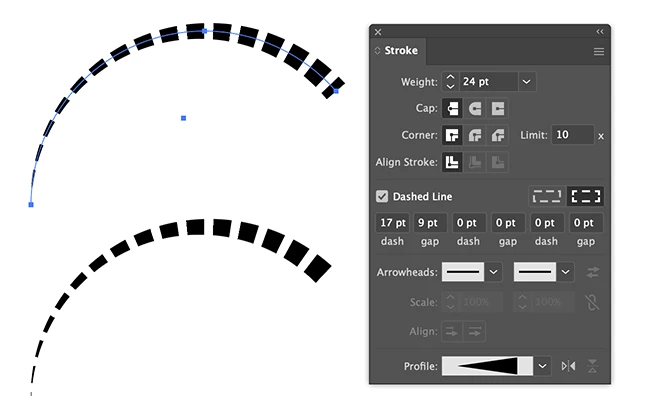
Like this (and in the end you can always use Object > Path > Outline Stroke to remove one of the dashes).

3 replies

pixxxelschubser
Community Expert
Community Expert
July 6, 2022

Or construct it from scratch (there are many ways to get there) :


Your image in the background  +  2 circles and 1 star

fill the inner circle and the star with black (and no stroke)

cut both and

paste in place in the opacity mask of the outer circle (which I filled with blue)

the "same" as your own example image

pixxxelschubser
Community Expert
Community Expert
July 6, 2022

Depending on the desired result, you can use an artbrush, for example. Or you can use pathfinder operations with two circles and a star.

Ton Frederiks
Community Expert
Community Expert
July 6, 2022

You can try a thick dashed stroke with a variable width profile:

InacioJrAuthor
Known Participant
July 6, 2022

Ton Frederiks
Community Expert
Community Expert
July 6, 2022

You can change the amount of dashes by varying the Dash, Gap and Weight of the stroke.

I cannot replicate the scratches that you mentioned, is it a single path?