mikejmurphy
Inspiring
August 13, 2017
Answered

Clear Recent Files in Illustrator Issue

  • August 13, 2017
  • 4 replies
  • 94271 views

Question:

Is there a fix for this?

---------------------

Goal:

Clear Recently Open Files in Illustrator CC 2017

The First Steps I Took:

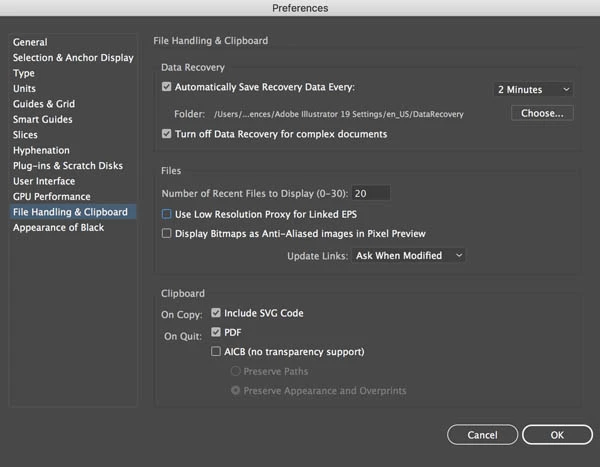
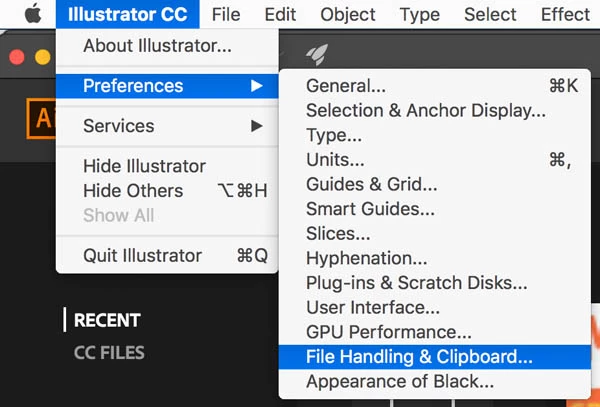
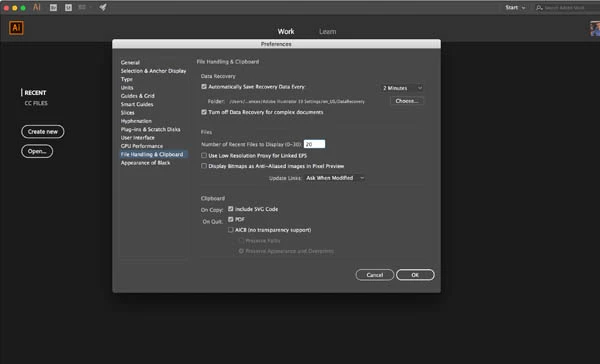
In Menu Bar...Illustrator CC>Preferences>File Handling & Clipboard

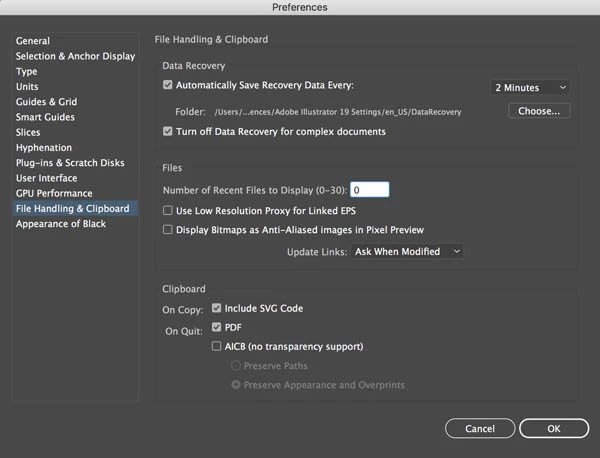
Change Number of Recent Files to Display from Default 20 to 0

Close Illustrator

Reopen Illustrator

Fixed!

Next Steps (Change Settings Back):

Open Illustrator Preferences

File Handling & Clipboard

Change Number of Recent Files from 0 to Back to the default of 20

Close Illustrator

Re-Open Illustrator

Problem:

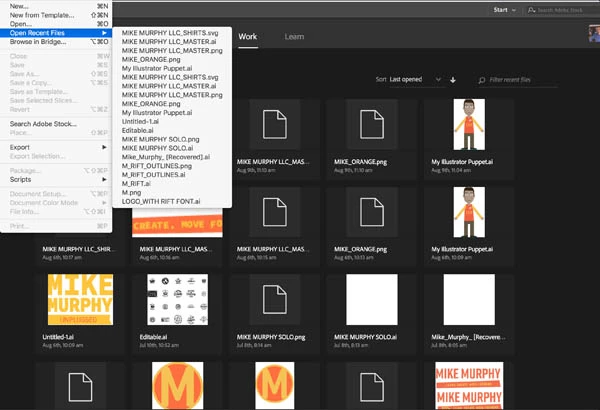
The old history of 20 Recently Opened Files is back.

-----------------------------------------------------------------------------------

STEP1: Preferences>File Handling & Clipboard

Step 3:

Restart Illustrator (Close & Open Again)

Appears as though problem resolved
What I wanted....but,

Step 4:

Go Back to Preferences...File Handling & Clipboard... Change back to 20

Quit Illustrator

Reopen Illustrator
Problem: All of the old history returns
This topic has been closed for replies.
Correct answer jane-e

mikejmurphy  wrote

Question:

Is there a fix for this?

---------------------

Goal:

Clear Recently Open Files in Illustrator CC 2017

Mike,

If it is imperative that you clear that list, here is one way:

  1. Quit Illustrator
  2. Relaunch, delelting Preferences as you do.
    Because you are on a Mac, hold down Cmd+Shift+Opt+Ctrl, then Open Illustrator. You won't get a dialog box as you do in ID and PS, but your recent files will be clear.

4 replies

Mark Simonson
New Participant
February 11, 2024

If you have one or more recent files in the list you don't want, say, your boss to see that you opened, one simple workaround is to open enough other Illustrator files until the offending one(s) are pushed off the bottom of the list.

chromax
Known Participant
October 27, 2022

An Dev at Adobe, please invest 5min für an option to delete the recent list. That can be that complex. 😵‍💫

rterry1
Participating Frequently
November 4, 2022

Right? Photoshop has had a "Clear Recent File List" option under File > Open for a LONG time now, while Illustrator has been missing it for 5+ years. It'd be nice if Adobe would focus on improving/finishing their existing features, rather than releasing a buggy new version every year with features that the overwhelming majority of users won't even use. I'm not at all surprised by any of this, but am continuously amazed by Adobe's incompetence as an "iNdUsTrY lEaDeR".

Community Manager
November 30, 2022

Hello @rterry1@chromax,


Sorry to hear about this experience and for the late response. Illustrator currently does not have this functionality. Would you mind upvoting this UserVoice (https://illustrator.uservoice.com/forums/333657-illustrator-desktop-feature-requests/suggestions/43218300-clear-delete-from-recent-files) and adding your comments there? Doing this will help us prioritize this feature request, and you will keep getting all the related updates.


Feel free to reach out if you need further assistance. We'd be happy to help.


Thanks,

Anubhav

jane-e
Community Expert
jane-eCommunity ExpertCorrect answer
Community Expert
August 13, 2017

mikejmurphy  wrote

Question:

Is there a fix for this?

---------------------

Goal:

Clear Recently Open Files in Illustrator CC 2017

Mike,

If it is imperative that you clear that list, here is one way:

  1. Quit Illustrator
  2. Relaunch, delelting Preferences as you do.
    Because you are on a Mac, hold down Cmd+Shift+Opt+Ctrl, then Open Illustrator. You won't get a dialog box as you do in ID and PS, but your recent files will be clear.
mikejmurphy
Inspiring
August 13, 2017

Thanks Jane-e. 

I would not say my interest in doing so is imperative or urgent, but probably something Adobe could address as a bug, since it works exactly the same on indesign and not even available as an option in some Of the CC apps.

I'm familiar with that technique as that is how you have to do it with Premier and After Effects. I do appreciate you taking the time to help.

I think my question has been solved/answered, but issue still unresolved.

Thanks all-

mike

joaosp
Inspiring
November 9, 2019

Hi Mike,

I've discovered a way to do this on a Windows setup, but it's slightly onerous. Be sure to back up your preferences file first if you try this. Steps as below:


  1. Ensure Illustrator is closed before starting.
  2. Locate Adobe Illustrator Prefs file – in Windows, it's usually in the folder:
    C:\Users\YOUR USER PROFILE NAME HERE\AppData\Roaming\Adobe\Adobe Illustrator 23 Settings\en_GB\x64
    (note that your Illustrator version number may be different).
  3. IMPORTANT: Make a backup copy of the preferences file before editing the original.
  4. Open the original file in a text editor and search for the /FileList tag.
  5. Underneath /FileList are items /file0, /file1, etc. (in my case it went up to /file19 because my recent file preference was set to 20) with various data between the curly braces. Remove all the /file tags except for /file0, and remove all the data from within /file0, being careful to make sure there are opening and closing braces for both /FileList and /file0.
    It should look like this:
	/FileList {
		/file0 {
		}
	}

6. Save the preferences file and restart Illustrator. If an error message comes up, copy the backup file over the original and try again.


If you don't change preferences very often, you could save a copy of the preferences file with the clean file list and just copy it back over whenever you want to clear recent files - it would be easier than doing the above steps every time. At least until Adobe deems it a problem worthy of putting a "Clear Recent File List" button on the Home screen!


Hope this helps you, and others.


I've been looking for that solution since a very long time. You're a genius!!! The only and, obviously, main reason we sometimes wanna clear recent files is the fact we're re-organizing our files, either by changing their names or folders where they were originally saved on. I just can't believe Adobe put a "Clear recent files" option on Photoshop and didn't it on Illustrator. Such an absurd!


Thanks again. I changed illustrator prefs file here and worked like a charm 🙂

Bill Silbert
Community Expert
Community Expert
August 13, 2017

Did you have a document window open when making your changes? Any changes to the preferences that need to be global should be made without an open document. Then, as you have already been doing, you should quit the program after the changes have been made and anything that is actually controlled by the preference file should now be part of the preferences globally when the program is reopened.

mikejmurphy
Inspiring
August 13, 2017

Thanks for the reply Bill.

I did not have any Illustrator documents open when I made this post. Just to be sure, I tried again. This time I closed every single application on Mac, restarted my computer and tried again with only Illustrator open and no documents and the same issue occurred.

It clears everything when I set to 0. When I make the changes back to 20 and restart, everything comes back.

Mike