
Exit
  • Global community
    • Language:
      • Deutsch
      • English
      • Español
      • Français
      • Português
  • 日本語コミュニティ
  • 한국 커뮤니티
0

Clipping mask is behaving differently and changing artwork, why?

Community Beginner ,
Apr 27, 2023 Apr 27, 2023

Hi,

Any idea why using the clipping mask has suddenly decided to change some effects that it didn't used to? See below. The image on the left was post clipping mask 2 weeks ago. With the same artwork the image on the right is how it comes out today. The opacity in the black box has changed and we have no idea why.

Note, the differnce only occurs when we place the link/place the clipped image into any other CMYK file.


Never had this issue before, so we are perplexed as to the sudden change. Any help appreciated 🙂
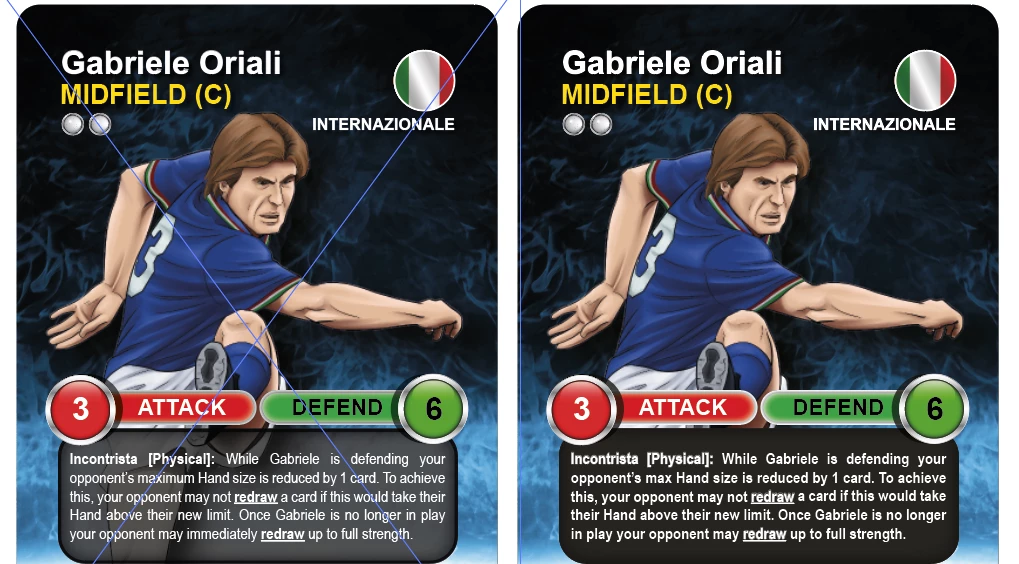
 

Clipping mask issue.PNG

TOPICS
Print and publish
654
Translate
Report
Community guidelines
Be kind and respectful, give credit to the original source of content, and search for duplicates before posting. Learn more
community guidelines
Adobe
Community Expert ,
Apr 27, 2023 Apr 27, 2023

Exactly what are we looking at?

How is that built?


Is this an issue of copying from RGB to CMYK documents?

Translate
Report
Community guidelines
Be kind and respectful, give credit to the original source of content, and search for duplicates before posting. Learn more
community guidelines
Community Beginner ,
Apr 27, 2023 Apr 27, 2023

Not sure how answer "how is this built"? 

All docs are set to CMYK, although if we place clipped artwork into a RGB it shows fine. The issue is, even with historic artwork that has already been clipped it shows fine in CMYK. If we repeat clipping process on this old art it now does not work in CMYK. As far we we know no settings have changed just the result?

Translate
Report
Community guidelines
Be kind and respectful, give credit to the original source of content, and search for duplicates before posting. Learn more
community guidelines
Community Beginner ,
Apr 27, 2023 Apr 27, 2023

Does this help identfy the issue?


The first image is with clipping mask applied. Opacity works as normal. All is good.

The second is when this clipped artwork in "placed" into another file. Zero opacity. Not good.

We have done this procedure 100's of times with no issue, until this week?

We have no idea why and cannot use the artwork ;(


Clipping mask file OK.PNGClipped artwork placed into other artwork.PNG

Translate
Report
Community guidelines
Be kind and respectful, give credit to the original source of content, and search for duplicates before posting. Learn more
community guidelines
Community Expert ,
Apr 27, 2023 Apr 27, 2023
LATEST

Please create a demo file with simple shapes, but using the exact building method. Package it and upload to Creative Cloud and post a link.

Translate
Report
Community guidelines
Be kind and respectful, give credit to the original source of content, and search for duplicates before posting. Learn more
community guidelines