
Inspiring
May 25, 2025
Answered

Clipping mask making verything dissapear

  • May 25, 2025
  • 3 replies
  • 999 views

Hello,

i have a simple clipping mask made of a compound path from 4 lines (object, compound), and an image below in the layers:
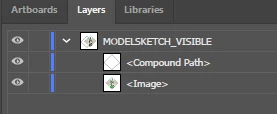
But when i select both and "make clipping path", the only thing left is a small sliver of the image that corresponds to the line of the path, everything else dissapears

At this point i'm lost on what's going on

Correct answer Eliminateur

i managed to make it work somehow by moving the path outside teh "line", then i joined the paths


That was apparently what was needed tomake it work, i have no idea why the DXF import puts a path as a subordinate of a line

3 replies

barbara_a7746676
Community Expert
Community Expert
May 25, 2025

Starting with your design. I am using a simple shapes to represent your design:

If your design consists of multiple shapes like my example, then Group all of the shapes.


Draw the shape that you want to use for the clipping mask. The shape must be a closed path.


Position the clipping shape over your design. The clipping shape must be on top of the shapes being clipped.

Select everything -- the design and the clipping shape.


Then choose Object > Clipping Mask > Make.

Inspiring
May 25, 2025

that's how it should work, but it wasn't working, since i need dimensional accuracy i could not make the mask in AI had to make it in onshape

barbara_a7746676
Community Expert
Community Expert
May 25, 2025

Once you make the mask in OnShape, can you trace it in Illustrator so that it is a proper mask?

Inspiring
May 25, 2025

if it's of any use, the lines are composed of a path, if i release the gorup i get this:

the path is an imported dxf because i need dimensional accuracyfar beyond what the basic line tool/vector editing AI has

Jacob Bugge
Community Expert
Community Expert
May 25, 2025

Eliminateur,


What happens if you selct all the LINE objects and Ctrl/Cmd+Shift+G to Ungroup them, then Join the Paths with Ctrl/Cmd+J?


Or make and expand a Live Paint Group?


EliminateurAuthorCorrect answer
Inspiring
May 25, 2025

i managed to make it work somehow by moving the path outside teh "line", then i joined the paths


That was apparently what was needed tomake it work, i have no idea why the DXF import puts a path as a subordinate of a line

Monika Gause
Community Expert
Community Expert
May 25, 2025

You want to have a mask that is basically a square?


Then it will be best to take the rectangle tool, draw the suqare, rotate it if necessary and then use it as a mask.


If there are just 4 lines, then you would need to join them instad of making a  compound path.

Inspiring
May 25, 2025

it's not a square, it's a irregular romboid that each segment is different length that i cannot precisely make into AI itself