
AC_PP
Known Participant
September 11, 2025
Question

Clipping masks make areas of any objects behind disappear

  • September 11, 2025
  • 5 replies
  • 682 views

This looks like a new visual bug. There seems to be a problem with the way Illustrator is displaying clipping masks. It has only started happening recently. 


The image below is taken from a file that worked fine before.


The wavy lines are contained inside a clipping mask (the same shape as the blue section). I have included images of the lines outside of the clipping mask (above) and inside the clipping mask (below).


Any separate objects placed behind this clipping mask have a section missing (see black shape behind). The clipping mask and the black shape are completely separate. The black shape is just a rectangle.
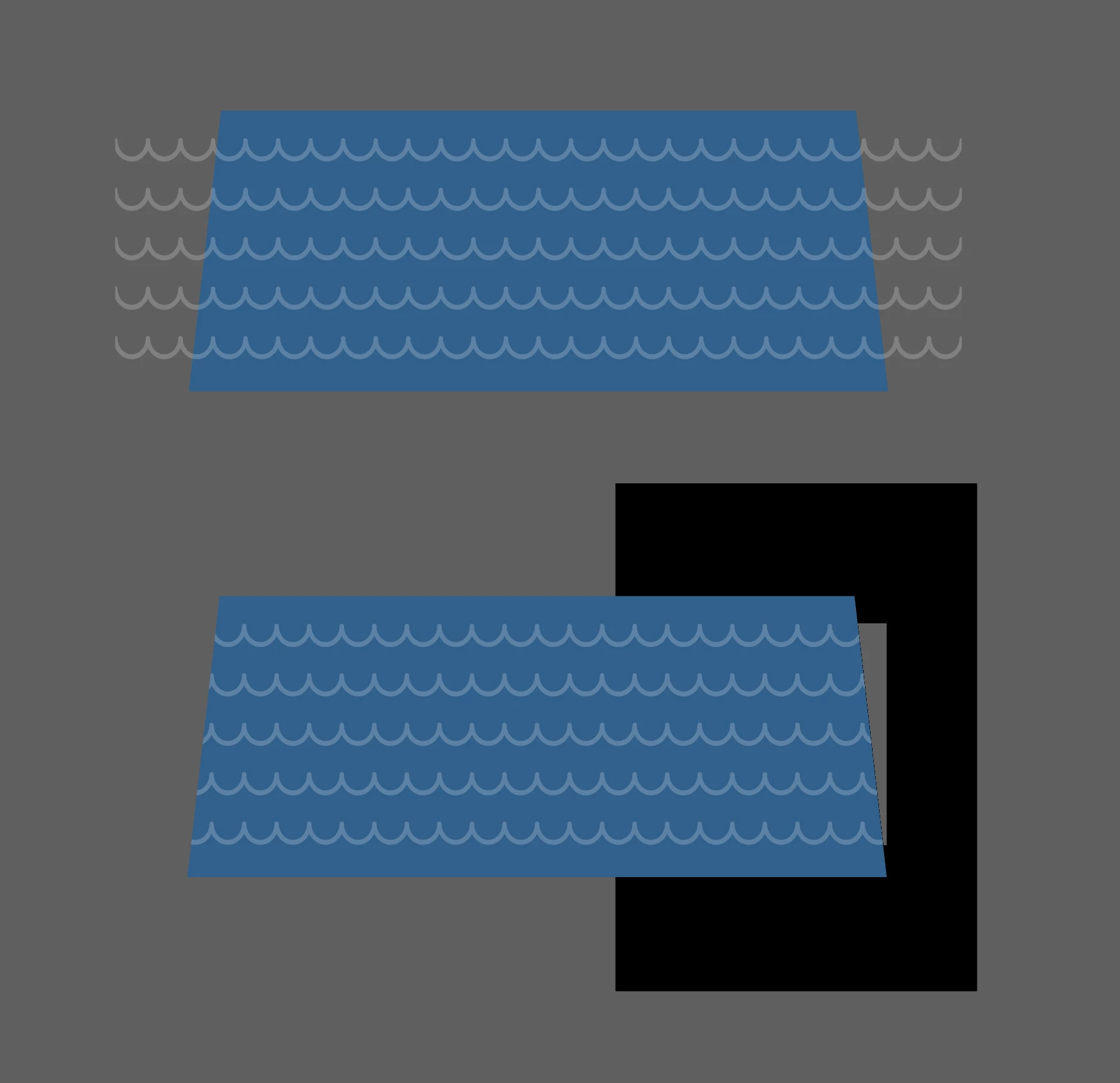


This only happens with clipping masks that had been created in the past. Any newly created clipping masks do not have the same problem. However this is quite a big problem for us as we have hundreds of files, each with multiple clipping masks. It won't be possible to recreate them all.


This is only a display issue. Any exported images don't have the missing sections.


I have the same problem on my 2019 iMac in the office and my 2024 iMac at home. One of my colleagues has the same problem on a 2017 iMac. Another colleague does not have the same issue on a 2020 iMac.

5 replies

AC_PP
AC_PPAuthor
Known Participant
September 19, 2025

Here's another example of this problem appearing in an Illustrator file. The image showed fine in previous versions of Illustrator:

Abhishek Rao
Community Manager
Community Manager
September 11, 2025

Hi @AC_PP,


Thanks for sharing all the details about your setup and version. Could you please check the below UserVoice thread and community post to see if the issue you're facing matches what other customers have reported?

UserVoice: https://adobe.ly/4mbUVBQ
Post: https://adobe.ly/3VJUwM1

It would be really helpful if you could confirm whether your experience is similar so we can keep track of it and share with the team.


Looking forward to your update.

Abhishek

AC_PP
AC_PPAuthor
Known Participant
September 11, 2025

Thanks Abishek,


It looks like the issue may be connected. However, I don't get the error when creating new clipping masks as described in the post. For me it only shows in my previously saved files. In my case the phantom box created on the object behind the clipping mask appears as a transparent 'hole' rather than a white shape.

AC_PP
AC_PPAuthor
Known Participant
September 25, 2025

Update: I previously said that this only appears in previously created files. Actually I've found that it also appears in new files. The problem is related to transparency of the object contained inside the clipping mask. It does seem like my issue is probably the same one referred to here:

UserVoice: https://adobe.ly/4mbUVBQ
Post: https://adobe.ly/3VJUwM1


AC_PP
AC_PPAuthor
Known Participant
September 11, 2025

Note: this only happens when in View using GPU mode. When I switch to View using CPU the image displays correctly.

Jacob Bugge
Community Expert
Community Expert
September 11, 2025

AC PP,


It could form the basis of a(n obvious) feature request, I believe, about solving/handling the GPU issue (in Version 29.8.1issue) in connexion with Clipping Masks:


https://illustrator.uservoice.com/forums/333657-illustrator-desktop-feature-requests
https://illustrator.uservoice.com/


You may try to see whether something like it has been reported already.

AC_PP
AC_PPAuthor
Known Participant
September 11, 2025
Doug A Roberts
Community Expert
Community Expert
September 11, 2025

What exact version are you seeing this in?

AC_PP
AC_PPAuthor
Known Participant
September 11, 2025

Version 29.8.1

AC_PP
AC_PPAuthor
Known Participant
September 11, 2025

Here is a pdf of the file: