

Diego Mejia
Participating Frequently
September 8, 2023
Answered

Clipping will be lost on roundtrip to tiny while opening SVG in Ai 27.8.1

  • September 8, 2023
  • 1 reply
  • 3758 views

Yes, I have seen all the other posts showing solutions, but none seem to work for me 😞

I generated a QR Code, using the Adobe Express "Generate QR code". Since the output would be print document, I decided to export to SVG (Why not PDF? This is all Adobe, after all...)

I create a new AI document and place the the svg. I get the error "Clipping will be lost on roundtrip to tiny" and I get a blank page. 

If I do a Ctrl-A, I get 
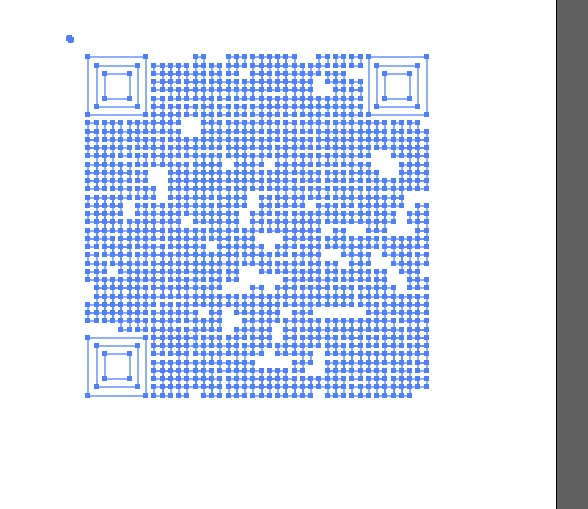
I can see the objects, but I don't know which to fill.

Printing to a PDF printer from a browser, gives me a black box. Once again I can see the "skeleton" but I don't know what to 'color'.

Opening on Inkscape, shows the QR with no errors, but if I "Save As..." a PDF file, I get the black box.

I would really like to have these programs work together. 


Any other solutions for QR codes, with export as vector and no funny redirections?


Thanks!


Diego

This topic has been closed for replies.
Correct answer Monika Gause

Thank you.

What you can do in Illusstrator is:

Open the Layers panel.

Get rid of the black rectangle

Release all the clipping masks - you might need to do Object > Clipping mask > Release twice.

Apply a black fill to those paths.

1 reply

Monika Gause
Community Expert
Community Expert
September 8, 2023

You can generate QR codes in InDesign.


Can you upload that SVG? 

Diego Mejia
Participating Frequently
September 9, 2023

Thanks for the InDesign tip!

The original svg is attached.

Monika Gause
Community Expert
Monika GauseCommunity ExpertCorrect answer
Community Expert
September 9, 2023

Thank you.

What you can do in Illusstrator is:

Open the Layers panel.

Get rid of the black rectangle

Release all the clipping masks - you might need to do Object > Clipping mask > Release twice.

Apply a black fill to those paths.