

skip-ad
Participant
May 6, 2021
Question

CMYK Conundrum! Seeking Guidance

  • May 6, 2021
  • 1 reply
  • 810 views

I'm working on finalizing a color palette for a client and I haven't been able to land on a serviceable CMYK value for most of the colors. Here's an explanation of what I'm talking about:
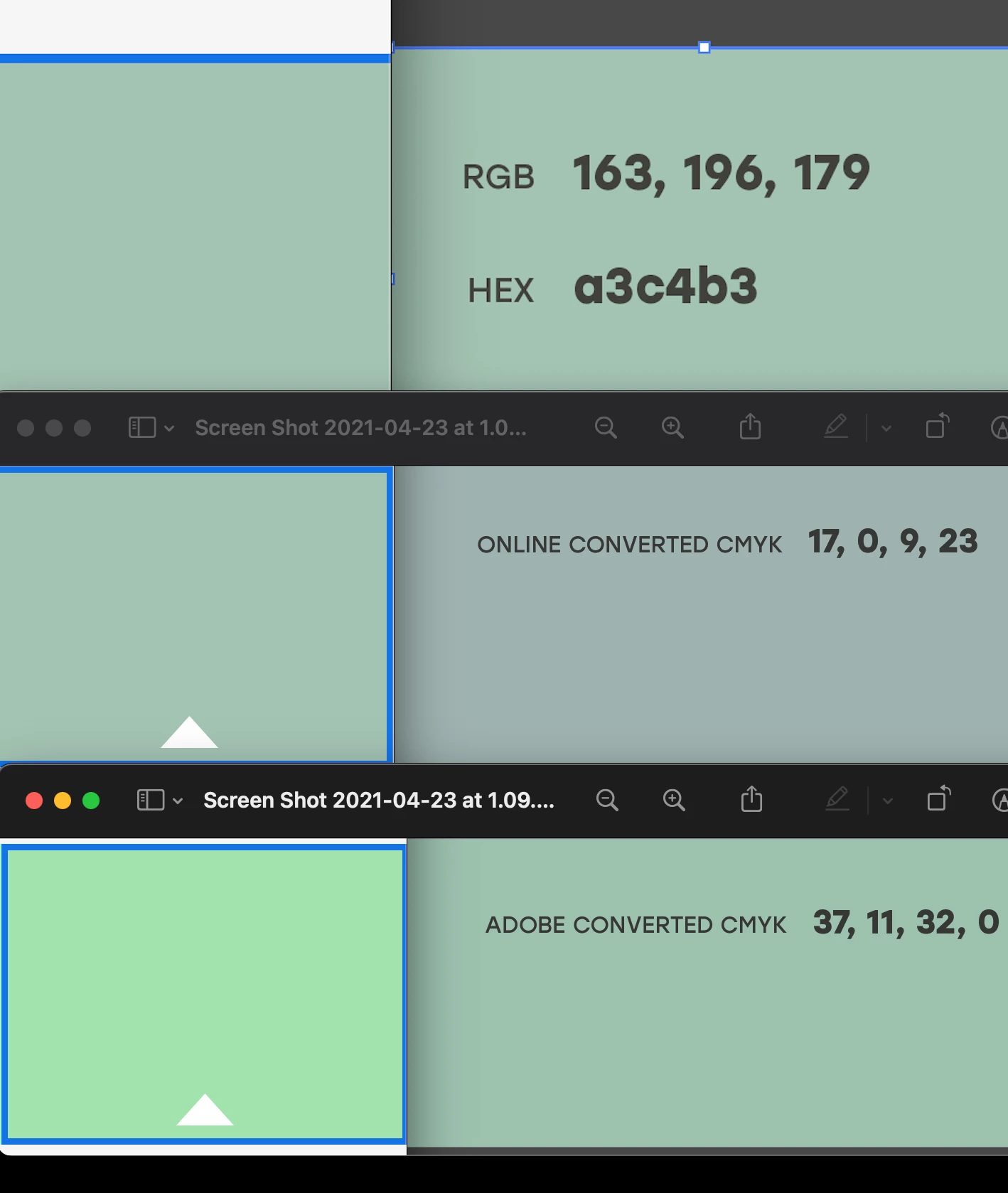
On the left, you can see samples from the Adobe Color website and on the right, samples from Adobe Illustrator. 

  • On the top row, the RGB and Hex values are shown: in both spaces, the colors are looking good. 

  • On the bottom row, Illustrator converts the RGB values to those CMYK values (We can see that the right side looks good but then using those values on the website look very off–way too bright).

  • And in the middle row, we're looking at the Adobe Color CMYK conversion of the RGB values. It looks good on that website but then when I bring them into Illustrator, the muddier/bluer looking color is created.

I have 17 color values that this affects so I'm really unsure of the best path forward. My thinking is:

  1. I could try to determine a CMYK value that works both on that Adobe Color website (and others) and in Illustrator.

  2. I could transition all values to Pantone values.

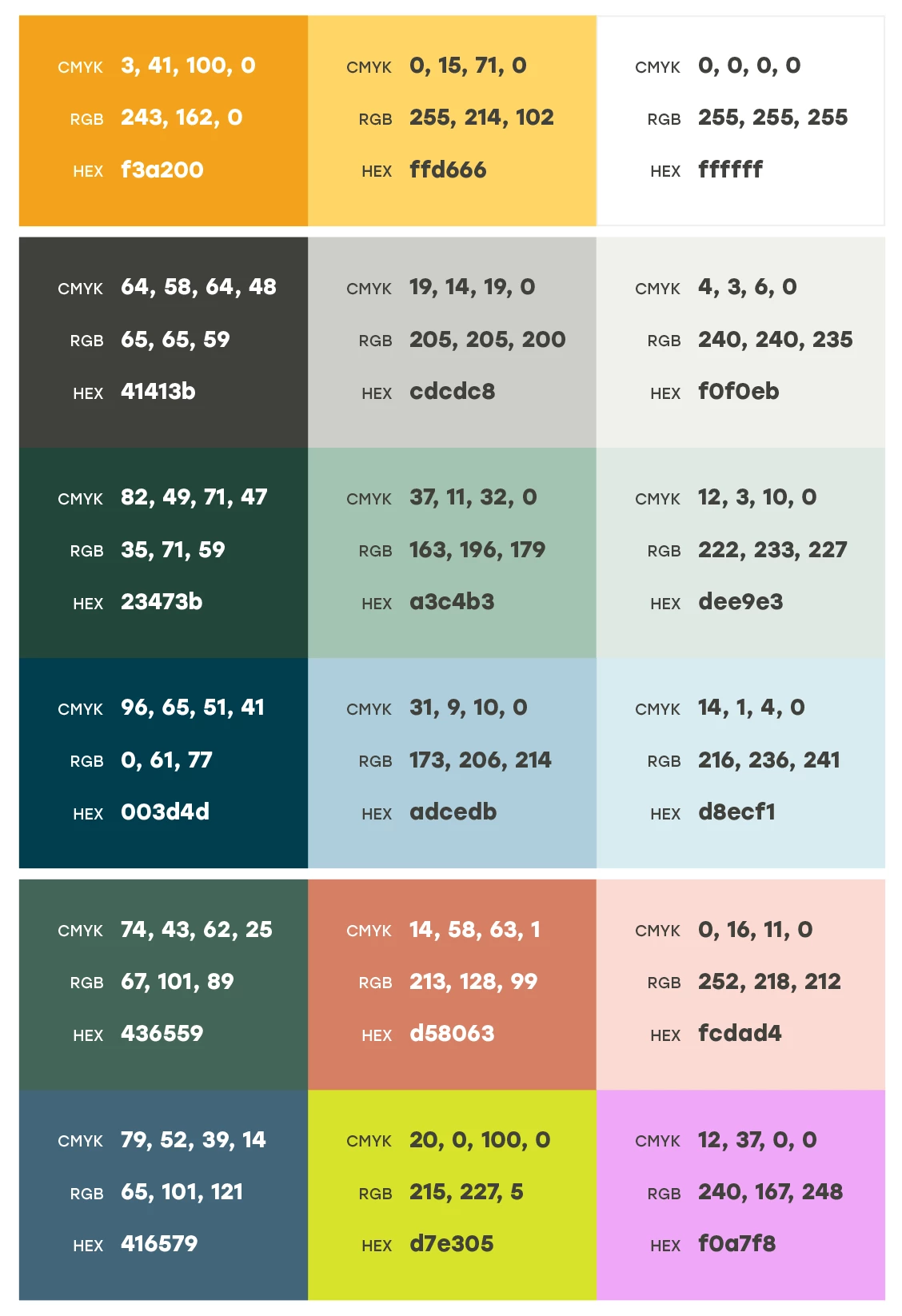
Looking for any help in this department as I've never experienced this drastic of an issue. One clue that I think created this issue: While I was developing the palette, I realized [Illustrator < Edit < Assign Profile] was set to "Display" instead of "sRGB IEC61966-2.1" which it is currently. If it helps, here's a screenshot of the full palette with Illustrator generated CMYK values noted:
Thanks in advance!

This topic has been closed for replies.

1 reply

Monika Gause
Community Expert
Community Expert
May 6, 2021

Don't rely on Online conversions.

Also: unless your color management is not set up accordingly, you can't rely on Illustrators conversion.

Oh, and don't set RGB working space to "Display". Just don't do it.


You can now: either learn color management and then set it up.

Or get a color atlas that has printed samples so you can check printed versions of the colors.


This is a color atlas: http://the-print-guide.blogspot.com/2009/07/color-atlas-helping-designers-to.html

skip-ad
skip-adAuthor
Participant
May 6, 2021

Thank you for your reply! All of this is super good to know. I really am not sure why my file was set to "Display" as I never adjusted "Assign Profile" to my knowledge. To elaborate on this project, this brand will primarily live online so the RGB/Hex values should suit this project well. However, I could imagine printed collateral down the line so I wanted to prepare them with values for it.


Could you elaborate on the "learn color management and then set it up"? This feels pretty general while I just need to remedy this situation for now. Feel free to share any relevant links in this space. I guess more specifically, do you think there's a proper way to find or generate suitable CMYK conversions based on these current colors? Thank you again!

Conrad_C
Community Expert
Community Expert
May 6, 2021

The color management aspect is critical, because the specific RGB and CMYK profiles assigned to the document affect the numbers you get out of the conversion. Changing the color space on either side, or on both sides, changes the conversion results. For example, if the conversion was based on sRGB to U.S. Web Coated SWOP (the usual North American defaults for Color Settings) but the actual print job is going to an overseas press (where FOGRA CMYK might be the standard), or a press where a specially tuned CMYK profile is provided, the color won’t print the same as a conversion done for U.S. Web Coated SWOP.


Therefore, if you are going to state that certain color values in RGB convert to specific CMYK color values, the only way for someone else to get the same results is if they are also told the RGB and CMYK color spaces used during the conversion. In other words it’s not just “set it up,” it’s also “and then tell everybody else which setup created that conversion.”