
CMYK input gives different RGB while RGB gives right CMYK
Hello,
There are many topics about CMYK and RGB colors but I can't find an answer to the following issue.
The values I have are:
CMYK: 68/18/0/0
RGB: 34/170/238
HEX: #22aaee
If I go to the color picker and I type in the RGB code I get these exact values back:
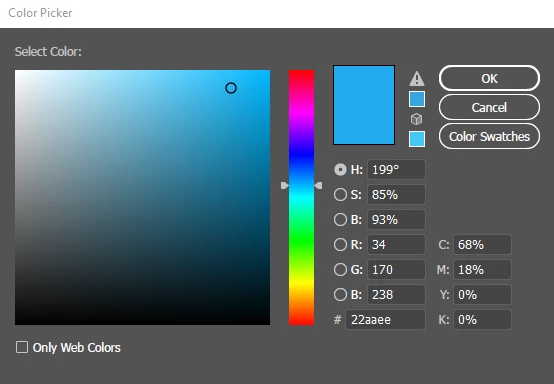
No problem so far.
BUT if I type in 68/18/0/0 I get different RGB and hexagon codes back, and the color looks less bright: (you first have to select another color, before entering 68/18/0/0 and seeing the change)
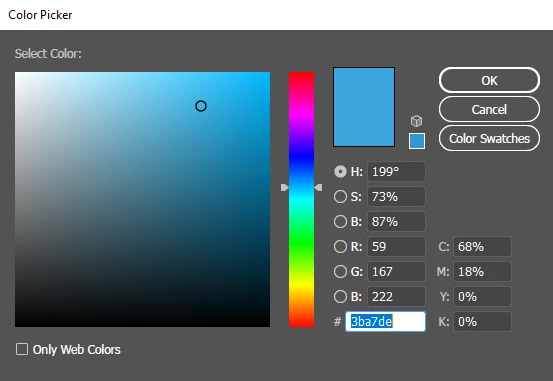
The difference is quite big! Below you can see the output for typing in the CMYK, RGB and Hexagon code.

I printed this out, and also there the difference is the same. Now I do get that CMYK and RGB are different and that they look different as well, but what I don't get is that RGB and Hexagon are giving me a CMYK code, and while typing in that same CMYK code the color:
- looks completely different
- gives other RGB and hexagon code back
Do you have any advice on this?
There is no difference for me between RGB and CMYK color mode.
What would you advice?
Using CMYK color mode and type in the RGB code?
Take another CMYK value to match at least the look and feel of the code?


 AdChoices