
Participating Frequently
October 14, 2024
Question

CMYK+PAN to CMYKOV conversion

  • October 14, 2024
  • 5 replies
  • 2568 views

Hello

Could someone help us with this conversion?

We have artwork CMYK  +  Pantone (could be one or many).

Now we want to convert it to CMYK+ORANGE+VIOLET values.

I have theese values in csv.
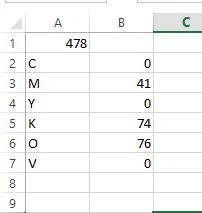
each pantone, separate file -->number of pantone.csv

Conversion should work with % value of pantone too.

5 replies

Participating Frequently
October 16, 2024

To all responders.

I onlny ask for script. If it`s posible.


I don`t need your opininion what I should do or not with this conversion.

Ton Frederiks
Community Expert
Community Expert
October 16, 2024

As said before, you cannot do that in Illustrator.

Participating Frequently
October 16, 2024

Thank You


Topic CLOSED.

Community Expert
October 15, 2024

What kind of RIP software is processing the art files? Is it an app that came included with the printer? I would hope that is the case since orange and violet are unusual for additional, gamut-extending ink colors. Most six-color large format printers have light magenta and light cyan inks (in addition to the CMYK inks).


Either way, the RIP software chooses how to apply those added inks, especially when simulating Pantone spot color ink values. I can't just add additional light cyan and light magenta color channels to an Illustrator document. I have to use the Pantone swatches. The RIP software should have its own built-in Pantone color libraries and CMYKOV formulas for those spot colors.

Ton Frederiks
Community Expert
Community Expert
October 15, 2024

These Indigo presses. with multiple inks can simulate many Pantone colors and use the additional inks to add to the CMYK  gamut. The rip does the conversion. 

Participating Frequently
October 14, 2024

Yes, we have INDIGO cmykov press. I want to check files before RIP.

file:

Inspiring
October 15, 2024
quote

Yes, we have INDIGO cmykov press. I want to check files before RIP.


Why? To what end?


Illustrator’s color model is rooted firmly in the 1980s and has hardly changed since. Raw CMYK numbers are pretty meaningless when your modern RIP software and digital press run on ICC profiles; you should be hanging your proofing process off that.


p.s. Serif’s Affinity supports 16-bit Lab documents out of the box, so Adobe’s failure to keep pace with modern print tech should be especially embarrassing considering how much they originally invented. Honestly, the print world sacks off CMYK sliders and Pantone books for Lab, the better.

Community Expert
October 15, 2024

The CIELAB color space is great for certain kinds of photo image editing tasks. But who actually does graphic design work in that color model? Even though plain CMYK has some limitations the color model is far easier to understand (even more easy than RGB). So CMYK has far more universal use. In many workflow situations more than one person and more than one computer setup is opening the art file. Even if I can create vector art within Affinity Designer using 16-bit LAB color space it would be an adventure giving that artwork to someone else for a task like printing a billboard face. Chances are they would kick the file back to me and tell me to convert it to CMYK or even RGB.

Ton Frederiks
Community Expert
Community Expert
October 14, 2024

Do you have a printer with these inks?

If so, the conversion is done during printing.

m1b
Community Expert
Community Expert
October 14, 2024

Hi @grafik2_5837, just putting aside the question of converting to CMYKOV... can you even specify a color manually as CMYKOV in Illustrator? I did a quick google of "CMYKOV Adobe Illustrator" and nothing relevent appeared. Maybe you can't do it? Or need a third-party plug-in?


EDIT: you could create a spot color of "Orange" and "Violet", then add a second and third fill color (all overprinting), but you probably couldn't automate this via scripting because the scripting API only provides access to the single basic fill and stroke, not the extra ones.


It would be good to post a sample document (save as illustrator editable pdf to post here) showing (a) before conversion and (b) after conversion, so we know what exactly you want to achieve.

- Mark