

tatum5C41
Participating Frequently
May 24, 2022
Answered

Color in illustrator is dull

  • May 24, 2022
  • 2 replies
  • 897 views

Hi! I can't quite find anything in the forums that will work for this


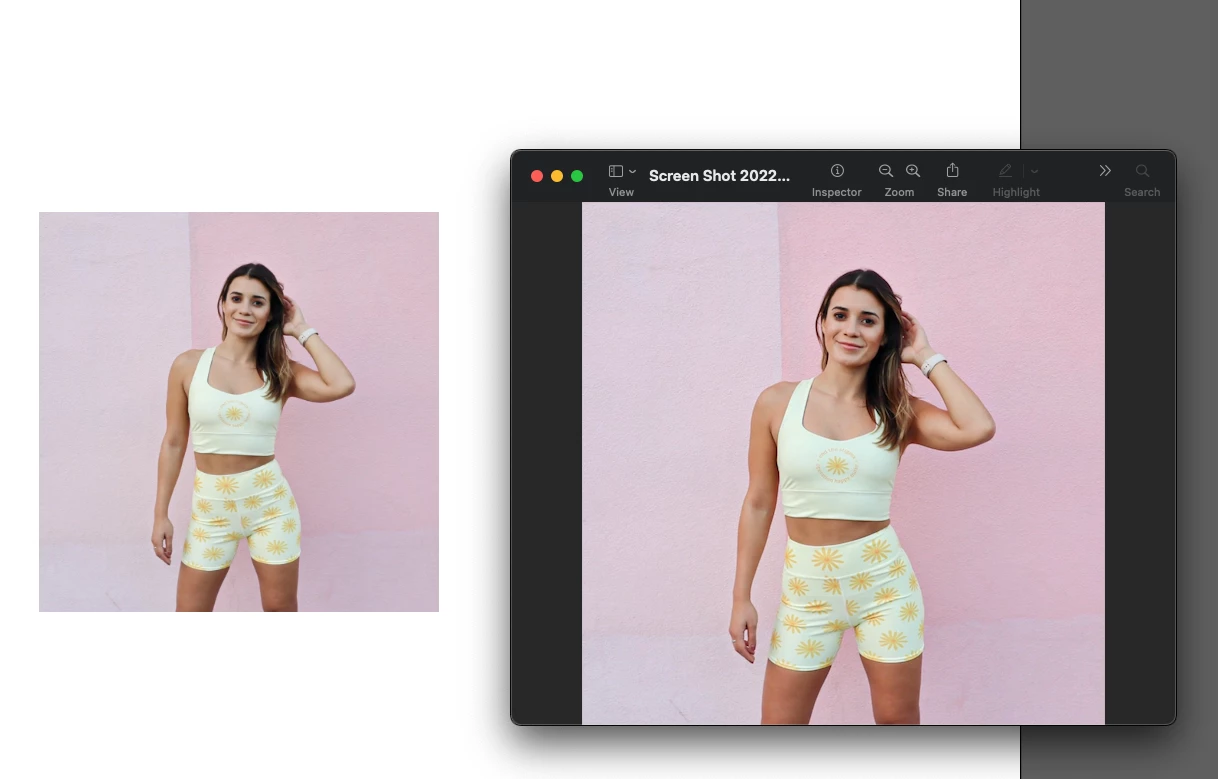
The other day I reset my illustrator settings when watching a tutorial and since then I have not been able to get illustrator colors to work correctly. They look dull


I've look at my color mode i'm in RGB 

I've also gone to color settings and made sure i was in north america general 2 


What else can I do here? Here's an example below of how it's muting my colors. It also does this if I try to use the eyedrop tool on a bright color, it will give me a more muted version of that color. Please help!!!!
 

This topic has been closed for replies.
Correct answer Anubhav M

Got it! It also says RGB! I'm a bit stumped  


Hello @tatum5C41,


Sorry to hear about this experience. Kindly calibrate your display for sRGB by following the steps shared in this help article (https://support.apple.com/en-in/guide/mac-help/mchlp1109/12.0/mac/12.0), restart your computer, and then try using Illustrator.


Please update this thread if the issue persists or if you need further assistance.


Thanks,

Anubhav

2 replies

Ton Frederiks
Community Expert
Community Expert
May 24, 2022

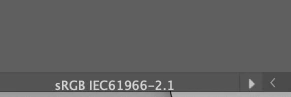
What is your document color profile?

You can check that at the bottom of your document window:

tatum5C41
tatum5C41Author
Participating Frequently
May 24, 2022

I don't see that at the bottom but I have been checking from the dropdown and I am in RGB! Am i missing where this is at the bottom? (attached image)

Ton Frederiks
Community Expert
Community Expert
May 24, 2022

It is down where your screen shows Selection (Current Tool).

tatum5C41
tatum5C41Author
Participating Frequently
May 24, 2022

looked***

tatum5C41
tatum5C41Author
Participating Frequently
May 24, 2022

These are my color settings