
Participant
November 7, 2012
Answered

Color Picker won't change the color properly?

  • November 7, 2012
  • 6 replies
  • 73007 views

Hi guys,

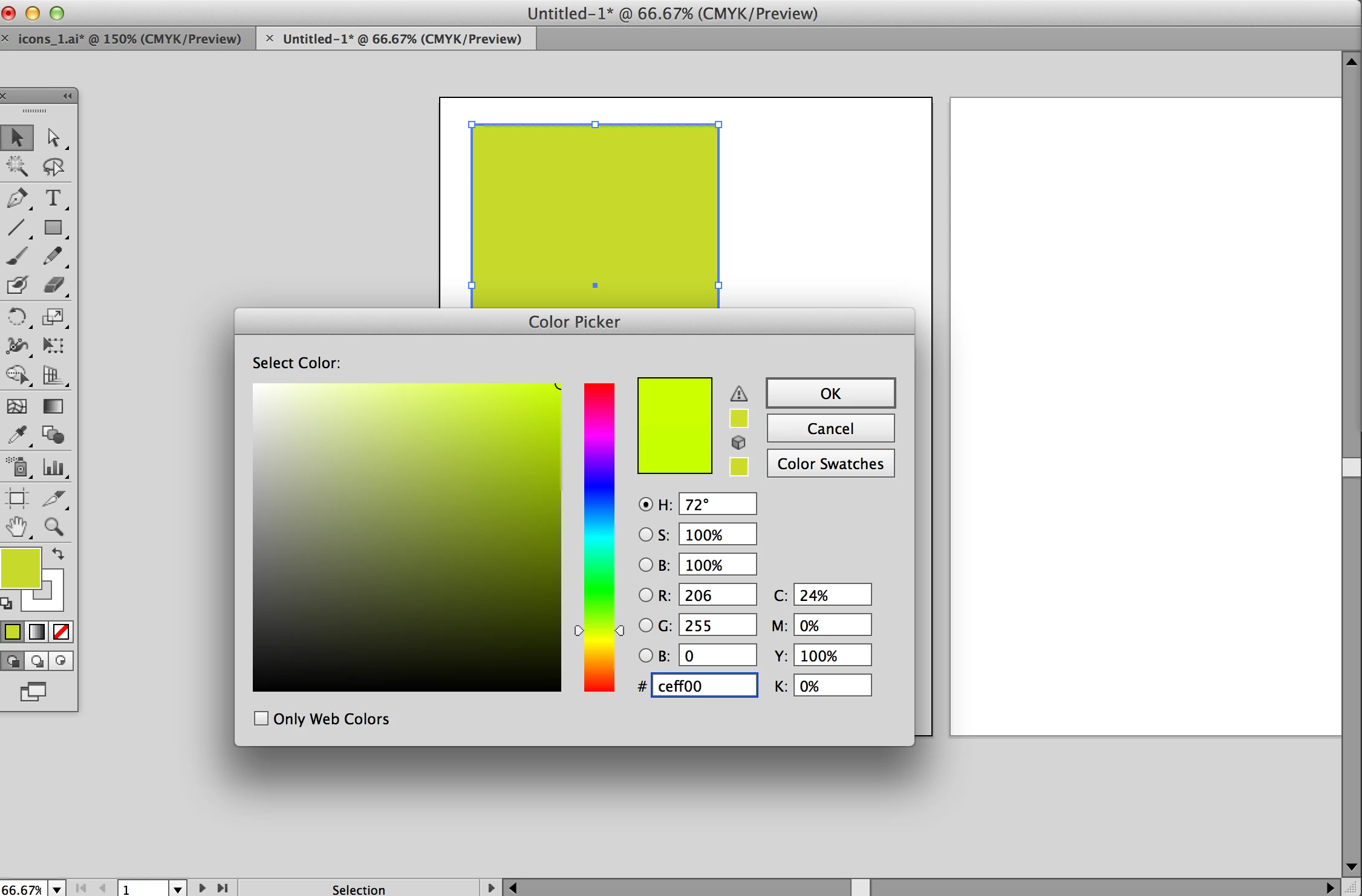
I have a weird issue with the color. When I changed the color from dark green to bright lime green on Color Picker. The Color Picker show the specific color I want and then I click "OK". It did not change the dark green to bright lime green... instead it show the dull green color. It is really bugging me because I can't figured it what wrong with it. I checked the Color Mode (RGB mode) and Color Setting... everything seems to be right to me.

Here is the quick screenshot:
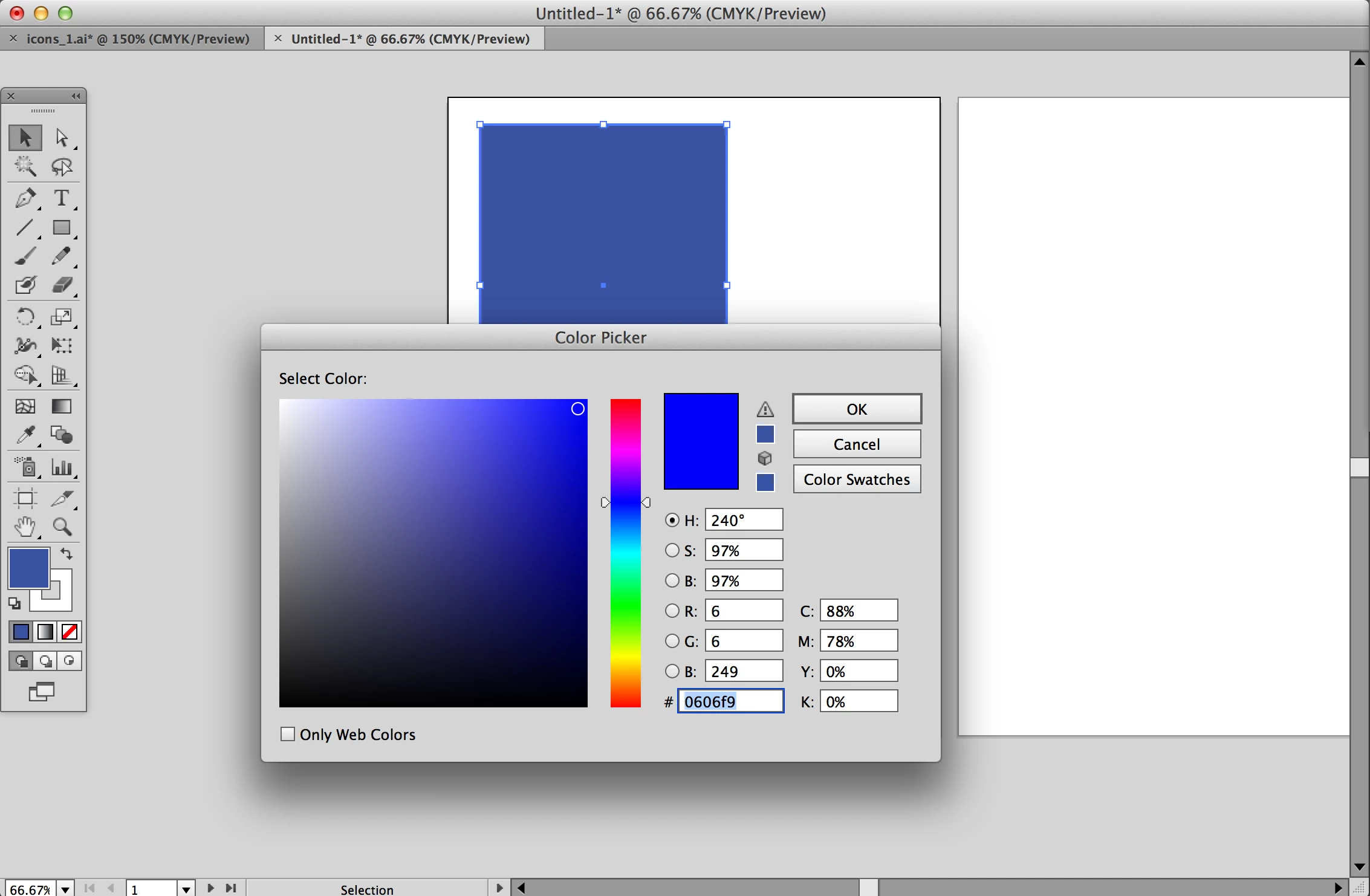
I also tested with other color, it still have the same problem. They won't show the bright color, it show the dull color instead.
I hope you guys can help me out!

Thanks,

Christie

This topic has been closed for replies.
Correct answer Wade_Zimmerman1

From the information you are supplyng us wih and from the screenshot it appears quite clearly you are mistaken the Color Mode is CMYK and not RGB just look at you screen shot and you will see what I mean.

The Document Color  mode in both screenshots indicates CMYK.

The color you see is expected. Change the color mode properly to RGB and it will solve your problem.

6 replies

ermilomagana_mx
Participant
April 28, 2021

i was having the same issue, i had to open PS and there with the color picker get the hex value i needed, its not a solution per se but i can keep working at least.

Participant
January 24, 2017

Hi guys,

It seems I have exactly the same problem here.
I'm trying to understand how to change CYMK to RGB and I know the solution is easy but I really don't know how to do it and it's been a while I'm looking for the solution now


I tried to go to the "color settings" but there are like a billon possible choices.
I tried to go to Window > Color > Swatches but nothing happened ...

Thank you in advance for your help.

Have a great day !

Alex.

Monika Gause
Community Expert
Community Expert
January 24, 2017

alexlanguages schrieb:


I tried to go to the "color settings" but there are like a billon possible choices.
I tried to go to Window > Color > Swatches but nothing happened ...

As for the Color settings, please read about color management. There are dozens of web sits and tutorials and trainings dedicated to it. Both free and paid.

As for document color modes please read the documentation

Change the color mode of a document via File > Document color mode

All the colors inside the document (including swatches) will be converted accordingly. You need to check all the definitions afterwards, because the change is made by color management so your settings need to be correct before chaning the color mode.

These links are just a start. You will need to read much more:

Overview of color in Illustrator

Creative Suite * Understanding color management

This is a paid ressource

Color Management Fundamentals

abdoriginal
Participant
December 18, 2016

I am having this same problem. But I have Creative Cloud, so my version of InDesign is CC 2017. I'm working on my final, and I need to show what colours I used on my final, which I made in Experience Design Beta, and I used #65FF58. But when I enter it on InDesign, it changes to #8AC542. These answers given above are all so complicated. I just need a yes or no, can it be fixed? If so, how?

Monika Gause
Community Expert
Community Expert
December 18, 2016

Are you working in InDesign or Illustrator? This is the Illustrator forum.

Even if you're working in Illustrator, please create your own thread and describe step by tep what you have done. You might or might not have the same issue as the original poster. And in order to not mess everything up, make your own thread.

Also: we would need to know in which color mode you are working (document color mode). If you are working in CMYK document color mode, this is expected behaviour.

Wade_Zimmerman1Correct answer
Inspiring
November 7, 2012

From the information you are supplyng us wih and from the screenshot it appears quite clearly you are mistaken the Color Mode is CMYK and not RGB just look at you screen shot and you will see what I mean.

The Document Color  mode in both screenshots indicates CMYK.

The color you see is expected. Change the color mode properly to RGB and it will solve your problem.

Participant
November 7, 2012

It finally works!

Thanks for finding this simple problem... I wish I have noticed that soon -_-.

DrStrik9
Inspiring
November 7, 2012

This is why we call it "YMCK" -- sung to the Village People tune.  :+D

Inspiring
November 7, 2012
Participant
November 7, 2012

Thanks emil emil for the link.

I checked the issue and it still did not fix the problem

Inspiring
November 7, 2012

ChristieDesign wrote:

Thanks emil emil for the link.

I checked the issue and it still did not fix the problem

Christie if you mean that you tried my suggestion in the other thread, apparently you didn't do it properly. Monitor profiles are only RGB and in order to assign it  as a color space of your document you have to have your document in RGB mode first. Again, as it was the case in the other thread, just switching to RGB mode will not fix the problem from the fact that the color picker is not color managed and will still show a difference even in RGB documents if the monitor profile is different than the profile of the RGB document. If you don't have a custom monitor profile you system assigns by default the sRGB color space as a profile of your monitor and since the default RGB mode in Illustrator is also using the sRGB color space then the Color PIcker will show no difference in a sRGB document. However, if you try assigning another RGB color space for, example Adobe RGB, from Edit > Assign Profile then the color picker will be equally useless as when working in a CMYK document.

Wade_Zimmerman wrote:

The color you see is expected. Change the color mode properly to RGB and it will solve your problem.

Wade, you mean "the color you see is the result of how badly color picker was programmed to work"? If the color picker was  color managed it would display only the colors within the limit of the color space of the current document so the user can not choose colors outside of it and then wonder why the colors in the document are not the same. I wouldn't consider the way the color picker shows the colors as expected.

Jacob Bugge
Community Expert
Community Expert
November 7, 2012

Christie,

Have you tried (all the) different Edit>Color Settings?

Participant
November 7, 2012

Yes, I have. But no luck.

I found it a bit odd, I have been working on Illustrator for 8 years and I never had this problem. Maybe there is something wrong with CS6?