Inspiring
October 20, 2022
Answered

color profile

  • October 20, 2022
  • 5 replies
  • 824 views

Hi,


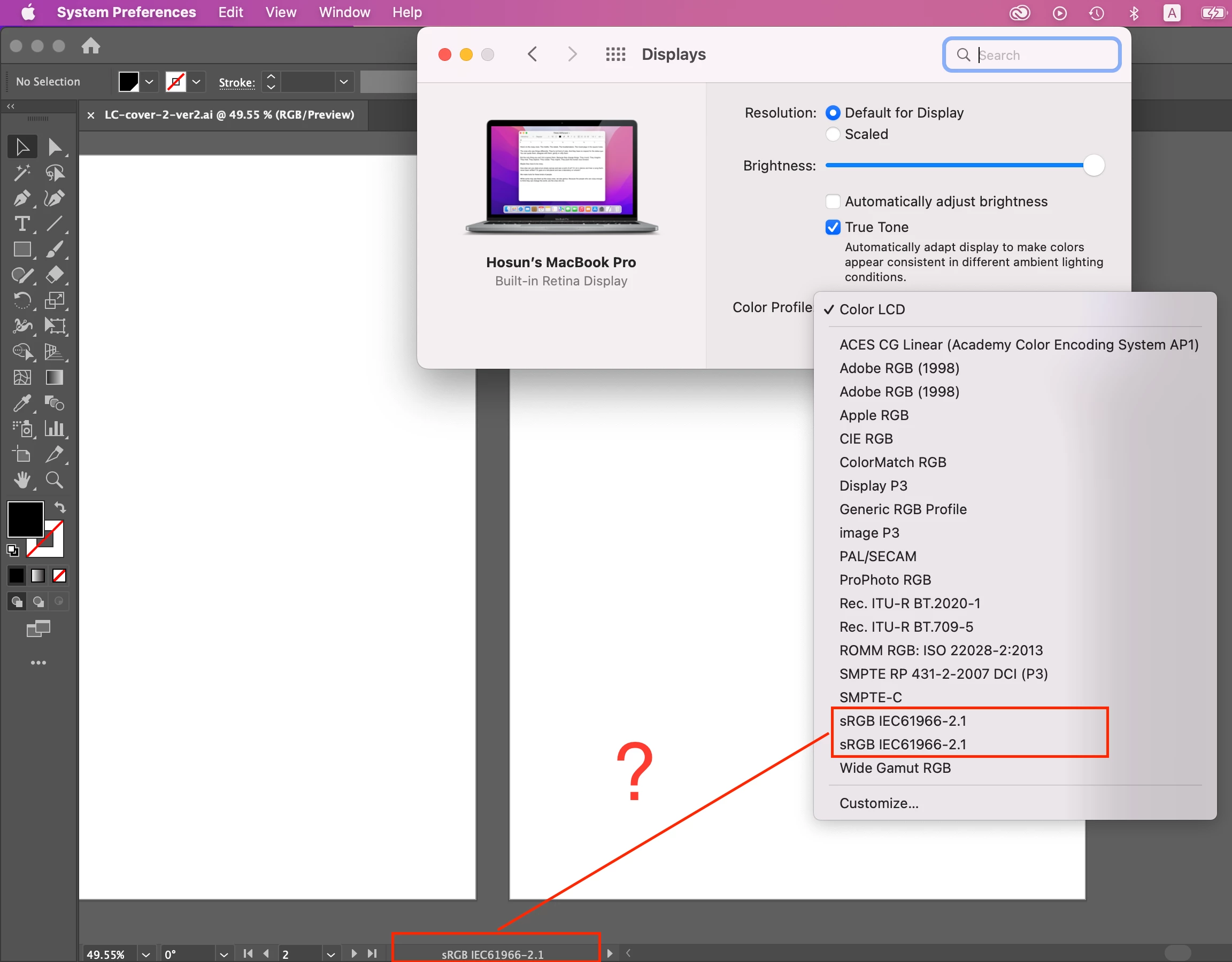
In Mac's System Preferences, there is Color Profile (I've just found it).


So far, I have been with Color LCD by default.

Should I change it to my color profile?


Hosun
This topic has been closed for replies.
Correct answer Conrad_C

The correct answer for the display color profile is always “the profile that most closely matches the actual display hardware in use.” So let’s think through that.


If you are using a recent Mac display, then sRGB and Adobe RGB are always the wrong choice. That is because recent Mac, iPad, and iPhone displays don’t match the sRGB or Adobe RGB color gamuts; they are based on the Display P3 color gamut. But Display P3 might not precisely describe the behavior of the specific display hardware in use, so to provide a closer match, Apple provides Color LCD as the factory default profile.


So, in the end, for the question “Which display profile should I choose?” on a Mac, there are really just two possible correct answers:

  • A custom display profile generated by display calibration/profiling software. If you don’t have that, then…
  • The Color LCD profile.


The document color mode and Illustrator working space in Edit > Color Settings (and the result of Assign Profile) will normally not match either of those, because those are not about the display, they should be based on your project’s final delivery medium (a specific type of RGB or CMYK), not your display.


So always think of the display profile, the document color mode, and the working space profile/Assign Profile as different profile settings for different purposes.

5 replies

Conrad_C
Community Expert
Conrad_CCommunity ExpertCorrect answer
Community Expert
October 23, 2022

The correct answer for the display color profile is always “the profile that most closely matches the actual display hardware in use.” So let’s think through that.


If you are using a recent Mac display, then sRGB and Adobe RGB are always the wrong choice. That is because recent Mac, iPad, and iPhone displays don’t match the sRGB or Adobe RGB color gamuts; they are based on the Display P3 color gamut. But Display P3 might not precisely describe the behavior of the specific display hardware in use, so to provide a closer match, Apple provides Color LCD as the factory default profile.


So, in the end, for the question “Which display profile should I choose?” on a Mac, there are really just two possible correct answers:

  • A custom display profile generated by display calibration/profiling software. If you don’t have that, then…
  • The Color LCD profile.


The document color mode and Illustrator working space in Edit > Color Settings (and the result of Assign Profile) will normally not match either of those, because those are not about the display, they should be based on your project’s final delivery medium (a specific type of RGB or CMYK), not your display.


So always think of the display profile, the document color mode, and the working space profile/Assign Profile as different profile settings for different purposes.

Inspiring
October 25, 2022

Thank you very much.


Hosun

chrisg11235813
Participating Frequently
October 20, 2022

Can I ask what are you using illustrator for?

RGB is for web / digital output.

CMYK is (typically) for Print output.

Your document profile should be chosen based on your output intent.

The monitor profile can be calibrated to mimic an output intent, but not typically done unless you are very concerned with using your monitor to colour match.

Inspiring
October 22, 2022

Thank you very much for your reply.


I chose RGB and sRGB for color mode and profile.


My question is:

"In Illustrator, my color profile is sRGB IEC61966-2.1.

Should I change the monitor's color profile to sRGB?"


Reading other replies, I guess I don't need to change.


Hosun

Monika Gause
Community Expert
Community Expert
October 22, 2022

Your monitor profile should describe the monitor.

So in an ideal setting, a monitor profile is generated by specific hardware that will also adjust the monitor. In a not so ideal world you can still use the settings built into your system for calibration (this is in no way exact). In a less than ideal world, there is a generic profile for that monitor type or it cannot be adjusted at all.


https://www.digitaltrends.com/computing/how-to-calibrate-your-monitor/

Anubhav M
Community Manager
Community Manager
October 20, 2022

Hello @Hosun26059267k946,


Thanks for reaching out. Would you mind trying to recalibrate your monitor for SRGB, restart your computer, and then relaunch Illustrator to check if it helps with color consistency for Illustrator?


Looking forward to your response.


Thanks,

Anubhav

Monika Gause
Community Expert
Community Expert
October 20, 2022

Your Illustrator working space should not be a monitor profile.

Your monitor profile should not be something like AdobeRGB.

Legend
October 20, 2022

What do you mean "my color profile"?  Have you made a color profile for your monitor by calibrating it? If so, yes. Otherwise, no. This is not expected to match your working space.
