
Exit
  • Global community
    • Language:
      • Deutsch
      • English
      • Español
      • Français
      • Português
  • 日本語コミュニティ
  • 한국 커뮤니티
0

Colors not preserved when exporting PDF

Community Beginner ,
Nov 17, 2025 Nov 17, 2025

I'm using Illustrator 30.0 to prepare some scientific figures. I use matplotlib to output a PDF, which I then "Place" in my Illustrator file, and after making my edits I would export the file as a new PDF. However, when I do this, the output files' colors seem messed up on every PDF viewer I use (Acrobat, Chrome, Firefox, even Illustrator). For example, here's a screengrab of the matplotlib output, which looks as expected:

matplotlib.png

Here's the preview in Illustrator, before export:

illustrator_preview.png

And here's after export. Document color mode is RGB, exporting using the [PDF/X-4:2008] preset, though other settings have given me similar results:

x4_rgb.png

If I change the document color mode to CMYK before export, it looks slightly different, but still bad:

x4_cmyk.png

And here's my color settings, if it's any clue:
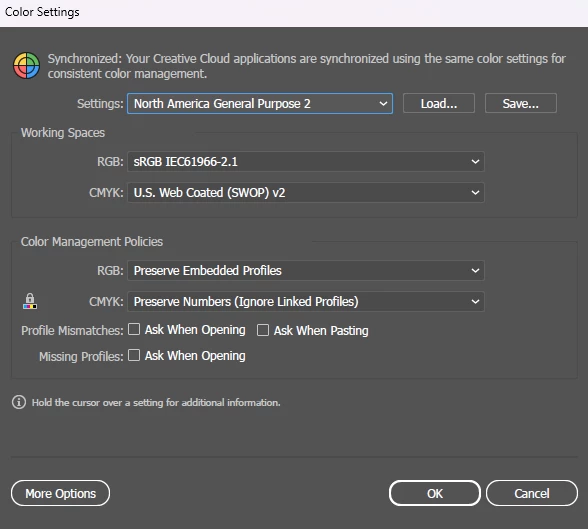
settings.png

I don't expect a perfect color match on the output, but this seems dramatically far off. Is there some combination of settings which I can use to preserve the appearance of my output? Here's a Creative Cloud link to my example file: https://illustrator.adobe.com/id/urn:aaid:sc:US:265137ba-9f92-49b1-ada9-1f68341c16c4 
TOPICS
Bug , Import and export
353
Translate
Report
Community guidelines
Be kind and respectful, give credit to the original source of content, and search for duplicates before posting. Learn more
community guidelines

correct answers 2 Correct answers

Community Expert , Nov 17, 2025 Nov 17, 2025

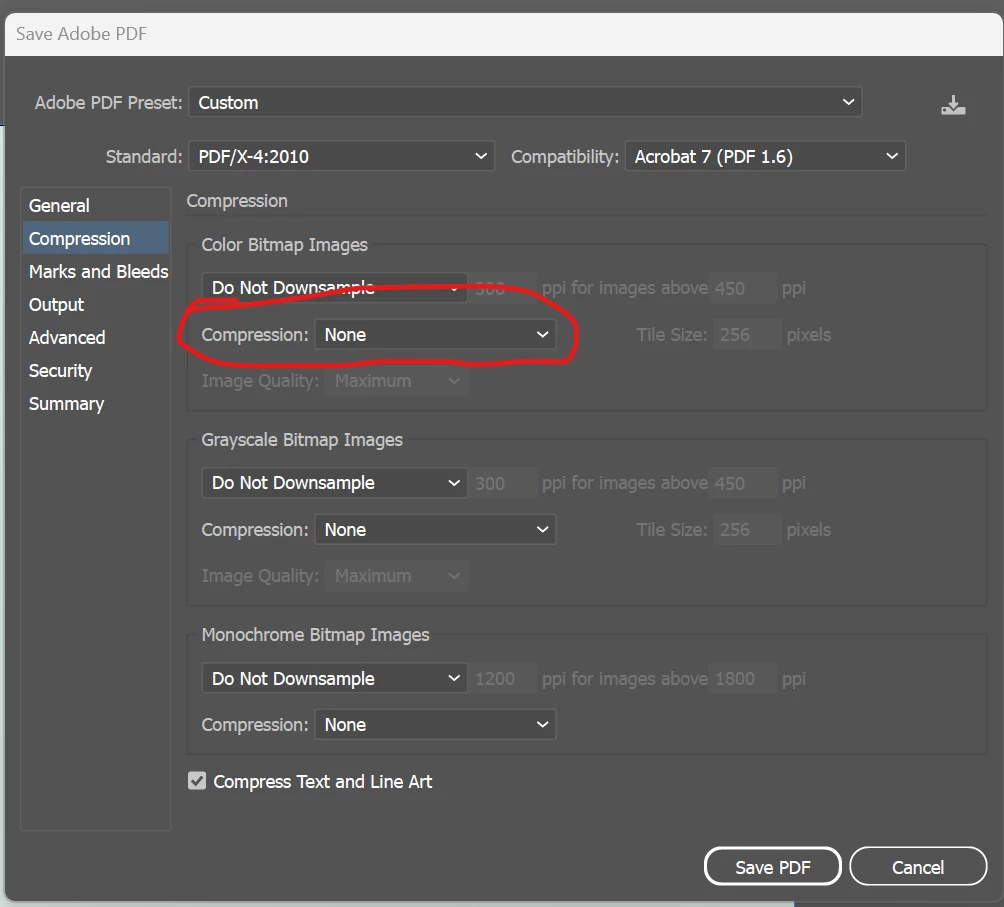
Did you set Compression to None?

DougARoberts_0-1763395892840.png

Translate
Community Beginner , Nov 17, 2025 Nov 17, 2025

Aha, this was it! I was under the false impression that setting "Do not downsample" meant the rest of the compression settings would be disabled by default; switching these to "None" did the trick. Thanks!

Translate
Adobe
Community Expert ,
Nov 17, 2025 Nov 17, 2025

I think you need to give edit access to enable your file to be downloaded.

Translate
Report
Community guidelines
Be kind and respectful, give credit to the original source of content, and search for duplicates before posting. Learn more
community guidelines
Community Beginner ,
Nov 17, 2025 Nov 17, 2025

Thanks for the heads up, "Save a copy" should now be enabled for anyone with the link

Translate
Report
Community guidelines
Be kind and respectful, give credit to the original source of content, and search for duplicates before posting. Learn more
community guidelines
Community Expert ,
Nov 17, 2025 Nov 17, 2025

The matplotlib output is a 5x5 px raster image upscaled 2800%. Is this normal for your output?

Your compression settings are what matter here, the image is showing compression artefacts.

Change to 'Do not downsample' and 'Compression: None'.

Translate
Report
Community guidelines
Be kind and respectful, give credit to the original source of content, and search for duplicates before posting. Learn more
community guidelines
Community Beginner ,
Nov 17, 2025 Nov 17, 2025

This blow-up is a bit more dramatic, but yes, my output will be a few-pixel raster image upscaled to a larger size.
On the export settings, if I go to Compression, turn off all downsampling, and uncheck the "Compress text and line art" box, I get the following output, which still doesn't look right:
no_downsampling.png

Translate
Report
Community guidelines
Be kind and respectful, give credit to the original source of content, and search for duplicates before posting. Learn more
community guidelines
Community Expert ,
Nov 17, 2025 Nov 17, 2025

Line art is for black and white images. What do you use for color? Don't use jpeg, because it is a lossy format that throws away and averages colors.

Translate
Report
Community guidelines
Be kind and respectful, give credit to the original source of content, and search for duplicates before posting. Learn more
community guidelines
Community Expert ,
Nov 17, 2025 Nov 17, 2025

Did you set Compression to None?

DougARoberts_0-1763395892840.png

Translate
Report
Community guidelines
Be kind and respectful, give credit to the original source of content, and search for duplicates before posting. Learn more
community guidelines
Community Beginner ,
Nov 17, 2025 Nov 17, 2025
LATEST

Aha, this was it! I was under the false impression that setting "Do not downsample" meant the rest of the compression settings would be disabled by default; switching these to "None" did the trick. Thanks!

Translate
Report
Community guidelines
Be kind and respectful, give credit to the original source of content, and search for duplicates before posting. Learn more
community guidelines