
eddiepostpones
Participant
March 17, 2018
Resuelto

Coloured Light

  • March 17, 2018
  • 3 respuestas
  • 1894 visualizaciones

Hello all!

I'm trying to create coloured light effect on a photograph to replicate how sunlight shines through a stained glass window.

I wonder if anyone knows of a way of doing this? Particular brushes or something?

Any help would be greatly appreciated!

Many thanks in advance..
Este tema ha sido cerrado para respuestas.
Mejor respuesta de Srishti Bali

That looks great! Thank you


Hi eddiepostpones,

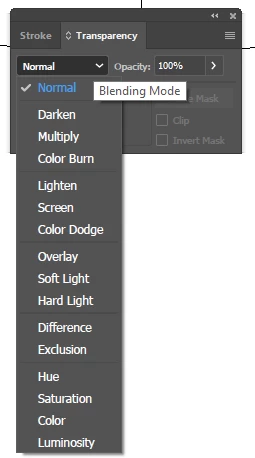
You may find blending modes under Transparency(Windows >Transperancy) panel.

Here is a detailed tutorial on How to edit artwork using transparency and blending modes in Illustrator

Hope it helps!

Regards,

Srishti

3 respuestas

Participating Frequently
March 22, 2018

Hi eddiepostpones​!

You might want to try the folowing.

  1. Create the floor (any suitable image)
  2. Duplicate the window image (Copy, Paste)

  3. Flip the stained glass window vertically (Right+Click, Transform ->Mirror)

  4. Stretch the duplicate image vertically
  5. Create a rectangle with gradient (white to black)
  6. Select the gradient and the duplicate image.

    In the Transparency panel menu -> Make Opacity Mask
    Now your duplicate image is fading downwards
  7. Apply a blur effect to the image. Increase the blur radius depending on the size of your image
    Effects -> Blur -> Gaussian Blur
  8. In the Transparency Panel, you can make the blending mode Screen, 100%

  9. Duplicate this object (Copy, Paste in Front).

  10. Change the Blending mode to Saturation to brighten the colors.
    You can duplicate some more if you like.
  11. You can add a 3D rotate filter to make it more realistic.
    Effects -> 3D -> Rotate
Ray Yorkshire
Participating Frequently
March 17, 2018

Agree it's really a job for a pixel program like Photoshop, if you have that maybe a bokeh type treatment, like here:

Photoshop Tutorial: BOKEH! How to Make a Bokeh Background & Text Effect - YouTube

ceyhun_akgun
Legend
March 17, 2018

Once you have your graphics in Illustrator, you can use the Blur value in a high frame. You can use Blending Modes (overlay, screen, color, etc.) if needed.

Graphic Designer Educator / PrePress Consultant
eddiepostpones
Participant
March 21, 2018

That looks great! Thank you

eddiepostpones
Participant
March 17, 2018

Something like this

Monika Gause
Community Expert
Community Expert
March 17, 2018

I would search for Photoshop tutorials on lighting effects, such as: http://www.vandelaydesign.com/lighting-effect-tutorials/