


Copy link to clipboard
Copied
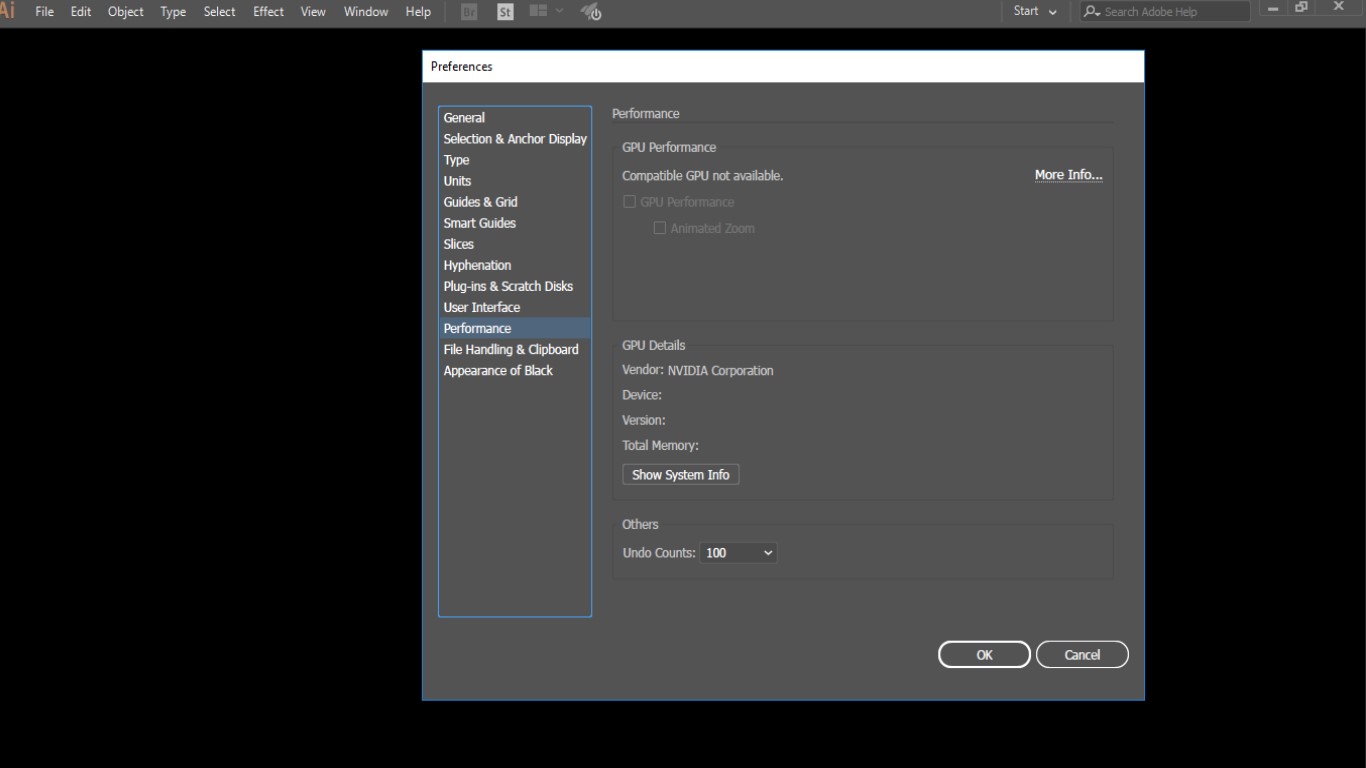
compatible gpu not available. vga:1 intel hd 3000 2 geforce 525m I have tried several different versions


 2 Correct answers

Please check this page: Adobe Illustrator system requirements
It looks like your graphics cards are not compatible. That is why it says "Compatible GPU not available".
You may want to upgrade your hardware if possible.



Hello Muhammad25695045ys6u,
Sorry to hear about this experience. I would request you try resetting Illustrator's preferences by following the steps shared in this article (https://helpx.adobe.com/illustrator/kb/troubleshoot-preference-issues.html) and sharing your observations.
Disclaimer: Please note that resetting preferences will remove all custom settings, and Illustrator will launch with the defaults. You may take a backup of these settings from the location mentioned in the article.
Also,

Explore related tutorials & articles
 15
Replies
15
15
Replies
15


Copy link to clipboard
Copied
Compatible with what?
-http://forums.adobe.com/thread/1001579
-link to why http://forums.adobe.com/message/4685328
-Use BIOS http://forums.adobe.com/thread/1019004?tstart=0 to select a display adapter
Copy link to clipboard
Copied
john, please help me. illustrator dosent work properly
i have problem. please
2018-07-09 7:19 GMT+03:30 Karim Ebrahimi <eng.kebrahimi@gmail.com>:
>
2018-07-09 2:10 GMT+03:30 John T Smith <forums_noreply@adobe.com>:
>> gpu created by John T Smith
>> <https://forums.adobe.com/people/JohnTSmith> in *Downloading,
>> Installing, Setting Up* - View the full discussion
>> <https://forums.adobe.com/message/10489126#10489126>
>>
Copy link to clipboard
Copied
karime96346179,
compatible with what? Do you get an error message that you could post here?
Best Regards,
Maurice
Copy link to clipboard
Copied
illustrator
2018-07-09 7:48 GMT+03:30 mauricep27921461 <forums_noreply@adobe.com>:
compatible gpu is not available created by mauricep27921461
<https://forums.adobe.com/people/mauricep27921461> in *Downloading,
Installing, Setting Up* - View the full discussion
<https://forums.adobe.com/message/10489192#10489192>
Copy link to clipboard
Copied
Copy link to clipboard
Copied
Please check this page: Adobe Illustrator system requirements
It looks like your graphics cards are not compatible. That is why it says "Compatible GPU not available".
You may want to upgrade your hardware if possible.
Copy link to clipboard
Copied
dear mauricep
in the past
it worked well with the same laptop
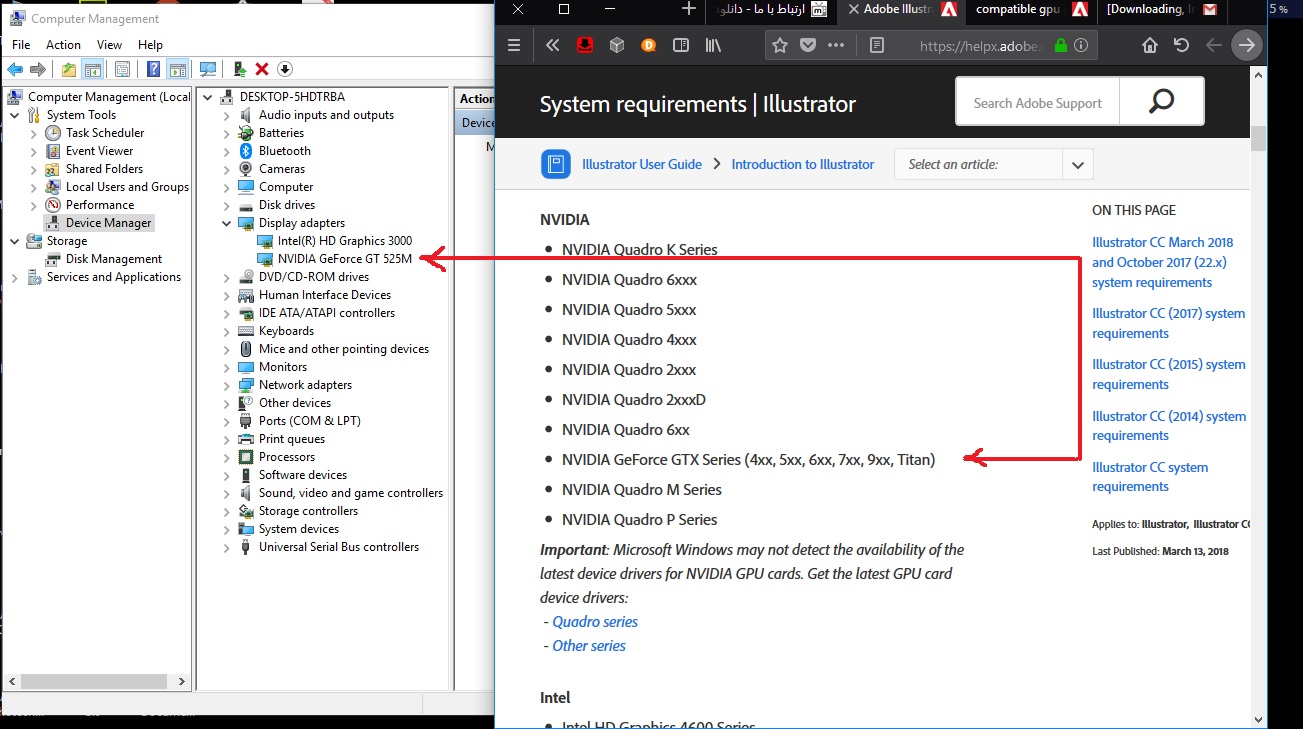
dell n5110 vga:gt525m 6g ram integrated vga: intel hd 3000
I am a hardware engineer
I have the necessary skills
It worked fine a few months ago, but now it's not
I also upgraded drivers and installed various versions and even changed the Windows
Copy link to clipboard
Copied
I am not questioning your skills, but you have a "NVIDIA GeForce GT 525M" built into your laptop, whereas Adobe Illustrator recommends a "NVIDIA GeForce GTX Series" one.
Here's an idea, though: since you're working on a laptop, you are probably aware that you can tell an app to use the dedicated GPU via the NVIDIA Control Panel?!
» How to manually set a default graphics card: Nvidia or AMD - Tech Advisor
Copy link to clipboard
Copied
My description of the skill was to tell you that I have tried out the usual methods
Including the same method you sent now
Your attempt to help me was very valuable.thanks
I'm sorry for the weakness of the English conversation

Copy link to clipboard
Copied
what if i have RTX3060
what upgreads can i make :I
Copy link to clipboard
Copied
@abdulrahmanSHD RTX 3060 should be enough.
That list on the system requirements page features graphics cards that Adobe themselves have tested. If your card is not listed there, but meets the requirements (at least 1 GB of VRAM (4 GB recommended) + supports OpenGL version 4.0 or greater), you can assume that it works with the latest version of Illustrator.

Copy link to clipboard
Copied
Hi,
Facing same issue, and i am using Nvidia Quadro K2200 whihc is available in Adobe illustrator requirements. but still it is showing in preferences.
Can you please help me out?
Copy link to clipboard
Copied
Hello Muhammad25695045ys6u,
Sorry to hear about this experience. I would request you try resetting Illustrator's preferences by following the steps shared in this article (https://helpx.adobe.com/illustrator/kb/troubleshoot-preference-issues.html) and sharing your observations.
Disclaimer: Please note that resetting preferences will remove all custom settings, and Illustrator will launch with the defaults. You may take a backup of these settings from the location mentioned in the article.
Also, try updating the drivers for your GPU and check if it helps.
Looking forward to hearing from you.
Thanks,
Anubhav
Copy link to clipboard
Copied
Did you see the picture?
can you help me ?
Copy link to clipboard
Copied
John, do you have any idea?


Get ready! An upgraded Adobe Community experience is coming in January.
Learn more
 AdChoices