


Compound path - How to invert?

Copy link to clipboard
Copied
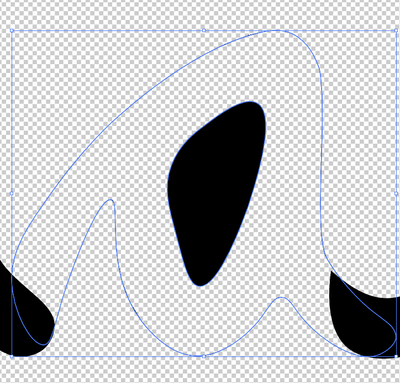
Hello, so I know how to use the compound path to an extent but whenever I use it, the middle of the a is solid and the rest of the a is transparent. Is there a way to flip it?
I got info from here: Solved: How do I remove the center of the a? - Adobe Support Community - 12462285



Explore related tutorials & articles
 10
Replies
10
10
Replies
10




Copy link to clipboard
Copied
default6,
Maybe too silly, but what happens if you release the Compound Path (so you have the two separate paths, the inner one on top in the stacking order), then select both paths and use Minus front (Pathfinder)?

Copy link to clipboard
Copied
Change the stacking, the item being punched out needs to be on top.

Copy link to clipboard
Copied
The stacking order is crucial for a Clipping Mask, but shouldn't matter for a Compound Path.
Peter
Copy link to clipboard
Copied
If the two items are the same color, sure.
Copy link to clipboard
Copied
The rear-most path determines the color of the compound; otherwise, there should be no difference. Am I missing something?


Copy link to clipboard
Copied
I can't see anything you could be missing.
Copy link to clipboard
Copied
For me starting out, it was easier to understand if I had the smaller, punch out item, on top, and also the color you want to keep below. If I ever get to be a pro, I guess I won't think it matters...

Copy link to clipboard
Copied
It might matter if you have more than two items and you're using the non-zero winding fill rule.
Copy link to clipboard
Copied
Did you inadvertently select Clipping Mask > Make instead of Compound Path > Make? or press ⌘/Ctrl + 7 instead of ⌘/Ctrl + 8?
Peter
Copy link to clipboard
Copied
Release it and then examine it. I suspect there are double paths.


Find more inspiration, events, and resources on the new Adobe Community
Explore Now
 AdChoices