
Compound Path issue: can anyone explain how I got here . . .?
I have – what is probably the reverse of a normal problem – I have the answer, but I appear to have just stumbled upon it.
Could anyone explain the background thinking, so that I can get a better grasp of the fundamentals. This would help me in designing future projects.
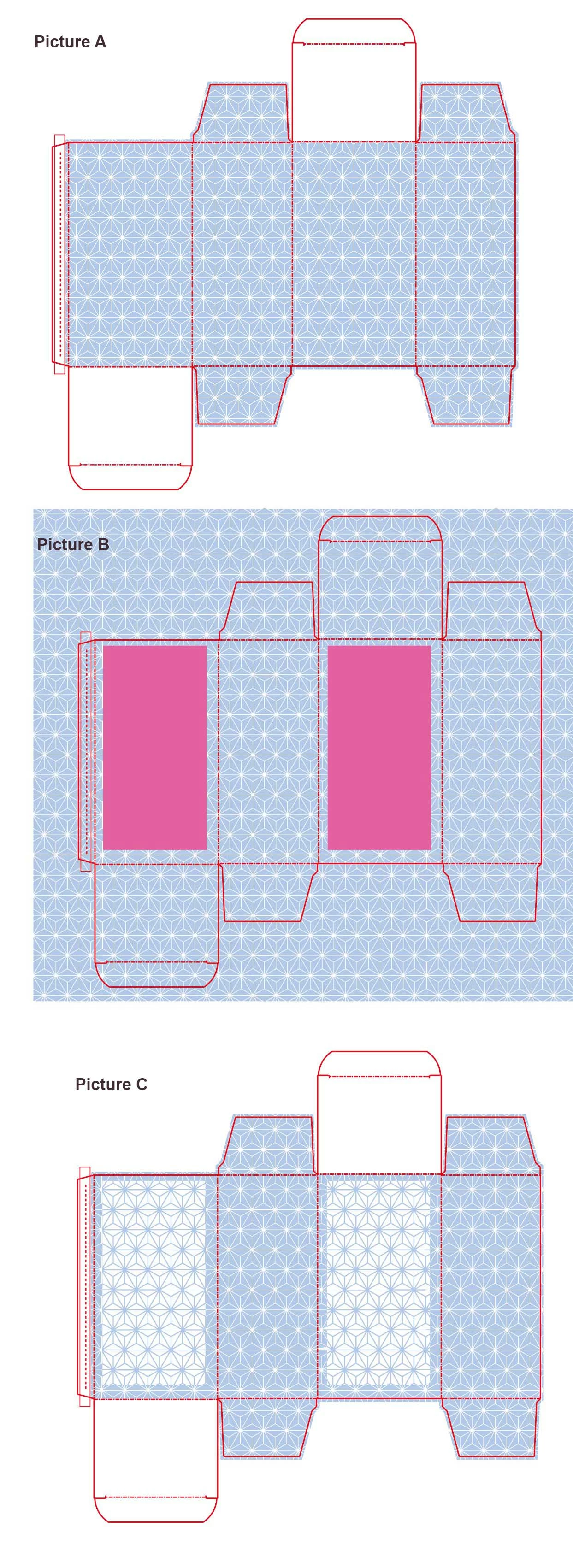
Firstly in picture A – what is white is actually transparent.
So I need to create a reverse of this in two sections – on the back and the front – so that transparent becomes blue and the blue becomes transparent
In picture B I have created two rectangles and, by selecting the background design: Object > Compound Path > Make
I had to apply the “Use Even-Odd fill rule” from Attributes.
The result, which is exactly what I wanted, is in Picture C.
My problem is that I cannot understand how colour is created in an area that was previously transparent and that it gets filled with the main background colour.
Can someone explain the background principles to this process (keep it simple please!)
Thank you!
 AdChoices