


Participating Frequently
November 29, 2018
Question

Compund Path Invert Effect

  • November 29, 2018
  • 2 replies
  • 868 views

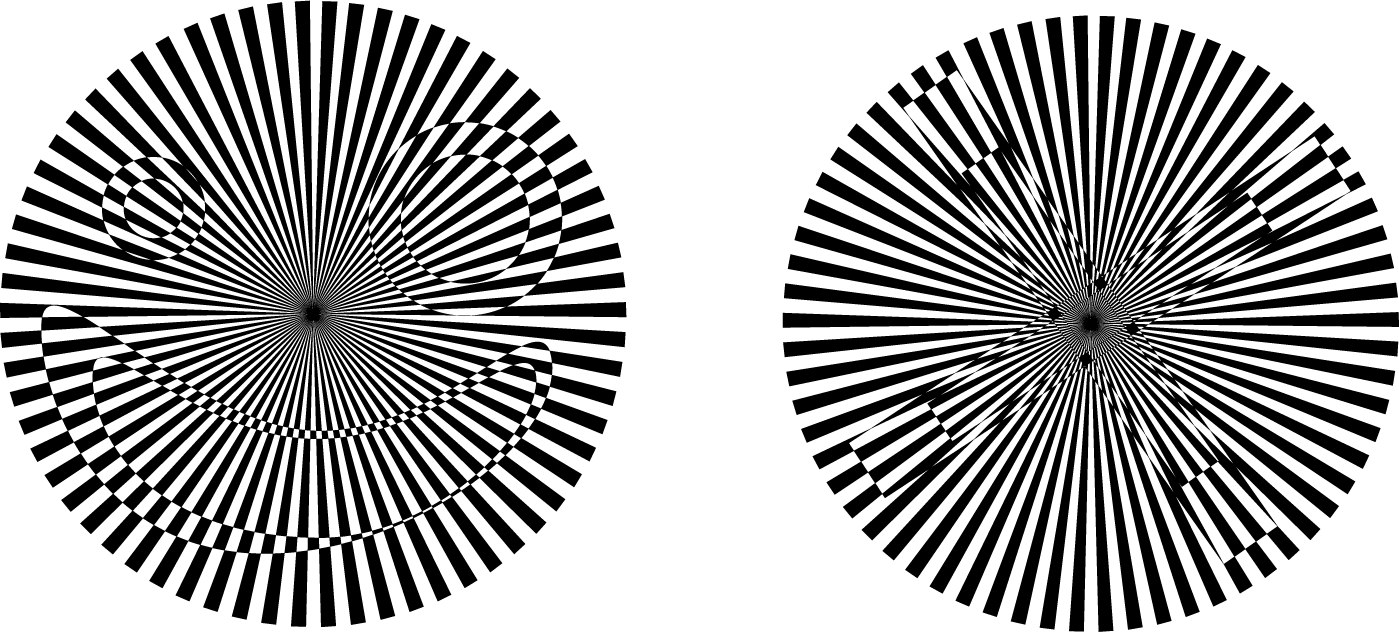
Heyo so I've been playing around with Op Art stuff and I accidentally stumbled upon this cool effect that comes from creating a compound path with a background that's an op-art like radial pattern and a shape on top of it. The effect causes the shape on top to invert the colors of the background radial pattern creating a trippy effect. Also I should note that it seems the top shape needs to have no fill and be a shape that has had a pathfinder minus front applied to it. So I was wondering if anyone can help explain to me what's going on here? Why does the compound path cause the form on top to invert the form below it? Also It'd be awesome if I could animate the top shape to move around in AE so if anyone has knowledge on how to this that'd b awesome! Heres two examples of the effect:
This topic has been closed for replies.

2 replies

Ray Yorkshire
Participating Frequently
November 30, 2018

Not sure how you did yours,  maybe it's similar to this way

The background made of shapes not strokes

Add a front object same colour,

select both

Pathfinder >  (Alt click) Exclude

deselect and with Direct Selection Tool  move bottom shape over top ones

Guess it's just removing the colour where ever it overlaps.

Making it look like it changes from black to white?

tromboniator
Community Expert
Community Expert
November 30, 2018

Yup, Compound Shape rather than Compound Path. I'll buy that.

tromboniator
Community Expert
Community Expert
November 30, 2018

A Compound Path by itself does not give you that effect. Try this:

1. Copy the stripe pattern, lock it, then Paste in Front.

2. Invert the colors of the stripes. I used Edit > Edit Colors > Invert Colors to start. The white came out gray, so I selected that and made it white.

3. Draw shapes (any color)as you want the pattern reversals, overlapping as you want to flip back and forth.

4. Select all the reversal shapes and Object > Compound Path > Make.

5. Select the inverted stripes and the Compound Path

6. Object > Clipping Mask > Make.

Peter