luciea48269334
Participant
April 19, 2020
Answered

Converting Circle to Star

  • April 19, 2020
  • 2 replies
  • 4033 views

Is there any way I can convert a circle to a star in illustrator? I've used the select tool to select all my circles. I need them to be squares. How can I do this quickly?

This topic has been closed for replies.
Correct answer Mario Arizmendi

To convert a Circle into a square just 

  1. Select the circle
  2. Go to Effect - convert to shape

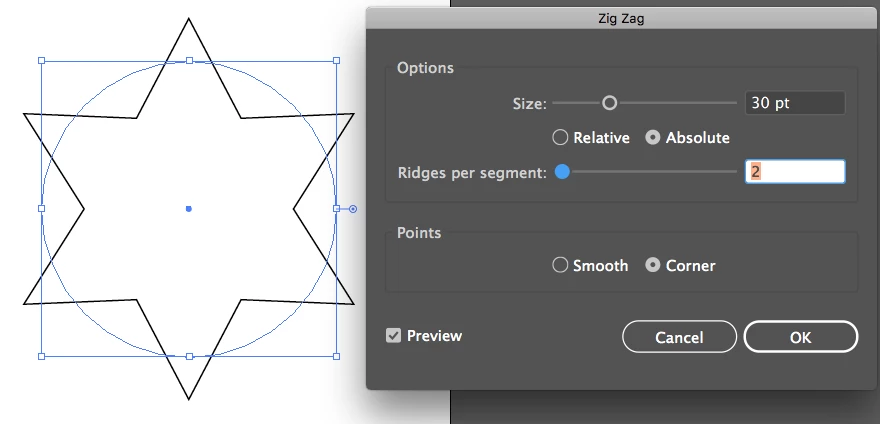
Now to convert a Circle int a star select the circle and go to Effect -  Distort and Transform - ZigZag as you can see in the picture attached
 

2 replies

pixxxelschubser
Community Expert
Community Expert
April 20, 2020

@luciea48269334,

was that the right answer for you?


Or do still waiting for another solutions?


In the second case you should explain a bit more.

Do you have different circles?

Do you want to replace all circles with one star (in one size)?

Or do you want to replace all circles with stars (in the size of the corresponding circle)?

Or … or … ?


Mario Arizmendi
Mario ArizmendiCorrect answer
Legend
April 19, 2020

To convert a Circle into a square just 

  1. Select the circle
  2. Go to Effect - convert to shape

Now to convert a Circle int a star select the circle and go to Effect -  Distort and Transform - ZigZag as you can see in the picture attached


luciea48269334
Participant
April 19, 2020

Thank You!