
Known Participant
August 26, 2020
Question

Converting Pantone to RGB

  • August 26, 2020
  • 3 replies
  • 11671 views

Hello friends,


I really need your help! I have designed a logo in Adobe Ilustrator CC 2020 consisting of 2 Pantone colors and I am having issues converting Pantone to the correct RGB values.


These are the steps I have taken:


  1. The logo was originally made using CMYK mode with Pantone colors from the COLOR BRIDGE coated book. *The colors are PANTONE 2035 C and PANTONE 446 C
  2. I have changed the mode to RGB, so I could prepare the logo files for digital use.
  3. Then when I tried to add the RGB values to match the Pantones, an error message appeared (See ScreenShot for reference)  * Out of web color warning and Out of Gamut Color
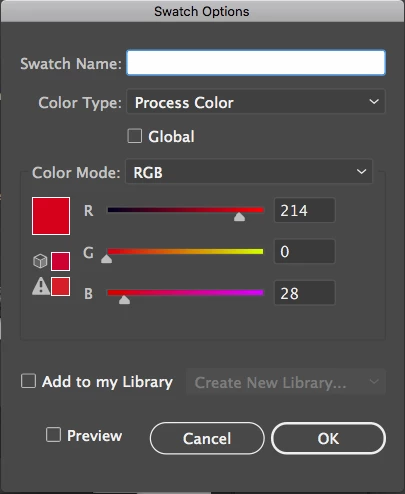


How do I fix these issues? Please advice!


This topic has been closed for replies.

3 replies

carlosgarro
Community Expert
Community Expert
August 26, 2020

Hi.

Try with this https://www.pantone.com/color-finder

And make the new swatches in a new RGB color Mode Document.

Best Regards


Known Participant
August 26, 2020

Based on your answer, you are saying its better to create a new document with RGB mode directly, instead of converting colors from a CMYK document ?

carlosgarro
Community Expert
Community Expert
August 27, 2020

Yes. You already have the RGB values.

Remember to keep a document for the printing side in CMYK and another file in RGB.

Regards


Ton Frederiks
Community Expert
Community Expert
August 26, 2020

Just make sure that your Edit menu > Color Settings have sRGB as the RGB working space

Known Participant
August 26, 2020

Sorry to bother you again, but Would you mind to show me a screenshot of this so I fully understand? 🙏

Ton Frederiks
Community Expert
Community Expert
August 26, 2020

It is best to create an RGB document, select the Pantone color and convert it to RGB with these RGB working space color settings.

Ton Frederiks
Community Expert
Community Expert
August 26, 2020

Don't worry about it for RGB.

It warns that the color cannot be printed with CMYK inks and that it does not fit in the limited (and obsolete) web color palette.

Known Participant
August 26, 2020

Great news 👍 Im amazed of the quick and efficient responses! Thank you. So even if error messages show, I can still save the logo as it is without having to worry?