MahaB82A
May 21, 2025
Question

Copy & Paste Gradient to Image

  • May 21, 2025
  • 2 replies
  • 1358 views

I want to Copy & Paste this Gradient to other sides exactly with the same appearance. How can it be done? 
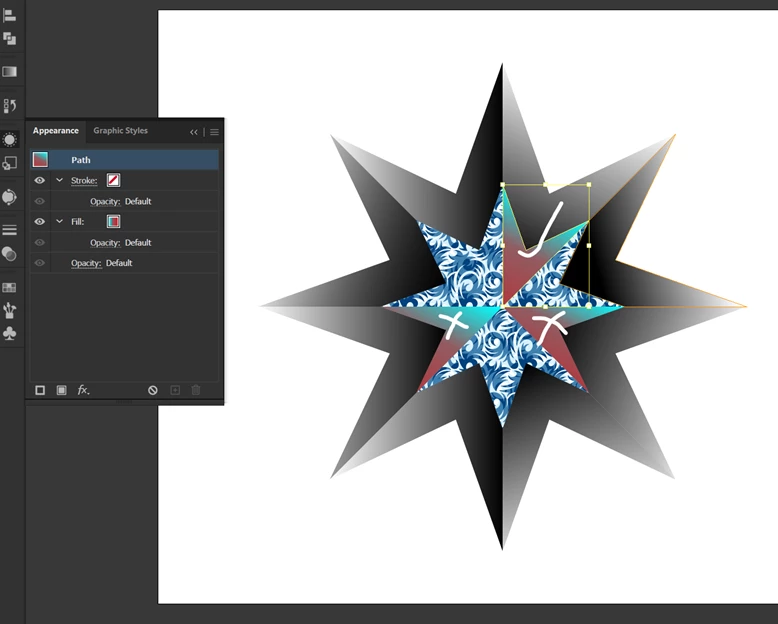
 

2 replies

Ton Frederiks
Community Expert
Community Expert
May 21, 2025

Which version of Illustrator do you use? I have not problem with copy/paste/rotate an object with a gradient.

MahaB82A
MahaB82AAuthor
May 21, 2025

Latest Version.

MahaB82A
MahaB82AAuthor
May 22, 2025

The "advanced method" does not happen. You have to rotate the gradient manually and probably also reposition it.


If I do copy & past in a location, is there any way to delete existing layer. That mean when new layer is on the top that will automatically delete underneath layer. 

Abhishek Rao
Community Manager
Community Manager
May 21, 2025

Hi @MahaB82A,


Thanks for the screenshot. To copy and paste the exact same gradient appearance onto the other sides, you can use the Eyedropper Tool (I). First, select the object you want to apply the gradient to, then click on the side that already has the gradient using the Eyedropper. This will pick up all appearance attributes including the gradient fill. Know more about eye dropper tool here: Pick colors using the Eyedropper tool

If you would like to reuse the style on multiple elements later, you could also drag the styled object into the Graphic Styles panel (Window > Graphic styles) and apply it easily to others with just a click.


Let me know how that works out for you or if you any other questions. 

Abhishek

MahaB82A
MahaB82AAuthor
May 21, 2025

It is not coming. Video is attached.

Monika Gause
Community Expert
Community Expert
May 21, 2025

Please select the object with the correct gradient and show the gradient panel.
