

Z∆K
Participating Frequently
March 31, 2020
Answered

Copy Excel Graphs into Illustrator

  • March 31, 2020
  • 2 replies
  • 2811 views

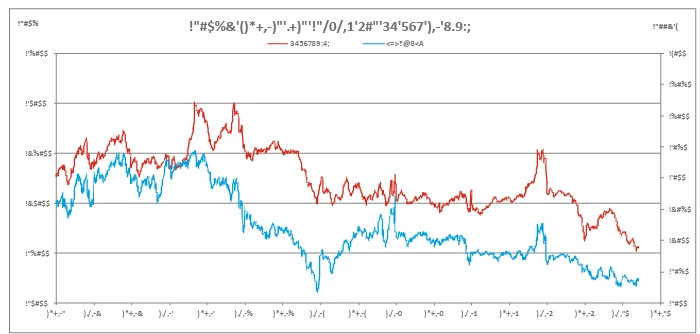
I'm having issues copying certain graphs from Excel to Illustrator. Some paste just fine. Others paste like this example. The text is scrambled. I'm assuming it's a security measure encrypting the data. Wanted to ask the community though as this isn't always the case. 
 

This topic has been closed for replies.
Correct answer mjbelt

Change the Font/Size in Excel before pasting it into Illustrator.

Alternate option: re-create graph in Illustrator.

https://helpx.adobe.com/illustrator/using/graphs.html

2 replies

mjbeltCorrect answer
Participating Frequently
March 31, 2020

Change the Font/Size in Excel before pasting it into Illustrator.

Alternate option: re-create graph in Illustrator.

https://helpx.adobe.com/illustrator/using/graphs.html

Participating Frequently
April 3, 2023

This only worked for 1 graph in the same file. I am on Windows.

Monika Gause
Community Expert
Community Expert
March 31, 2020

Is that on a Mac?

In that case try a different font in Excel. There maight be issues with Calibri

Participant
June 22, 2022

Lol I was not expecting this but this solved my issue. Directly copy-pasting an excel table with Calibri text led to a table full of nonsense pasted into illustrator. Changed the font in excel & problem solved! This is such a weird bug 😄