
chrisw30864448
Known Participant
May 16, 2017
Answered

Copy & Paste color issues in Illustrator

  • May 16, 2017
  • 4 replies
  • 34092 views

When I copy from an RBG file to a new RGB file (Or even from CMYK TO CMYK) I get a loss of color (It almost looks like a transparency issue, but it's not)

This is NOT an RGB to CMYK issue (or vice versa)

The original is on the left, on the right is a NEW file after pasting:
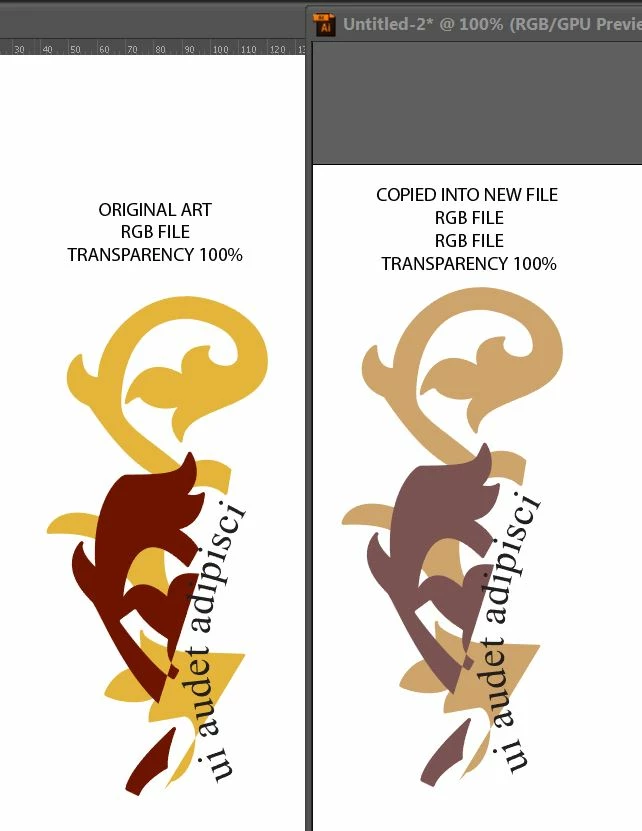
Please help, this is driving me crazy

This topic has been closed for replies.
Correct answer barbara_a7746676

Pantone changed how Pantone colors were interpreted in CS6. Are you by any chance copying from a pre Illustrator CS6 file into a CS6 or later file?

4 replies

Participant
June 28, 2021

Correct Solution for Copy-Paste issues in illustrator is here:

Step1: Click on "File" and then "New"

Step2: Right Side look at Color Mode and select "RGB Color".

 and here you go.

jenrenear
Participant
November 17, 2021

I feel like i've waited for ever for this answer. Thank you for this simple fix!

Ton Frederiks
Community Expert
Community Expert
November 17, 2021

Actually better is: 

Step1: Click on "File" and then "New"

Step2: Select an Art & Illustration preset (unless you work for web or video).

 and here you go.

Selecting the correct preset is important because when a print preset is used for RGB all the swatches are converted from CMYK to RGB and look dull (or are wrong in the case of Black).

chrisw30864448
Known Participant
May 16, 2017

I have been playing with this and just noticed that this only happens with Pantone colors, not with CMYK or RGB colors.

barbara_a7746676
Community Expert
barbara_a7746676Community ExpertCorrect answer
Community Expert
May 16, 2017

Pantone changed how Pantone colors were interpreted in CS6. Are you by any chance copying from a pre Illustrator CS6 file into a CS6 or later file?

chrisw30864448
Known Participant
May 16, 2017

Yes, Is there a work around?

barbara_a7746676
Community Expert
Community Expert
May 16, 2017

You're not in isolation mode, right?

barbara_a7746676
Community Expert
Community Expert
May 16, 2017

Check Edit > Color Settings for both files to make sure you have the same settings.

chrisw30864448
Known Participant
May 16, 2017

I noted in my post that they are the same.

Chris Wightman

Sr. Director Design and Innovation

Tel: 973.805.6500 Ext: 2221

Cell: 973.452.0452

<https://www.instagram.com/wwp_cosmetics/> <https://www.facebook.com/World-Wide-Packaging-LLC-222137144478771/timeline/>

barbara_a7746676
Community Expert
Community Expert
May 16, 2017

Both are using Adobe RGB or both using sRGB?