
Taiwanees250
Participant
November 20, 2017
Answered

Crappy object on illustrator
  • November 20, 2017
  • 2 replies
  • 218 views

Hi everyone,

I know - I should've gotten a more performant device - I work on a Surface Pro 3 with 4GB of ram (cry)

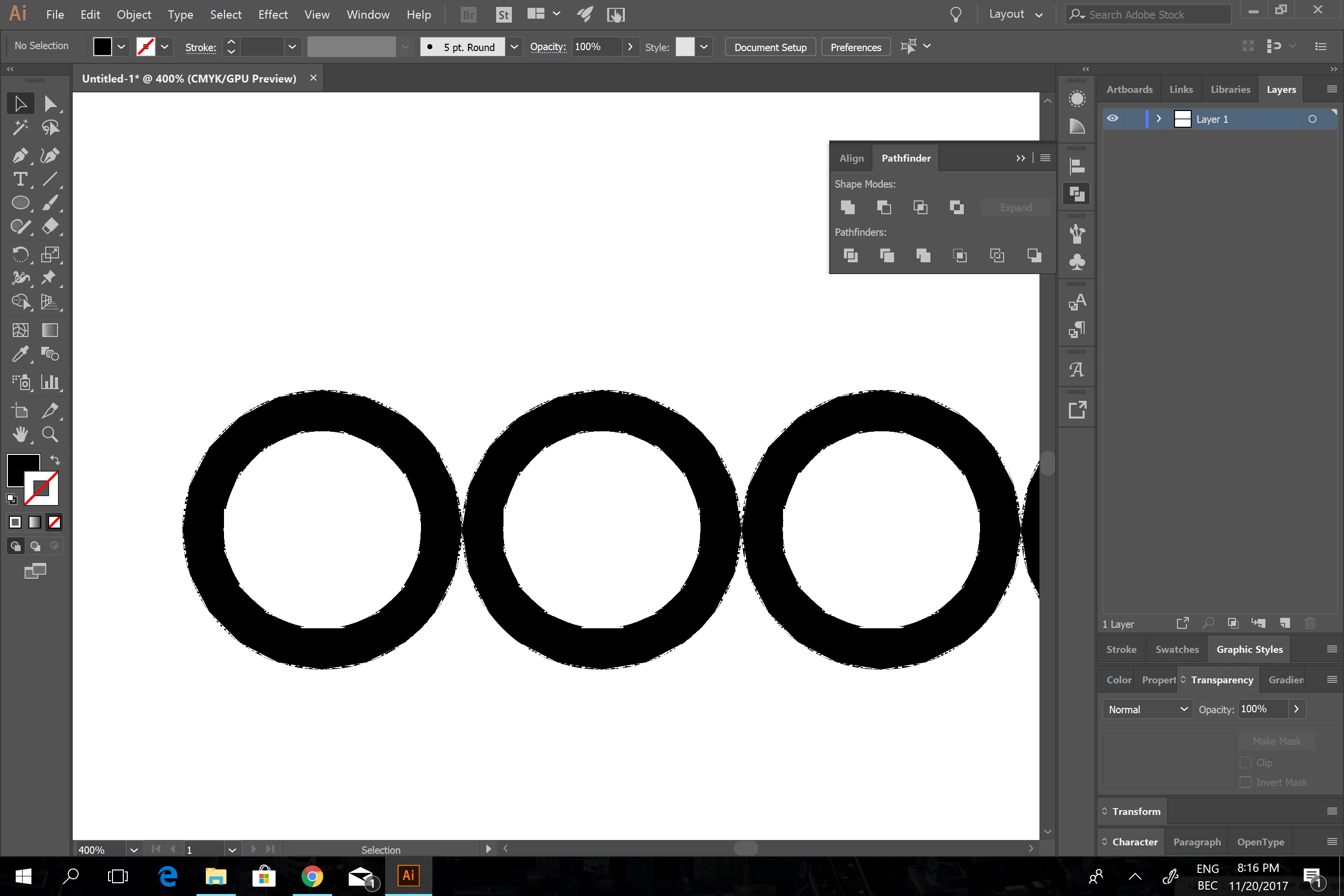
and whenever I draw objects in illustrator, the view is like this... Anybody know a workarounf other than

should've gotten a Macbook Pro?

Cheers

    This topic has been closed for replies.
    Correct answer Bill Silbert

    Try turning off GPU Performance. Click on the rocketship in Illustrator's top menu bar to access it.

    2 replies

    Taiwanees250
    Participant
    November 20, 2017

    @Bill Silbert You're the man

    Thanks (this is actually my first PC in 20 years... I've always used Macs before )

    Cheers

    Bill Silbert
    Community Expert
    Community Expert
    November 20, 2017

    Happy to help.

    Bill Silbert
    Community Expert
    Bill SilbertCommunity ExpertCorrect answer
    Community Expert
    November 20, 2017

    Try turning off GPU Performance. Click on the rocketship in Illustrator's top menu bar to access it.