
Known Participant
June 7, 2017
Resuelto

Create a double helix

  • June 7, 2017
  • 3 respuestas
  • 6129 visualizaciones

One would think a double helix wouldn't be rocket science in Illustrator, but I'm stumped. See the two twisted ribbons herewith, each created by extending a thin rectangle diagonally along the extrusion of a circle, using 3D effect. I'd like them to twist inside each other, though. I don't need the final illustration to be editable 3d, though that would be cool. The first blunt-object idea I had was just to expand/flatten the top object and then erase the portion that's going "behind" the bottom object. This has proven more difficult than I'd hoped.

Any help doing this, or finding any other nifty way of making a double helix in Illustrator gratefully accepted. A google search has been surprisingly unsuccessful.

Rob
Mejor respuesta de Mike_Gondek10189183

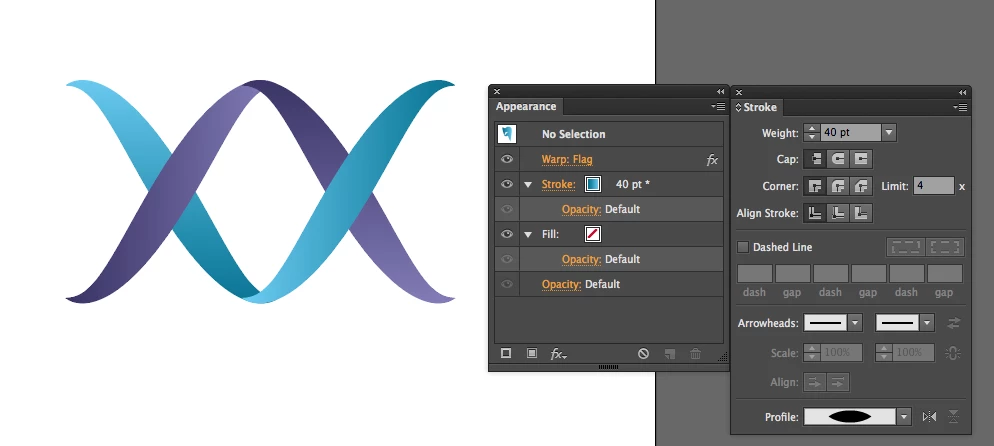
Here is my 2D live effects interpretation in case this is useful to you.

http://files.kaleidoscopechicago.com/_2Y0KqXd7vTXs9R

Double Helix.ai

1.1 MB

The URL will expire on July 7.

3 respuestas

kphotopage
Legend
December 4, 2017

I did something similar. I am sharing if interested.

My starting point was an angled stroke line and applied a Warp>Flag.

Expanded the Flag.

My friends here were Selection Tool, Direct Selection Tool, Layers, Transform, Align, Pathfinders, Preview Mode, Outline Mode, Smart Guides, Live Paint.

I then made some Pattern Brushes.

K

Mike_Gondek10189183
Community Expert
Community Expert
June 7, 2017

Here is my 2D live effects interpretation in case this is useful to you.

http://files.kaleidoscopechicago.com/_2Y0KqXd7vTXs9R

Double Helix.ai

1.1 MB

The URL will expire on July 7.

Participant
November 28, 2017

Hello Mike,

Please could you upload your Double Helix.ai file again?  I've just come across this thread and it's what I'm trying to do.

Many thanks,

Jon

Mike_Gondek10189183
Community Expert
Community Expert
November 28, 2017

HI Jon,

I no longer have that file, but created a new one with steps for you to follow how I got there.

http://files.kaleidoscopechicago.com/_Mg1ZQ7MpUR0spR

Double Helix2.ai

119 KB

The URL will expire on Dec 28.

Srishti Bali
Community Manager
Community Manager
June 7, 2017

Create 2 equal squares and give then then gradient shape

From Transform Panel change corner angles of first one to 60 Degrees and second one to -60 degrees ,

it will look like this

Then Duplicate it by ALT and drag and rotate second one to 180 degrees and adjust the positions.

Regards

Srishti
