


- Home
- Illustrator
- Discussions
- Re: Create a shape that encompasses several non-ov...
- Re: Create a shape that encompasses several non-ov...

Copy link to clipboard
Copied
Is there a script, technique or plugin that will allow me to easily create a shape which encompasses several objects which don't overlap. I can do it easily enough by hand but I have thousands of these to do and I need some method of automation.
The left hand image is typical of the type of group I have and the image to the right is what I need to end up with; a shape which encompasses all objects but acts as a perimeter for the object group.
Thanks in advance.



 1 Correct answer


The following approach refers to the screenshot in your initial post that shows something you called „typical“ for the objects that have to be encompassed by a closed path.
This .zip file contains a sample .ai file and an action file (.aia):
encompass_strokes.zip - Google Drive
Instructions:
- Open the file called encompass_sample.ai
- In the Actions palette menu, import the action set encompass_straight_strokes.aia
- Select the grey strokes
- Play back the action
You may probably imagine that this is
...

Explore related tutorials & articles
 10
Replies
10
10
Replies
10


Copy link to clipboard
Copied
- Pull a framed selection with hollow arrow tool (shown in red)
- Delete
- Select and Command J
- make fill none, stoke dashed. You can set up a graphic style

This may not work depending on how differetn/complex your remaining art is
Copy link to clipboard
Copied
Hello
Thank you — that's useful for those groups that are that neat but some of them wouldn't allow for such an easy election of the obsolete lines.
Copy link to clipboard
Copied
You can use the lasso tool to help with free form selections. Select >> Object >> Direction Handles command and scaling or edit corner radius on a live shape, can help with adding curvature.
Please post another example via screenshot or even better a dropbox/goggel drive/etc link to an .ai file, and we can try and figure something out for you.
Copy link to clipboard
Copied
This is also typical of the groups that I need to perimeter
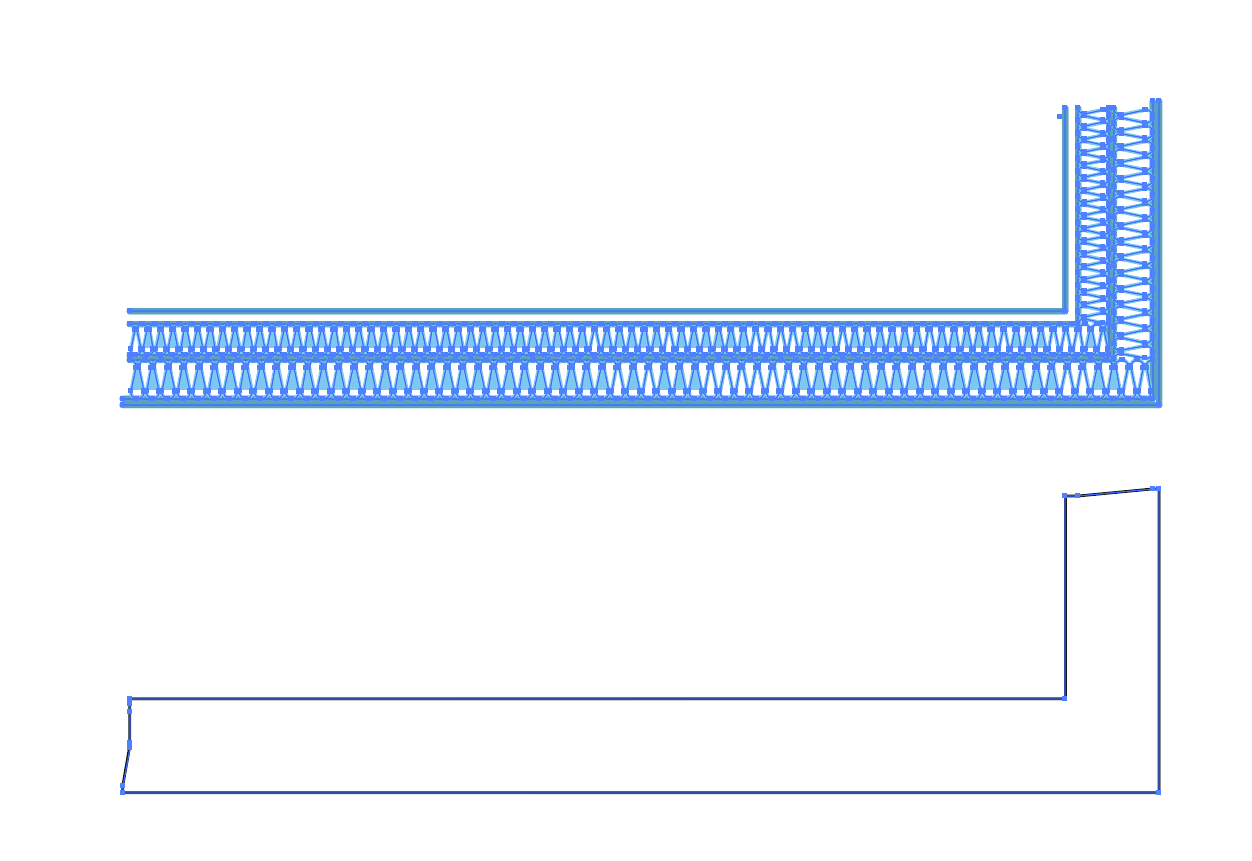
Here's the sample file >>> Dropbox - Example.ai
I can't use Live Paint because the disconnected lines outside don't get included and they need to be.
Cheers
R
Copy link to clipboard
Copied
- Click on one item. Select >> Same >> Appearance. Delete.
- Delete middle lines
- Pen tool to join edges
- K to switch to live paint. Click to fill and set stroke to none.

For this one,Jeffs approach might be a little faster with less clicks.Wanted to share anyhow, incase any part of that is useful

Copy link to clipboard
Copied
Select all the shapes you wish to encompass.
Copy and Paste those shapes.
Go to View > Guides > Make Guides. Make sure Guides are Locked.
Use your Pen to to trace all of the ins and outs of your shapes. The Pen should Snap right to the Guides.
Move your new shape into position over the top of your original shapes and drag your new all-encompassing shape under the originals in the Layers panel.
Copy link to clipboard
Copied
Thank you for your suggestions. These are all useful but they're not really what I'm after. I know how to create a shape to encompass items — I was more after something that can make it a one- or two-click thing. I have several thousand of these to do and having to manually join endpoints is going to be a long and boring process.
Live Paint is almost what I need except that the 'paint' doesn't appear to be able to jump across gaps (despite their being gap options.

Copy link to clipboard
Copied
Rob.Wood schrieb
Live Paint is almost what I need except that the 'paint' doesn't appear to be able to jump across gaps (despite their being gap options.
Triple-click to fill all the areas that have currently the same (or none at all) fill applied.
Copy link to clipboard
Copied
The following approach refers to the screenshot in your initial post that shows something you called „typical“ for the objects that have to be encompassed by a closed path.
This .zip file contains a sample .ai file and an action file (.aia):
encompass_strokes.zip - Google Drive
Instructions:
- Open the file called encompass_sample.ai
- In the Actions palette menu, import the action set encompass_straight_strokes.aia
- Select the grey strokes
- Play back the action
You may probably imagine that this is not a general purpose way. It won’t work in all situations and some groundwork may be required, but perhaps you can use it as a starting point for your own ideas.
Copy link to clipboard
Copied
Hello Kurt
That works a treat, thank you
Cheers
Rob


Get ready! An upgraded Adobe Community experience is coming in January.
Learn more
 AdChoices