
Participant
August 5, 2020
Answered

Create a Smooth Transition Circular Gradient

  • August 5, 2020
  • 3 replies
  • 505 views

Hi,


I am trying to create a circular spiral that uses a smooth transiton gradient. I had used the cut path but it doesn't create a smooth transitioning gradient. Here is what I have but I just need to make the transition smooth. Thanks. 
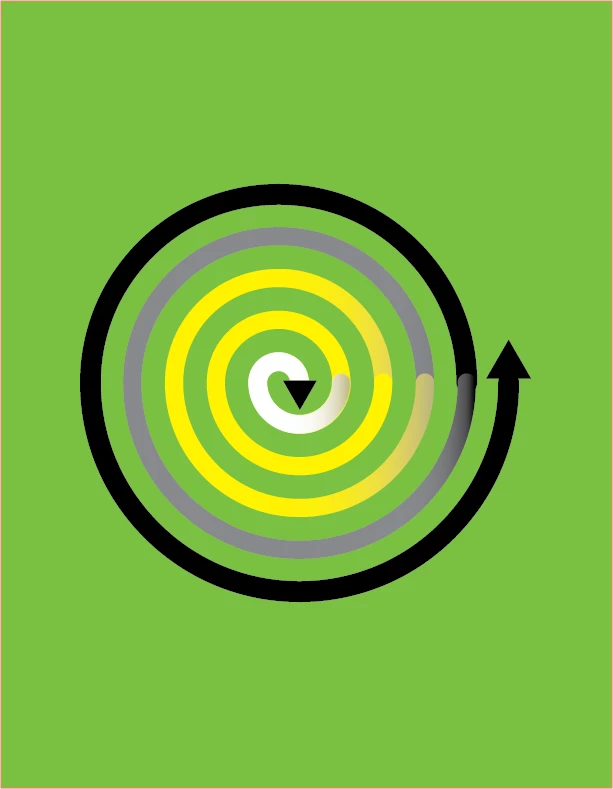
This topic has been closed for replies.
Correct answer tromboniator

If for some reason you want to maintain the spiral as separate paths, be sure that the gradient on each path starts with exactly the same color that the previous path ends on. Also, the round cap on the ends of strokes may cause some problems with the transitions. You may want to try applying a butt cap instead, or experiment with changing which of two adjoining paths is in front and which behind.


Peter

3 replies

tromboniator
Community Expert
tromboniatorCommunity ExpertCorrect answer
Community Expert
August 5, 2020

If for some reason you want to maintain the spiral as separate paths, be sure that the gradient on each path starts with exactly the same color that the previous path ends on. Also, the round cap on the ends of strokes may cause some problems with the transitions. You may want to try applying a butt cap instead, or experiment with changing which of two adjoining paths is in front and which behind.


Peter

Ton Frederiks
Community Expert
Community Expert
August 5, 2020

Connect the paths into a single spiral path and apply a single gradient that uses al the stops you want.

Monika Gause
Community Expert
Community Expert
August 5, 2020

Re-connecting the path doesn't work?