
michaelh64017536
Participant
December 29, 2019
Answered

Create a wavy line using the gradient tool
  • December 29, 2019
  • 1 reply
  • 1592 views

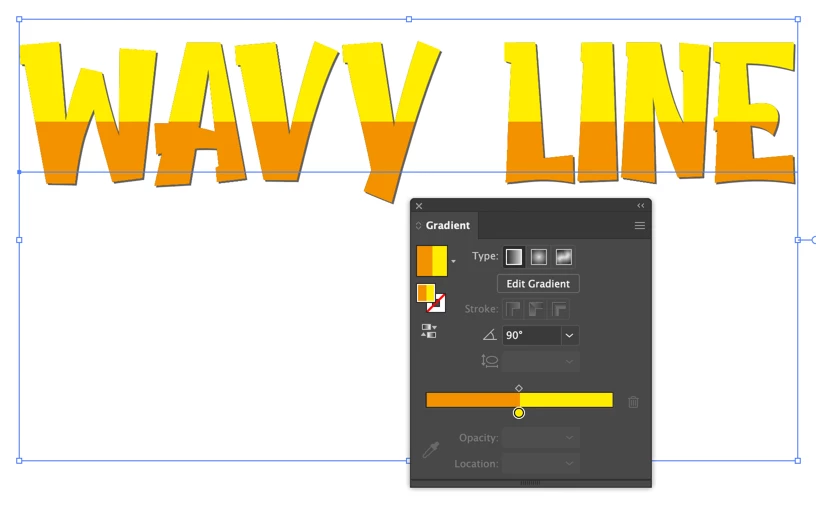
Good day, everyone. I'm looking for help in creating a wavy or curved line within the Gradient tool in Illustrator. The illustration above shows what I have so far, but what I would like to achieve is a wavy line where the yellow changes to orange rather than the straight line that is there now. I would be grateful for any help that can be offered. Thank you.

This topic has been closed for replies.
Correct answer Monika Gause

So it doesn't matter?


Anyway: you can't do it with a gradient.

You might somehow (with a lot of adjusting) be able to do it using a pattern swatch. But the solution that can be adjusted most comfortably is applying the text as a clipping mask to however you create the wavy thingy. Is a clipping mask acceptable?

1 reply

Monika Gause
Community Expert
Community Expert
December 29, 2019

So this should not be a color transition, but instead a hard edge?

michaelh64017536
Participant
December 29, 2019

Ideally I'd like to have either a blend or a hard edge.

Monika Gause
Community Expert
Monika GauseCommunity ExpertCorrect answer
Community Expert
December 29, 2019

So it doesn't matter?


Anyway: you can't do it with a gradient.

You might somehow (with a lot of adjusting) be able to do it using a pattern swatch. But the solution that can be adjusted most comfortably is applying the text as a clipping mask to however you create the wavy thingy. Is a clipping mask acceptable?