Known Participant
June 20, 2020
Answered

Creating a specific shape with javascript

  • June 20, 2020
  • 1 reply
  • 1036 views

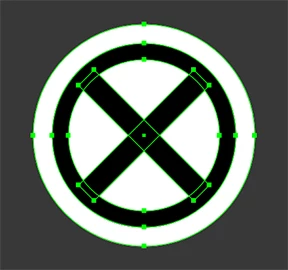
I was looking to have a script create the below shape, and place it within a document up to hundreds of times.  It's 2-3 circles and 2 rectangles, but I'm not sure of the best approach.  Would calling a function that creates it each time be most efficient?


This topic has been closed for replies.
Correct answer m1b

Hi Maple_Stirrup,


I think it would be a good time to use Symbols. Drag your artwork into the symbol palette, call it "mySymbol" for example, and try out this script:


// make sure there's a symbol in the document called "mySymbol"
mySymbol = app.activeDocument.symbols.getByName("mySymbol");
placeSymbols(mySymbol, 10);

function placeSymbol(symbol, pos) {
    // create a symbol item, centred on pos
    symbolItem = app.activeDocument.symbolItems.add(symbol);
    symbolItem.left = pos[0] - symbolItem.width / 2;
    symbolItem.top = pos[1] - symbolItem.height / 2;
    return symbolItem;
}

function placeSymbols(symbol, howMany) {
    // place a bunch of symbols randomly
    for (var i =0 ; i < howMany ; i ++ ) {
        var x = Math.random() * 100;
        var y = Math.random() * -100;
        placeSymbol(symbol, [x,y]);
    }
}


Of course, you'd have to decide how your symbol needed to be positioned. I've just made it random for the illustration.


Regards,

Mark

1 reply

m1b
Community Expert
m1bCommunity ExpertCorrect answer
Community Expert
June 20, 2020

Hi Maple_Stirrup,


I think it would be a good time to use Symbols. Drag your artwork into the symbol palette, call it "mySymbol" for example, and try out this script:


// make sure there's a symbol in the document called "mySymbol"
mySymbol = app.activeDocument.symbols.getByName("mySymbol");
placeSymbols(mySymbol, 10);

function placeSymbol(symbol, pos) {
    // create a symbol item, centred on pos
    symbolItem = app.activeDocument.symbolItems.add(symbol);
    symbolItem.left = pos[0] - symbolItem.width / 2;
    symbolItem.top = pos[1] - symbolItem.height / 2;
    return symbolItem;
}

function placeSymbols(symbol, howMany) {
    // place a bunch of symbols randomly
    for (var i =0 ; i < howMany ; i ++ ) {
        var x = Math.random() * 100;
        var y = Math.random() * -100;
        placeSymbol(symbol, [x,y]);
    }
}


Of course, you'd have to decide how your symbol needed to be positioned. I've just made it random for the illustration.


Regards,

Mark
Known Participant
June 20, 2020

I apprecaite the reply.  What if I wanted this to work on any machine, a symbol wouldn't work then right?

m1b
Community Expert
Community Expert
June 20, 2020

I see, you need the script to draw it first. No problem. Extendscript has the basic drawing methods to make your object. (And then turn it into a symbol and position multiple instances.)


Have a look at Creating Paths and Shapes. Let me know how you go.