
Inspiring
June 30, 2016
Answered

Creating Color Halftones in Illustrator

  • June 30, 2016
  • 6 replies
  • 24246 views

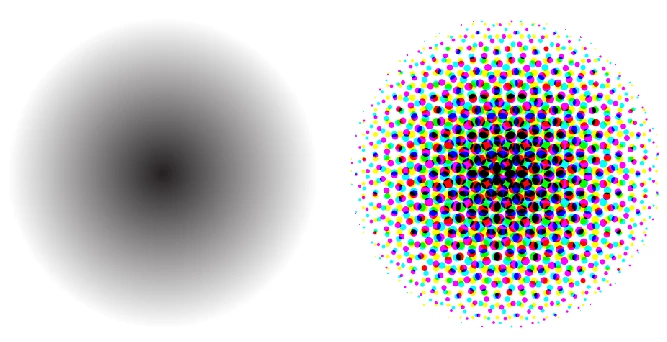
I want to create Color Halftones with Adobe Illustrator cc 2015 for a comic book look. Why does the black and white gradient turn into a color halftone that has color? Shouldn't it be black and white? In addition, what tool is better to use for color halftones, Adobe Illustrator or Adobe Photoshop?

Thanks
This topic has been closed for replies.
Correct answer mecdos

because in RGB mode color is representing light. all colors are made up of red green and blue. in cmyk, it is representing inks. so black can be made up of a single black ink or a combination of the other inks. in your case it seems like it was just black.

6 replies

Participant
February 1, 2023

honestly how do we create vector for a halftone? maybe i "Image trace" it is a wrong step to vectorised the halftone. can someone tell me how to vectorise a halftone?

Monika Gause
Community Expert
Community Expert
February 1, 2023

So your issue is not with the RGB/CMYK conversion?

Could you please show your iossue?


In any case: the plugin Phantasm or the application Vectoraster will give you true vector halftone effects.

Participant
February 1, 2023

After done halftone, i raster it into vector but then the pattern will be different than before. How do we raster halftone exactly like the one we created? especially those dots, all will be different after i rasterised it.

AnotherMeAuthor
Inspiring
July 1, 2016

When went to Adobe Illustrator cc, 2015's Document Color Mode and changed it from RGB to CMYK the Color Halftone changed to black and white which is what I wanted to begin with. I wonder why that is?

mecdosCorrect answer
Inspiring
July 1, 2016

because in RGB mode color is representing light. all colors are made up of red green and blue. in cmyk, it is representing inks. so black can be made up of a single black ink or a combination of the other inks. in your case it seems like it was just black.

Ton Frederiks
Community Expert
Community Expert
June 30, 2016

If you first use the Effect > Rasterize and change the Color Model to Grayscale, and than use the Color Halftone effect, the result will be black and white.

Paul Easther
Participant
July 28, 2021

Ton nailed the "Correct Answer" IMHO !


Inspiring
June 30, 2016

have you tried to use the 'halftone pattern' instead?

"Effect > Sketch > Halftone Pattern"

I'm sure Monika has linked to a great half tone pattern plug in before on here somewhere, maybe it was someone else,,

Inspiring
June 30, 2016

dandid is correct. you used the color halftone filter. if you want just black and white make sure the color stops in your gradient are defined in gray scale or cmyk with no color in it. if you use rgb, the blacks will be separated into rgb.

"Effect > Sketch > Halftone Pattern"

will give you black and white, but it's more of a stylized effect so you won't get a smooth gradient like your sample. ei, you'll get a large black area with a few steps towards white towards the edges.

both effects are a photoshop effect and results will be the same in photoshop if you use those filters.

how i usually do halftones is in photoshop by turning my images into bitmaps and adjusting the halftone patterns there. there are also good halftone plug-ings for photoshop with a lot more control.

if you want to keep it in illustrator, astute graphics makes a plugin called phantasm that has vector halftones. some pretty cool effects, but it doesn't really make the traditional halftone patterns. for example a dot pattern will be made with perfect circles and not merging circles like in a real halftone.

Monika Gause
Community Expert
Community Expert
June 30, 2016

Which document color profile is it?

How exactly are the gradient colors defined?

Which app to choose depends on your workflow. Please describe in detail.