
Participant
February 4, 2019
Answered

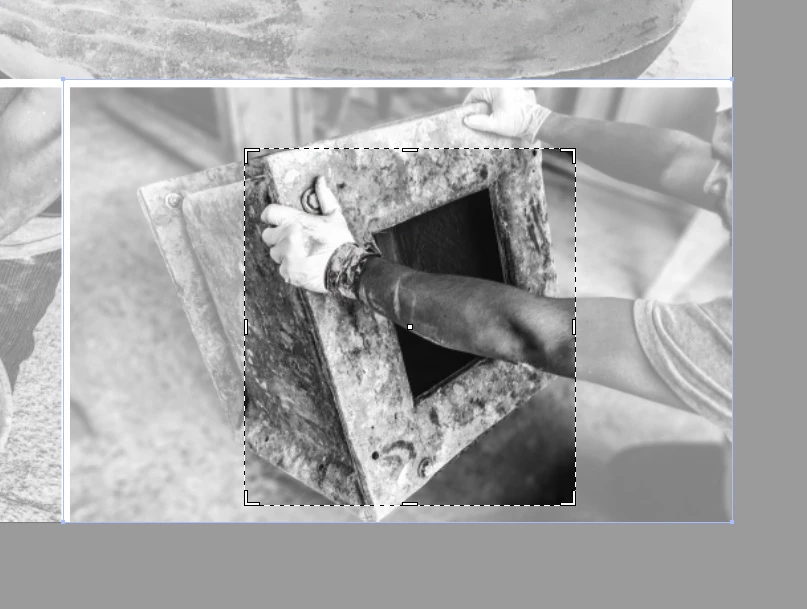
Crop image tool now shrinks to a smaller size instead of original

  • February 4, 2019
  • 4 replies
  • 1376 views

I recently updated Illustrator and am having an annoying issue with the Crop Image Tool. In previous versions, the crop box that highlighted the image would start as the original images size, then you would crop down or left and right as needed. Now, when you click the Crop Image Tool, the box shrinks to random sizes, causing me extra steps to return the sided left and right, because I only want to crop down the top. Is this a bug, or a settings issue? Se image as example.
    This topic has been closed for replies.
    Correct answer macpawel

    It's a new feature - Enable Content Aware Defaults (CTRL+K)

    You can uncheck it and use command in normal way

    pawel

    4 replies

    Participating Frequently
    October 12, 2021

    I've had to undo this 'content-aware crop' likely hundreds of times because i was unaware that Illustrator was "helping" me. Terribly frustrating. Please implement one of those blue callouts if you're going to change default beheavior in the future. 

    Met1
    Legend
    October 12, 2021

    This answer has been on this forum just shy of two years - https://community.adobe.com/t5/illustrator-discussions/stop-illustrator-suggesting-crop/td-p/10744085. It was in the release notes for the update too. It's good to keep yourself informed as much as possible about updates, sometimes Adobe does some whacky stuff, and just to google Illy tips and tricks once in a while is fun and informative, there's a wealth of info out there on the interWebs.

    Participant
    February 4, 2019

    Thanks guys, that did it.

    macpawel
    macpawelCorrect answer
    Participating Frequently
    February 4, 2019

    It's a new feature - Enable Content Aware Defaults (CTRL+K)

    You can uncheck it and use command in normal way

    pawel

    Kurt Gold
    Community Expert
    Community Expert
    February 4, 2019

    In the general Illustrator preferences there is an option called "Activate content sensitive settings" (or something like that).

    Turn that option off.