
Participating Frequently
September 23, 2021
Question

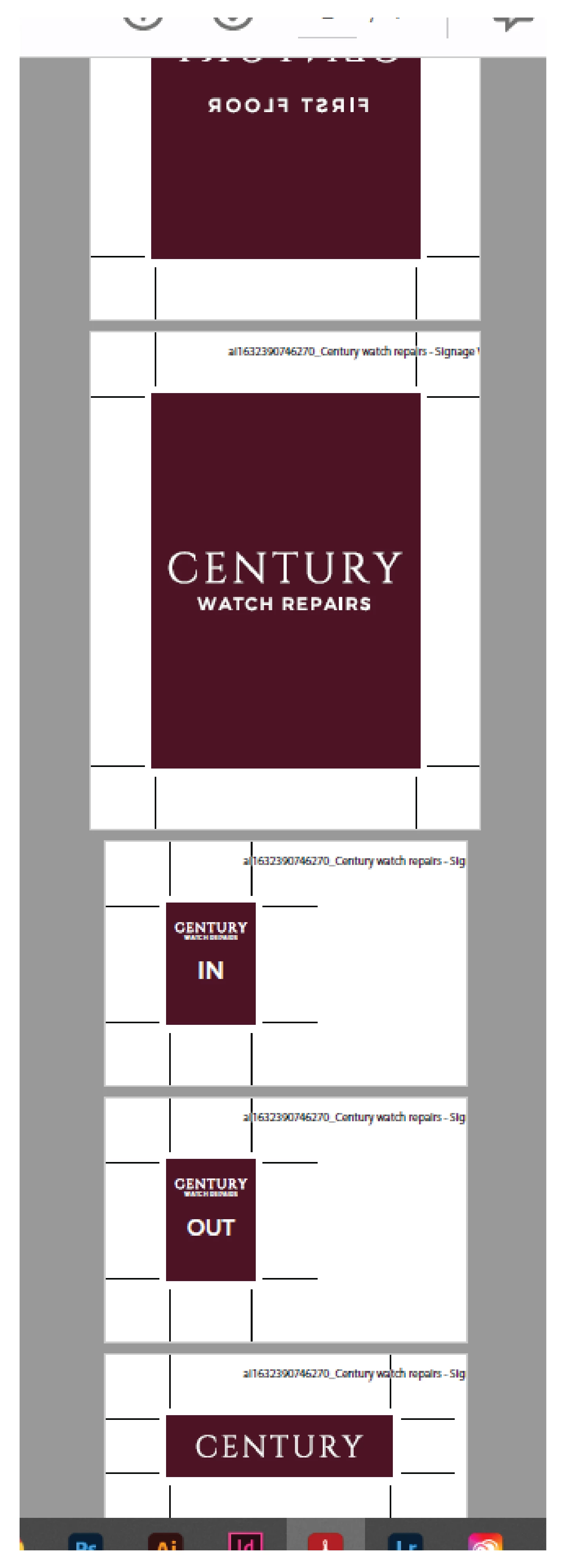
Crop marks are HUGE when saving as a pdf for print...

  • September 23, 2021
  • 7 replies
  • 8392 views

Hello all,

I work in signage and we use Illustrator everyday for large format printing.

My problem is that now and then, when saving the documents as a pdf, the crop marks and bleeds are HUGE. This doesn't happen everytime and is becoming very frustrating.


Can anyone help with this please?
 

7 replies

Participant
September 11, 2025

I encountered the same issue and concluded it was a bug in the Adobe Illustrator file. Each time, at PDF export, I switched between the document and custom bleed, I observed a tenfold increase (with document bleed settings). Regardless of the circumstances, this issue persisted in the corrupted file. Thus, I created a new file, transferred the graphics into it, and exported once more. This solution proved successful. The new file functioned correctly.

Doug A Roberts
Community Expert
Community Expert
September 11, 2025

Have you read the comments in this thread about the issues with large canvas documents?

Participant
August 9, 2024

clearly adobe doesn't care about this issue!!  I have tried new documents, tried copy/paste artbords to new files, new files and copy/paste artwork Doesn't seem to matter how many artboards. Tried single large artboards, single smaller artboards. Seems taht once it starts, I can't figure out how to get rid of them. Deleted AI preferences, doesn't help, rebooting doesn't help. Will now have to try to uninstall and re-install AI completely. Its very very frustrating no attention given to this. Its a waste of our work time, our media etc. 

Participant
August 9, 2024
Capture-PNG.png
Monika Gause
Community Expert
Community Expert
August 9, 2024

Is that a Large Canvas Document?

Brian Grimming
Participant
July 14, 2023

this is still an issue as of 7-14-2023...  It is definitely related to using the oversized canvas option in Illustrator, I have two workarounds that I use to solve this problem when I must design with the oversized canvas option in Illustrator. If I can not transfer the designed artwork in sections to a standard canvas-sized illustrator document, I place the PDF with huge crop marks into a multi-page Indesign document you will need to adjust the scaling one more time, but you will get a PDF file with normal crop marks as an end result... I find the only issues I have ever run into doing this is once in a while an issue arises with gradients depending on how they are created or how they are interpreted and the other issue is placed images, if they are not of the highest image quality some interpretation issues may arise, so proceed at you own risque and good luck

Participant
May 31, 2023

Hello, 


Did you find a solution to this? As the exact same thing is happening to me, when I save with Printers marks and bleeds they are saving huge and I'm not doing anything different to any other time I've saved them like this? 


Please see attached photo, 

Thanks in advance! 

Doug A Roberts
Community Expert
Community Expert
May 31, 2023

Was this file created in a large canvas document (i.e. one with a canvas size greater than 5780 mm square)?

Participant
September 5, 2022

I got the same issue. It's so annoying! Didn't find a solution yet.. It's seems that if you choose to export just one of the artboads, you'll see just one artbord in acrobat but when you open it in illustrator, you'll still see the others(you didn't wanted to export) too.. 

Ton Frederiks
Community Expert
Community Expert
September 5, 2022

Turn off Illustrator Editing Capabilities to avoid embedding the entire Illustrator file.

Met1
Legend
September 23, 2021

I stopped using built in crops a while ago, the script MakeCropMarksAI by Sergey Anosov
is available at https://sites.google.com/site/dtpscripting

Doug A Roberts
Community Expert
Community Expert
September 23, 2021

What size are these documents?

Participating Frequently
September 23, 2021

Hello there,

The largest print in this document is 475mm x 670mm.

Oddly, I have no problems a lot of the time with large sizes, it's just quite sporadic.

Thanks.

Doug A Roberts
Community Expert
Community Expert
September 23, 2021

Can you reproduce this reliably, i.e. create a new document from scratch and end up with crop marks like this? If so, please list the steps.