Participant
January 8, 2023
Answered

Cross box appeared in saved PDF

  • January 8, 2023
  • 4 replies
  • 1485 views

Hello everyone,

For some reason a cross box appeared on a " letter in my saved PDF file:
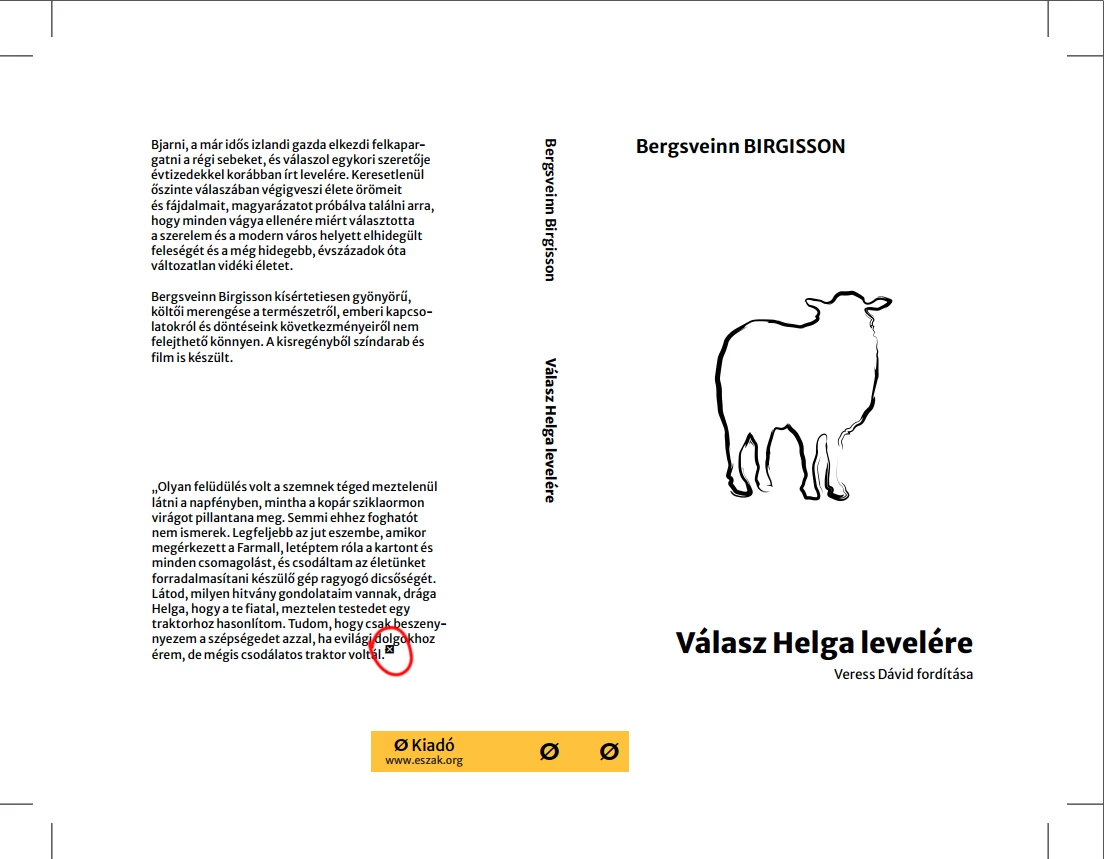

How do I get rid of it?

Thank you very much in advance!

This topic has been closed for replies.
Correct answer Monika Gause

Is this the PDF opened in Acrobat?

Or opened in Illutrator? Somewhere else?

4 replies

Participant
January 16, 2023

Thank you everyone for your help!

The strange thing is that I've never had any issues with this font (Merriweather Sans) earlier, and the error only affects the variable regular weight. Otherwise it is fully embeded; I didn't mess around with the glyph at all; and it looks awful if I convert it to outlines. 

Update: I've just realised that the screenshot was taken in Foxit, and the PDF seems to work just fine in Acrobat.

Mike_Gondek10189183
Community Expert
Community Expert
January 8, 2023

Change to another font or as Mylenium already suggested make a copy of the .ai, then convert type to outlines and make PDF.

Monika Gause
Community Expert
Monika GauseCommunity ExpertCorrect answer
Community Expert
January 8, 2023

Is this the PDF opened in Acrobat?

Or opened in Illutrator? Somewhere else?

Mylenium
Legend
January 8, 2023

That indicates that the font could not be embedded fully and/ or you manipulated the glyph in such a fashion that it can't be rendered as editable PDF text. You may need to convert it to outlines. Anything more would require specific info about fonts used, their formatting, PDF settings and so on.


Mylenium

Dave Creamer of IDEAS
Community Expert
Community Expert
January 8, 2023

If the font turns out to be protected, check to see if the font license allows converting to outlines. Many protected fonts do not. 

David Creamer: Community Expert (ACI and ACE 1995-2023)