Exit
  • Global community
    • Language:
      • Deutsch
      • English
      • Español
      • Français
      • Português
  • 日本語コミュニティ
  • 한국 커뮤니티
0

Ctrl commands not working

New Here ,
Jun 20, 2018 Jun 20, 2018

I cannot get any of the Ctrl + commands to work in Illustrator. I have checked to make sure both buttons on the keyboard are working and have uninstalled and reinstalled. I am now at a loss. Not being able to Group and UnGroup objects without using the menu bar, is driving me batty. Any help would be greatly appreciated.

Running Windows 7

Current Adobe CC version of Illustrator

Thanks

13.7K
Translate
Report
Community guidelines
Be kind and respectful, give credit to the original source of content, and search for duplicates before posting. Learn more
community guidelines

correct answers 1 Correct answer

Community Expert , Jun 22, 2018 Jun 22, 2018

Please rename the preferences folder. (method described in here: How to set preferences in Illustrator  )

Preferences can go corrupt from time to time. And then you have to delete them.

Translate
Adobe
Community Expert ,
Jun 20, 2018 Jun 20, 2018

Check Edit > Keyboard shortcuts if they are assigned correctly.

When uninstalling and reinstalling: did you delete the preferences?

Translate
Report
Community guidelines
Be kind and respectful, give credit to the original source of content, and search for duplicates before posting. Learn more
community guidelines
New Here ,
Jun 21, 2018 Jun 21, 2018

I checked the Keyboard shortcuts and they were all good.

And no, I didn't delete my settings...god forbid...lol

Translate
Report
Community guidelines
Be kind and respectful, give credit to the original source of content, and search for duplicates before posting. Learn more
community guidelines
Community Expert ,
Jun 22, 2018 Jun 22, 2018

Please rename the preferences folder. (method described in here: How to set preferences in Illustrator  )

Preferences can go corrupt from time to time. And then you have to delete them.

Translate
Report
Community guidelines
Be kind and respectful, give credit to the original source of content, and search for duplicates before posting. Learn more
community guidelines
New Here ,
May 22, 2021 May 22, 2021

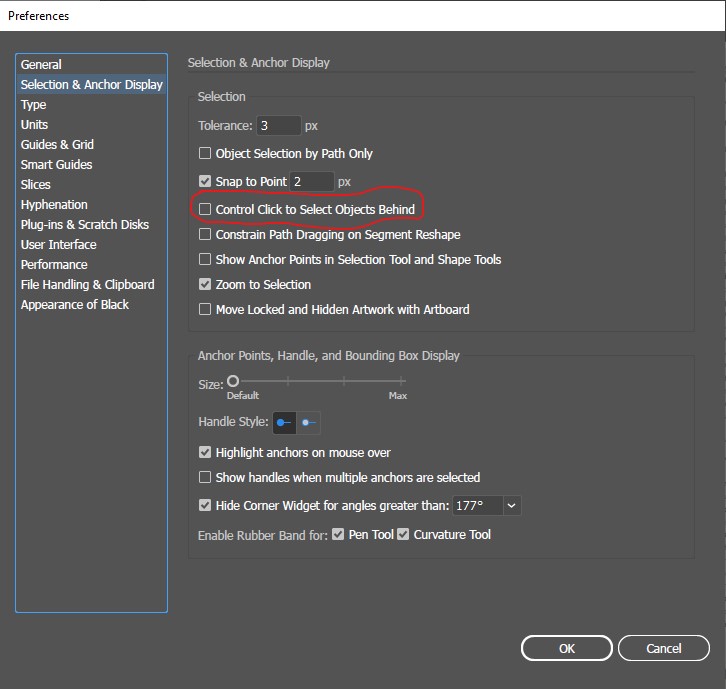
Hi, go to Preferences and choose the "Selection & Anchor Display" Tab.

Then uncheck the "Control Click to Select Objects Behind" option.

Translate
Report
Community guidelines
Be kind and respectful, give credit to the original source of content, and search for duplicates before posting. Learn more
community guidelines
New Here ,
Jan 03, 2022 Jan 03, 2022

Thank you, kind stranger

Translate
Report
Community guidelines
Be kind and respectful, give credit to the original source of content, and search for duplicates before posting. Learn more
community guidelines
New Here ,
Apr 30, 2024 Apr 30, 2024
LATEST

If using Illustrator on iOS:

Click on "Window" and uncheck the "Control" feature. You should be good to go.

Translate
Report
Community guidelines
Be kind and respectful, give credit to the original source of content, and search for duplicates before posting. Learn more
community guidelines