
cunning way (script ideally) to round internal corners of a shape?
I'm trying to find a solution to a slightly vexing problem, I have a bunch of paths like following image where I need to smooth only the hard corners while keeping the rest of the shape as it is.
This is an example of the original shape and what I hope to end up with, where only the 'internal' corners have been smoothed.
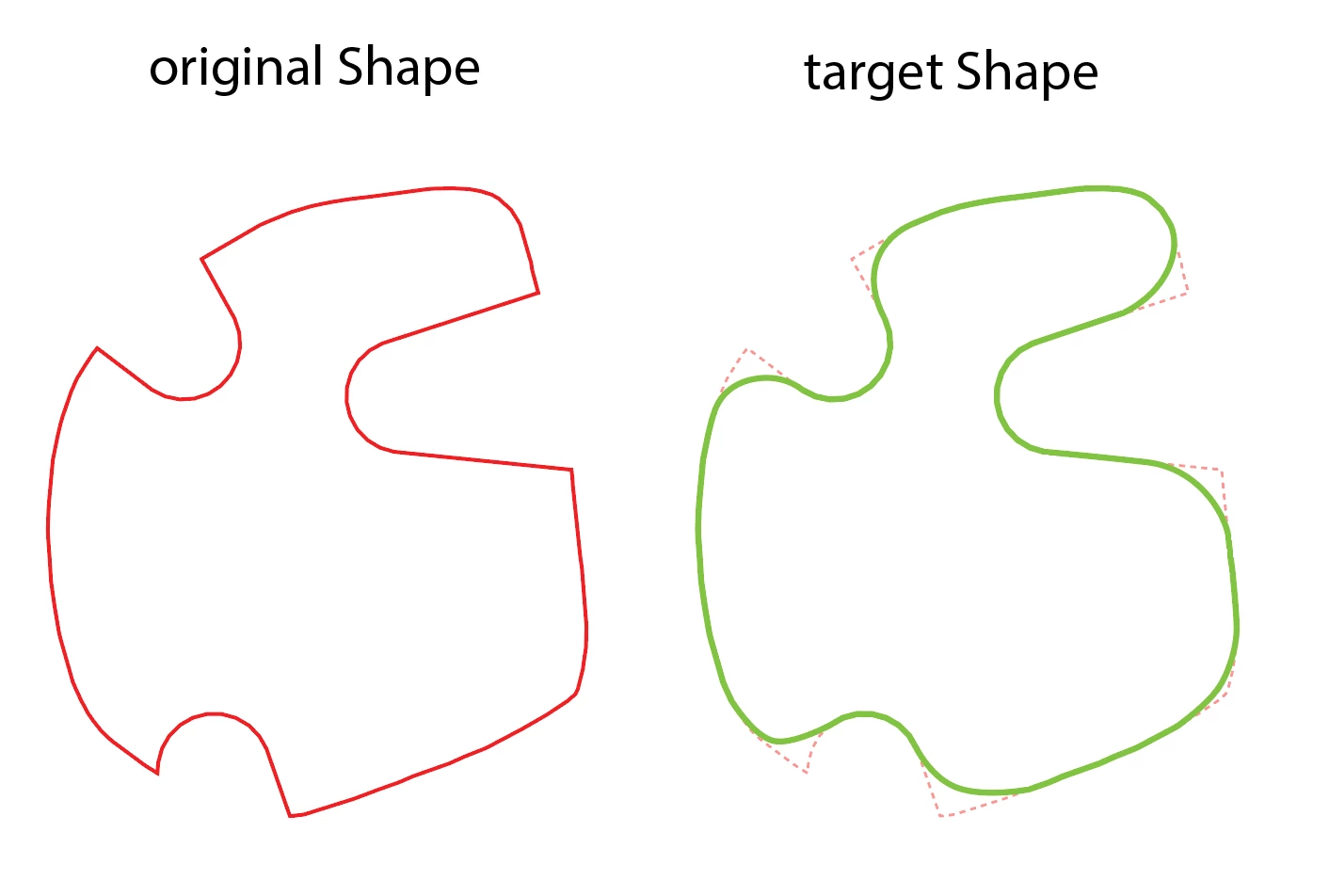
using the smooth tool does a great job on the cornes but also contracts and expands the other parts of the shape that i need to stay the same as the original.

the closest I've come is to do a simplify by eye, then manually select the corners, then apply Hiroyuki Sato's corner rounding script. This achieves pretty much what I need to do but with quite a bit of manual tweaking and GUI interfacing, and only for a single shape. but I need to process hundreds of similar but all unique shapes, so this process isn't going to feasible.

I'm really hoping someone has a cunning plan for how to appoach this... ideally a scripting solution, but even a 'select all shapes' and do some GUI steps that are applicable to all shapes at once, without having to individually tweaking settings for each and every shape...
any suggestions very greatly appreciated.
 AdChoices