
NetForward4686204
Participant
July 28, 2020
Answered

Custom Bullets in Illustrator

  • July 28, 2020
  • 2 replies
  • 17170 views

Hi all,


I hired a design firm to create a trifold brochure. Much to my dismay, they created this document in Illustrator rather than InDesign. Seriously?


Across our branding, we use an icon from our logo for custom bullets when making lists.


A single list on our brochure doesn't meet this brand standard. Is there a way to apply a custom bullet in Illustrator?


A screenshot with some filler text is attached so you can see what I'm talking about.


Thank you for your help!
This topic has been closed for replies.
Correct answer kphotopage

Maggie, Hi.

Good Grief, they used Illustrator!!!!  >:-O


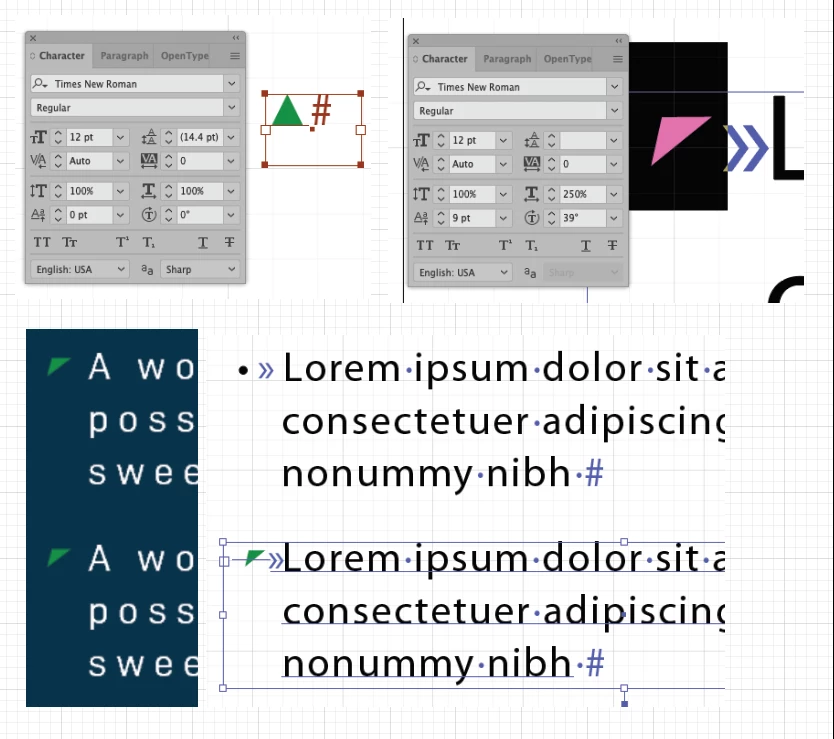
Here is a workaround using Illustrator.

Actually, in your case, you can recreate that bullet just like your logo.

It’s really a rotated triangle with many custom settings using your Character panel.


My starting point was to open Type>Glyphs panel.

Many fonts have triangles. Here I am using Times New Roman.

I adjusted all the settings to match your given image.

See attached below. Your settings will be slightly different.


Next I created a Text box with Tabs. It’s Myriad Pro 33pt

Next I copied and paste that Times New Roman triangle character and replaced that Myriad Pro bullet character


K

2 replies

kphotopage
kphotopageCorrect answer
Legend
July 29, 2020

Maggie, Hi.

Good Grief, they used Illustrator!!!!  >:-O


Here is a workaround using Illustrator.

Actually, in your case, you can recreate that bullet just like your logo.

It’s really a rotated triangle with many custom settings using your Character panel.


My starting point was to open Type>Glyphs panel.

Many fonts have triangles. Here I am using Times New Roman.

I adjusted all the settings to match your given image.

See attached below. Your settings will be slightly different.


Next I created a Text box with Tabs. It’s Myriad Pro 33pt

Next I copied and paste that Times New Roman triangle character and replaced that Myriad Pro bullet character


K

pixxxelschubser
Community Expert
Community Expert
July 28, 2020

Not that I know.

Or better: not directly out of the Box.


For only one custom bullet character I suggest the following: a combination of IndyFont by Theunis de Jong and Bullet points in llustrator