


Copy link to clipboard
Copied
Is there a way to define more than three dashes and three gaps in Illustrator? I am working with a map/plan showing streams - the typical stream indicator is a long dash and three dots (more than can be defined in the stroke dialog box).


 1 Correct answer

It's a little tricky but make a single line with a stroke and large dashes. Add another stroke in the Appearance panel and make it dots using the rounded end cap. By using multiples of the space and dash it will give something like this
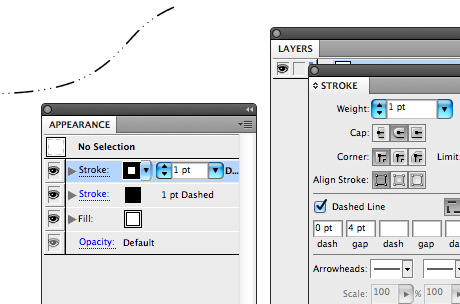
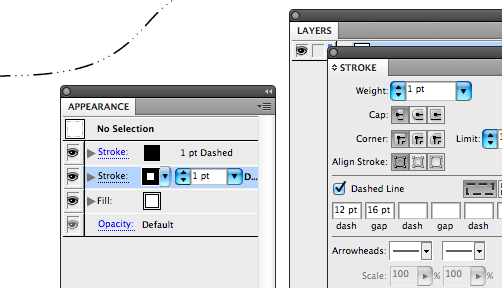
Then make it into a Graphic Style.


Explore related tutorials & articles
 7
Replies
7
7
Replies
7


Copy link to clipboard
Copied
You could make a brush.
Copy link to clipboard
Copied
It's a little tricky but make a single line with a stroke and large dashes. Add another stroke in the Appearance panel and make it dots using the rounded end cap. By using multiples of the space and dash it will give something like this
Then make it into a Graphic Style.
Copy link to clipboard
Copied
Thank you Larry! That did the trick.

Copy link to clipboard
Copied
Brilliant! this has been bugging me for a while - Using graphic styles instead of brushes a lot so I can use live paint and my brushes can't be used in live paint groups

Copy link to clipboard
Copied
Wha is meaning of then make it into a Graphic Style please?


Copy link to clipboard
Copied
Open the Graphic Style panel (Window > Graphic Styles). Select your path and choose New Graphic Style from the panel menu. The current appearance will be saved. Then you can select any path and click on the graphic style to apply that appearance.

Copy link to clipboard
Copied
thanks this amswered my question.


Get ready! An upgraded Adobe Community experience is coming in January.
Learn more
 AdChoices