
Participant
September 19, 2018
Answered

Destination options in Illustrator batch menu greyed out

  • September 19, 2018
  • 3 replies
  • 2379 views

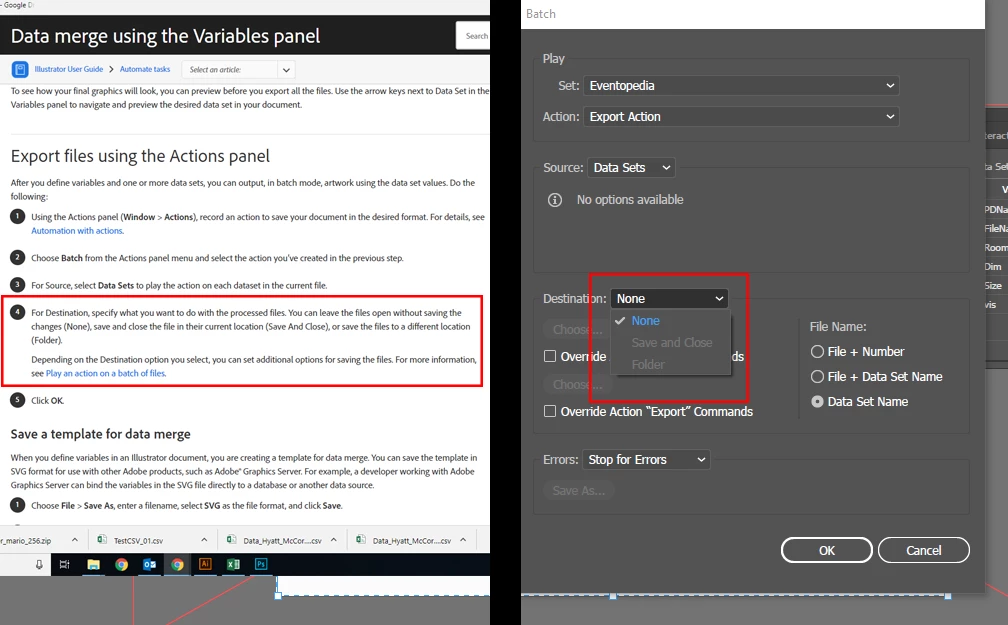
Hi all, been trying to get this work for hours now. I need to use the batch feature to run my export action many times over using a data set. The instructions on the Adobe site simply don't work as the required settings are greyed out when using data sets.

When working correctly this action should be able to save multiple files, each named with the correct data set.
    This topic has been closed for replies.
    Correct answer Ton Frederiks

    I see what you mean. I tried to create an action that exports PNG's, but when I use that action with variables and batch, the extension gets omitted.

    Looks like a bug to me (which you can mention here:

    Adobe Illustrator Feedback

    But it is easy to workaround:

    Open the folder with the output in Bridge.

    Select all and choose Tools > Batch Rename...

    Choose New Extension for the Filenames and type; png

    3 replies

    Participant
    December 12, 2020

    Also make sure you aren't actively recording the actions in question. An action will be grey in th ebtach menus if the recording process is active.

    Ton Frederiks
    Community Expert
    Community Expert
    September 23, 2018

    You have chosen Data Sets as Source.

    You can choose a Destination folder when you check any of the Override Action options.

    MulbinAuthor
    Participant
    September 24, 2018

    If I ignore the instructions from Adobe above, and use the override instead, it overides the file type too... and saves a bunch of useless generic "files" instead of the PNGs I actually want.

    Ton Frederiks
    Community Expert
    Ton FrederiksCommunity ExpertCorrect answer
    Community Expert
    September 24, 2018

    I see what you mean. I tried to create an action that exports PNG's, but when I use that action with variables and batch, the extension gets omitted.

    Looks like a bug to me (which you can mention here:

    Adobe Illustrator Feedback

    But it is easy to workaround:

    Open the folder with the output in Bridge.

    Select all and choose Tools > Batch Rename...

    Choose New Extension for the Filenames and type; png

    S_Gans
    Community Expert
    Community Expert
    September 22, 2018

    Does your action already have a save instruction in it? If so, that may be overwriting the ability to select other options.

    Adobe Community Expert / Adobe Certified Instructor
    MulbinAuthor
    Participant
    September 24, 2018

    If you read the official tutorial above I'm supposed to include a save as part of the action. If this is the issue then the official instructions are definitely telling me to do something impossible.