Participating Frequently
August 14, 2022
Answered

Detect vectors where the Distance to neighboring vectors is less than 1mm

  • August 14, 2022
  • 7 replies
  • 2360 views

Hi,


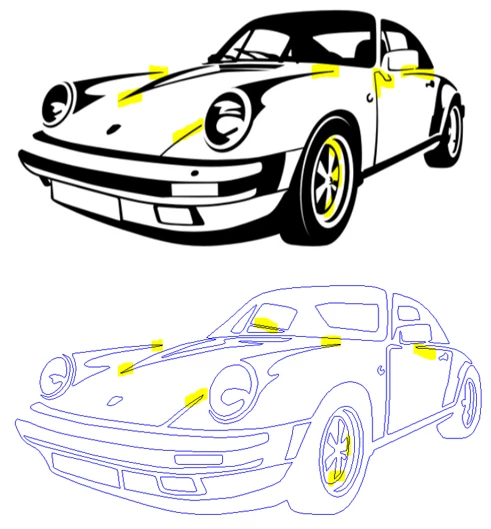
I need to find strategy to detect all very fine lines in my design, so the question is : how can I detect all vectors of my pattern where the width is below a given distance like 1mm.


Img to depict that :


Many Thx for help and ideas

Stefano


This topic has been closed for replies.
Correct answer Mylenium

The answer from @hhas01 notwithstanding who may have misunderstood your questions, the real answer is real hard vector math. You would have to comb through the paths and anchor points and write a proximity test algrorithm, which likely could reasonably optimized by limiting it to pre-selected points based on a visual selection of potentially critical areas. The question then is what you would want it to do like adjust the paths and points or invoke e.g. the curve offset function to correct these things or just select the offending points or move stuff to a dedicated layer for further manipulation. That said since none of this is trivial and doesn't really address the underlying issue of avoiding such problems in the first place you may want to consider a plug-in like ColliderScribe:


https://astutegraphics.com/plugins/colliderscribe


With it's built-in collision offset set according ly you could interactively adjust your artwork and avoid such situations.


Mylenium

7 replies

Met1
Legend
August 15, 2022

You could do offset path and see where they overlap. It's visual not automatic but if you only have the few as per your porsche it might help...

Participating Frequently
August 16, 2022

You guys are all very kind for having posted your suggestions.

I'm not experienced enough to do it by myself and moreover I have many other points I have to handle to start my CNC activity. I've decided to by lazzy and asked someone on fiverr to help me. I can't learn all by myself and need some offshore service and pragmatic solution to reach my goal..... or my wife will leave for a better husband ha ha 


CarlosCanto
Community Expert
Community Expert
August 17, 2022

Lollll

Mylenium
Legend
August 15, 2022

You'd simply set an offset distance in the tool palette (1mm in your case) and then move stuff around as needed. Their help and tutorials are pretty good, so I suggest you spend a few minutes combing through that stuff.


Mylenium

Mylenium
Legend
August 15, 2022

You can download a free seven day trial from the Astute web site as linked. Just click on that orange button in the top right corner and register. Crafting a script would be a whole different exercise and quite an undertaking...


Mylenium

Participating Frequently
August 15, 2022

Hi, I'll go this way,
Don't want  to abuse, but can I ask you to describe a bit the process to run that feature using Astute addON and the menu and tool name, I'll google it to search some info, tutorial, etc ..

StefanoH

Kurt Gold
Community Expert
Community Expert
August 14, 2022

Probably I'm a bit dense, but there is at least one question: Did you create the drawing(s)?


If so, why don't you make sure that you just won't run into this invidious situation right from the start instead of searching for some complex ways that may or may not help you to repair it afterwards?


Participating Frequently
August 16, 2022

I got the design from a library, I'm not the author

Mylenium
MyleniumCorrect answer
Legend
August 14, 2022

The answer from @hhas01 notwithstanding who may have misunderstood your questions, the real answer is real hard vector math. You would have to comb through the paths and anchor points and write a proximity test algrorithm, which likely could reasonably optimized by limiting it to pre-selected points based on a visual selection of potentially critical areas. The question then is what you would want it to do like adjust the paths and points or invoke e.g. the curve offset function to correct these things or just select the offending points or move stuff to a dedicated layer for further manipulation. That said since none of this is trivial and doesn't really address the underlying issue of avoiding such problems in the first place you may want to consider a plug-in like ColliderScribe:


https://astutegraphics.com/plugins/colliderscribe


With it's built-in collision offset set according ly you could interactively adjust your artwork and avoid such situations.


Mylenium
Participating Frequently
August 14, 2022

Once detected, I'll either skip the design in case of tto much critical zones OR manually adjust it, no auto correction requiered.

An idea where / how I can find a way to test that plugin, I m a basic illustrator user no idea how to do it myself, in case I get confirmation it's working then I'll try to learn 

tromboniator
Community Expert
Community Expert
August 14, 2022

If I understand your question correctly, you are asking if there is a way to detect where two converging (or diverging) segments of a path reach a particular distance from each other. I am not aware of any such capability.


Peter

Participating Frequently
August 14, 2022

Ya, it's exacty what I need ... you have described it better than me

Inspiring
August 14, 2022

Trivial in AppleScript:


tell application "Adobe Illustrator"
  tell document 1
    set selection to every path item whose stroke width < 1.0 -- width in pts
  end tell
end tell


In JSX you’ll have to loop through the paths yourself:


var doc = app.activeDocument;
doc.selection = []; // clear any existing selection

for (var i = 0; i < doc.pathItems.length; i++) {
	var p = doc.pathItems[i];
	p.selected = p.strokeWidth < 1.0; // stroke width in pts
}


Mind that page items have to be unlocked and visible in order to select them.


Converting from mm to points (which is what AI’s scripting APIs use) is left as an exercise to the reader.

Participating Frequently
August 14, 2022

Thx @hhas01, but your point is too far from my skills, no idea how to program in appleScript...

Inspiring
August 14, 2022

Sorry, I misread the question. tromboniator interpreted it correctly. That’s what happens when I post before coffee. You don’t want to find thin paths, you want to find narrow gaps between paths.


I think Mylenium is right: you would have to do the same math that Illustrator performs when it draws Bezier curves to screen. Calculate the coordinates of points along each line, e.g. every 1mm. That math is non-trivial, but someone experienced in implementing 2D vector graphics could tell you how, or even provide you with code. They might want to charge you, of course.


Having plotted these points, compare those points against points on other nearby lines to see if they are less than a minimum distance. Measuring distance between points at least is simple Pythagoras; any kid can do that. Although if you have a lot of lines to compare to each other, you’ll want to some crude bounds checks beforehand so you aren’t wasting time comparing lines that are obviously distant to each other. (A naive algorithm that compares every point to every other point has quadratic efficiency, so will get unspeakably slow very fast.)


There is a “cheat” you can use for that first part which bypasses the need to do Bezier math. Duplicate all your paths (so you don’t mess up your original artwork), then tell AI to add additional points to each path (Object > Path > Add Anchor Points). There isn’t, AFAIK, an option to specify a fixed distance between each path so figuring how to get a reasonable distribution is left as an exercise for readers. Once you’ve got enough points, get their coordinates along each path to perform the minimum distance tests as described above and annotate the file to indicate where points are too close, and finally delete the mangled artwork to leave the original.


If you know JavaScript then I expect you can figure out the code for this. If not, perhaps someone here will do you the solid. (I could write it for you but would have to charge you for my time as it’s not a 2-minute job like my lovely, simple, wrong AppleScript.)


Lastly, if the Astute Graphics plugin Mylenium linked to can provide the functionality you need, just go pay for that. Problem solved, and quicker and cheaper than paying for a custom solution.