

natrev
Legend
August 13, 2015
Answered

Did not Fix OverPrint on Chinese font...???

  • August 13, 2015
  • 1 reply
  • 522 views

Hi Everyone!,

This is Yajiv and I am purely new baby to this illustrator scripts. I need guidance to solve my problem.

I have an Illustrator documents contains text with Chinese font. Text color 100% process black and I need to fix OverPrint.

85% of texts convert into over print but some of character did not convert into OverPrint. Kindly guide to solve this problem.

Thanks,

- yajiv

Sample Text : 电脑贸易 (88-88)

Code:

CheckOverPrintoftheObject(0,0,0,100,false,true);

function CheckOverPrintoftheObject(c,m,y,k,flg1,flg2){

    // To check Text as Over Print........

        count = docRef.textFrames.length;

        //alert(count);

        for ( i = 0; i < count; i++ ) {

            textArt = activeDocument.textFrames;

            //alert(textArt.words.length);

            for ( j = 0; j < textArt.words.length; j++) {

                word = textArt.words;

                var SWColor = word.fillColor;

                var SWSTColor = word.strokeColor;

                if (SWColor.typename=="CMYKColor"){

                    //alert("in CMYK Fill ");

                    var c1=Math.round(SWColor.cyan);

                    var m1=Math.round(SWColor.magenta);

                    var y1=Math.round(SWColor.yellow);

                    var k1=Math.round(SWColor.black);


                if (( c1 == c ) && ( m1 == m) && ( y1 == y ) && ( k1 == k ) && (word.characterAttributes.overprintFill==flg1)) {

                word.characterAttributes.overprintFill=flg2;

                }

            }

        }

    }

}
This topic has been closed for replies.
Correct answer Qwertyfly___

you have a few "var" declarations missing. just for good practice

I think to be reliable you need to cycle Chars not words.

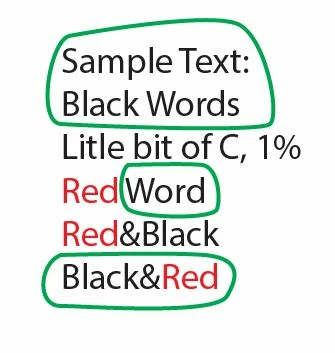
I ran this on some sample text and circled the text that has been set to overprint.

you can see that it seems to look at the first Char in the word and assumes the whole word is the same formatting.

1 reply

Qwertyfly___
Qwertyfly___Correct answer
Legend
August 14, 2015

you have a few "var" declarations missing. just for good practice

I think to be reliable you need to cycle Chars not words.

I ran this on some sample text and circled the text that has been set to overprint.

you can see that it seems to look at the first Char in the word and assumes the whole word is the same formatting.

natrev
natrevAuthor
Legend
August 14, 2015

This works perfect!  Thank you so much, Qwertyfly! 

- yajiv

Code:

CheckOverPrintoftheObject(0,0,0,100,false,true);

function CheckOverPrintoftheObject(c,m,y,k,flg1,flg2){

    var docRef = app.activeDocument; 

    // To check Text as Over Print........

        var count = docRef.textFrames.length;

        for ( i = 0; i < count; i++ ) {

            var textArt = activeDocument.textFrames;

            for ( j = 0; j < textArt.characters.length; j++) {

                var word = textArt.characters;

                var SWColor = word.fillColor;

                var SWSTColor = word.strokeColor;

                if (SWColor.typename=="CMYKColor"){

                    //alert("in CMYK Fill ");

                    var c1=Math.round(SWColor.cyan);

                    var m1=Math.round(SWColor.magenta);

                    var y1=Math.round(SWColor.yellow);

                    var k1=Math.round(SWColor.black);

                    //alert("( "+c1+" == "+c+" ) && ( "+m1+ "== "+m+") && ( "+y1+ "== "+y+" ) && ( "+k1+" == "+k+" ) && ("+word.characterAttributes.fillOverprint+"=="+flg1+")");   

                if (( c1 == c ) && ( m1 == m) && ( y1 == y ) && ( k1 == k ) && (word.characterAttributes.overprintFill==flg1)) {

                word.characterAttributes.overprintFill=flg2;

                }

            }

        }

    }

}

Qwertyfly___
Legend
August 14, 2015

Glad I could help