
Inspiring
October 21, 2020
Answered

Difficulty copying and pasting an image from my EPS file in Illustrator that has this box around it.

  • October 21, 2020
  • 2 replies
  • 1467 views

I am very new to Illustrator, so I may need step-by-step instructions or a simplified explanation of what to do here. What I want to do is to grab one part of the vector images that I placed onto Illustrator via an EPS file (in this case, the red flower), however I am unable to select and copy and paste that image into a new artboard. It seems as though an entire section has this box around it and this box is selecting a group of elements which a small part of the flower is a part of, making me unable to select the entire flower or delete anything that is around it that lies within this box.


How can I best able to just grab the entire flower itself and copy it and paste it onto a new Illustrator artboard?


Please let me know. I have included a screenshot.

Thanks so much.
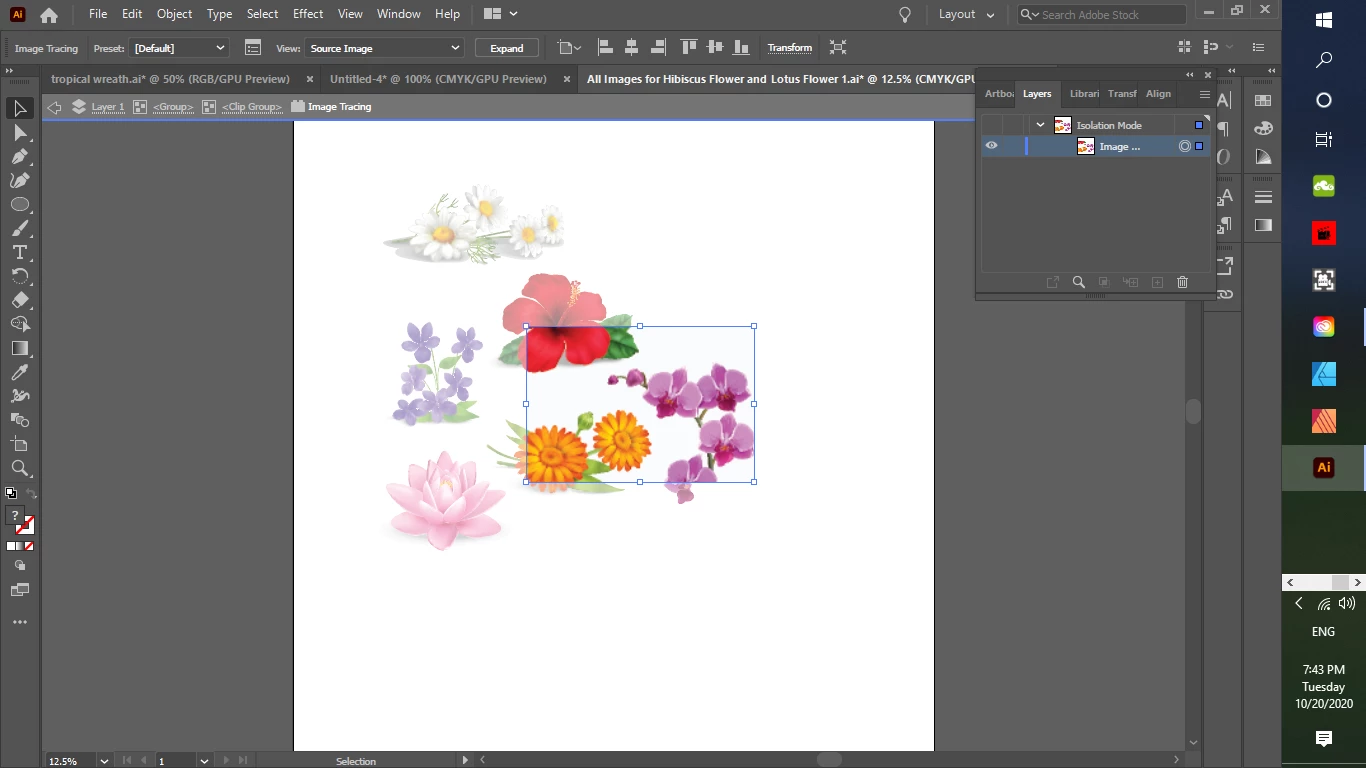
This topic has been closed for replies.
Correct answer stellas45198152

If ungrouping does not help, try releasing the clipping masks.

Since the upper part of the layers  is not visible, it's not possible to tell you about the structure of your file. You basically have to go through what the layers panel tells you.


Oh my Gosh, this is too funny ... I was trying to edit (copy and paste) from the EPS file that I had placed onto an Illustrator artboard. I am such a newbie with this, and I did not know that I needed to actually OPEN the EPS file and edit (copy and paste) elements from there. I did so just now, and it worked. I was able to select the entire flower and copy and paste it onto a new artboard.

Thanks so much for your help.

2 replies

Ton Frederiks
Community Expert
Community Expert
October 21, 2020

Looks like you are tracing pixel images.

You need to click the Expand button in the Control panel them to continue working with them as vector.

Inspiring
October 22, 2020

Thanks for responding.
Do I do so for the entire artwork or just that part before expanding? Do I keep the Object and Fill selected?
I tried this but I got the same box. In fact, I found out that there were several boxes still for different parts of the design, even after I ungrouped them.

Ton Frederiks
Community Expert
Community Expert
October 22, 2020

Hi there ... thanks for responding.

I just left a reply with Monika ... apparently it was all because I was trying to copy and paste an image after placing the EPS instead of editing the EPS itself. 

I am happy now that I know what to do.

Thanks for your help with this.


Good to hear you found the solution!

lambiloon
Community Expert
Community Expert
October 21, 2020

Hi first you need to ungroup the all items then you can select what you want as whole easily....regards

Ali Sajjad / Graphic Design Trainer / Freelancer / Adobe Certified Professional
Inspiring
October 22, 2020

Hi there:
Thanks for your answer.

I did that, however even though most of the flower gets ungrouped some of it (the bottom part) is still included in the box that also includes the purple flower and other elements. The box just pops up when I get to a certain petal.

Monika Gause
Community Expert
Community Expert
October 22, 2020

If ungrouping does not help, try releasing the clipping masks.

Since the upper part of the layers  is not visible, it's not possible to tell you about the structure of your file. You basically have to go through what the layers panel tells you.