Jeffery.Wright
Inspiring
August 18, 2022
Answered

Direct Selection - How to move a single text character?

  • August 18, 2022
  • 2 replies
  • 2645 views

In CorelDraw, you can grab the node of any character in a block/string of text and move it anywhere you like, and it is still editable text. 

How is this performed in Illustrator? Shouldn't this be easy to do? 
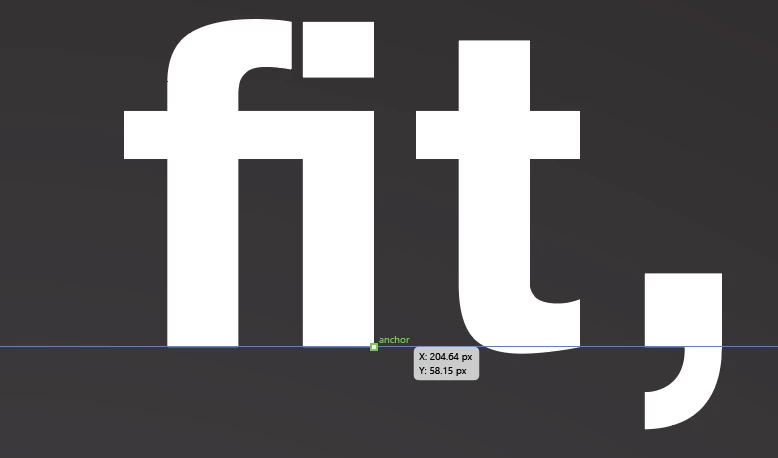
Dragging that anchor moves the entire text block/string. I just want to nudge that one character, how is this done?


Any helpful hints are very welcome, thanks. 
 

This topic has been closed for replies.
Correct answer Monika Gause

@Jeffery.Wright  schrieb:

No, not a ligature, I typed it myself. 


So you didn't try the OpenType panel?


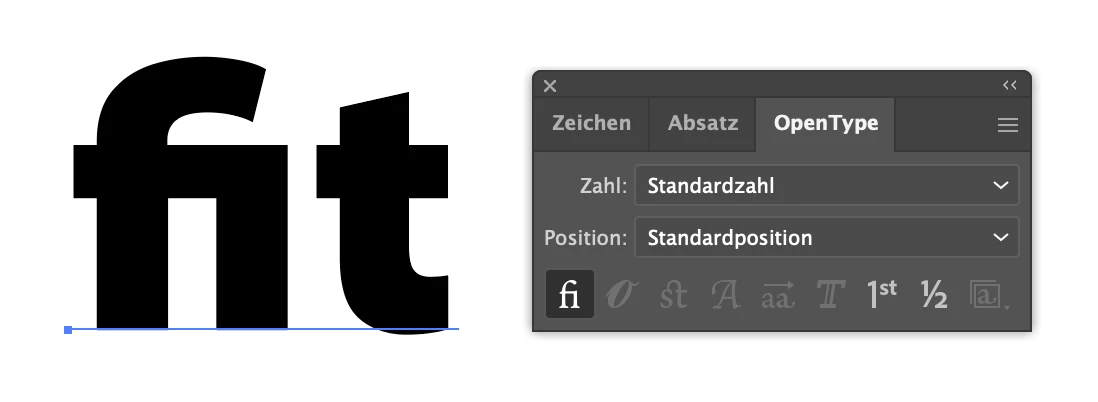
This is how it looks:

Ligature:

Not a ligature:


Ligature is the default setting. The fi pair of letters almost always looks awful, so the standard ligatures are turned on by default for your convenience. But of course you can change that. Edit the default character style in your New document profile, and turn off the standard ligatures. 

2 replies

Kurt Gold
Community Expert
Community Expert
August 18, 2022

It's a ligature and the Touch Type tool cannot split it.


You'll have to make sure that the "f" and the "i" are single characters (see Open Type palette, for example).


Jeffery.Wright
Inspiring
August 18, 2022

No, not a ligature, I typed it myself. 

I had to place a cursor between the the "f" and the "i" then find and click the Touch Type tool, move the "i" then delete the space I created between the  "f" and the "i" - an operation that took a hundred times longer than it would have in CorelD, where I would just click the text, grab the node and move the character. 

I wonder why Adobe makes simple things so difficult to do? 

Ton Frederiks
Community Expert
Community Expert
August 18, 2022

As Kurt mentioned, it is a Ligature and you can click the Standard Ligatures button in the OpenType panel to turn it off/on.

Kurt Gold
Community Expert
Community Expert
August 18, 2022

Does the Touch Type tool perhaps do what you want?


Jeffery.Wright
Inspiring
August 18, 2022

Thanks for the information, running a Google search for "Illustrator How to move a single text character" produced no mention of Touch Type tool for me, only results such as "Choose Type > Create Outlines to convert the text to editable paths"

The Touch Type tool allows me to select any character in the text string except the one I want to select, in the this case the "i" character:


When I try to select the "i" or the "f" nothing occurs at all. 


Any idea what the issue could be? 

Thanks again.