Exit
  • Global community
    • Language:
      • Deutsch
      • English
      • Español
      • Français
      • Português
  • 日本語コミュニティ
  • 한국 커뮤니티
0

Direct selection tool issue

New Here ,
Oct 06, 2021 Oct 06, 2021

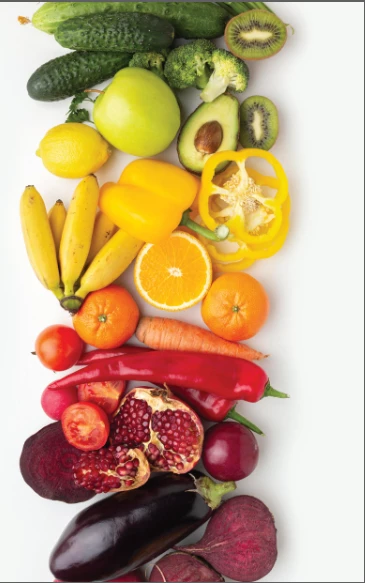
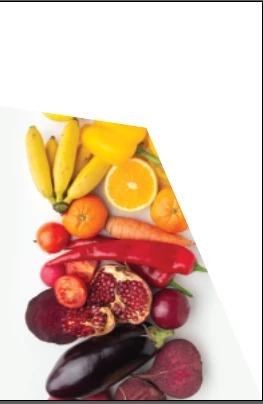
oringal image.PNGEditing.PNG


Hi, I have an issue in Illustartor, can someone help me out please?


I am trying to resize the image accordingly using the direct selection tool. Every time I try to adjust the image by dragging the corners, part of the image cuts off. I want to be able to resize the image using the direct selection tool while the whole image is still visible. 


What can I do? 

Thanks


TOPICS
Tools
211
Translate
Report
Community guidelines
Be kind and respectful, give credit to the original source of content, and search for duplicates before posting. Learn more
community guidelines
Adobe
Community Expert ,
Oct 06, 2021 Oct 06, 2021

You seem to be adjusting the clipping mask with the direct selection tool.

Use the selection tool or the scale tool to avoid this.

Translate
Report
Community guidelines
Be kind and respectful, give credit to the original source of content, and search for duplicates before posting. Learn more
community guidelines
New Here ,
Oct 06, 2021 Oct 06, 2021

I want it to fit in here for an advertising truck that's why i'm using the direct selection tool.

Translate
Report
Community guidelines
Be kind and respectful, give credit to the original source of content, and search for duplicates before posting. Learn more
community guidelines
Community Expert ,
Oct 06, 2021 Oct 06, 2021
LATEST

So you want to distort the image?

You could try an Envelope distort, with another object or a mesh:

https://helpx.adobe.com/illustrator/using/reshape-using-envelopes.html

Or pre-distort it in Photoshop.

Translate
Report
Community guidelines
Be kind and respectful, give credit to the original source of content, and search for duplicates before posting. Learn more
community guidelines