
Known Participant
April 25, 2018
Answered

Disable ALL tooltips, popups, start screens, bubbles and whatever Pros don't need

  • April 25, 2018
  • 1 reply
  • 9277 views

It may seem counterintuitive, but too many popups, tooltips, start screens, etc. etc. etc...actually slowdown the productivity and don't really help all that much and are quite annoying.

If there is a way to disable all of them for good, that would be great!

(my 2 cents is to have video tutorials "if" needed)

Thanks
Correct answer Bill Silbert

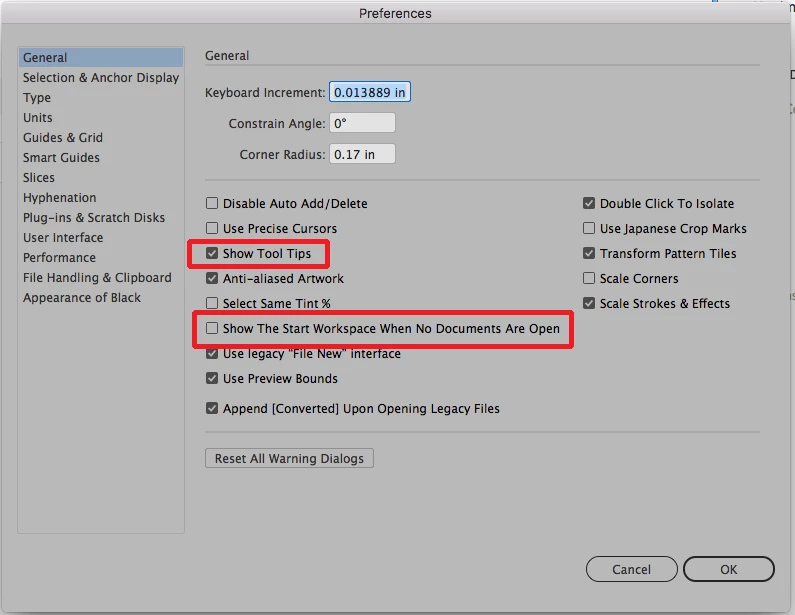
Most of what you mentioned can be deselected in the General section of the Illustrator preferences. In addition to the highlighted options in the screen shot you might find that using the legacy "File New"  Interface also will simplify things. Quit the program after you do it and it should become your default.

Unfortunately, the pop-ups for "features" cannot be shut off by the user. However, I've seen it mentioned that each one of them will only pop up three times after install and not be seen again after. One only hopes that that is true.

1 reply

Bill Silbert
Community Expert
Bill SilbertCommunity ExpertCorrect answer
Community Expert
April 25, 2018

Most of what you mentioned can be deselected in the General section of the Illustrator preferences. In addition to the highlighted options in the screen shot you might find that using the legacy "File New"  Interface also will simplify things. Quit the program after you do it and it should become your default.

Unfortunately, the pop-ups for "features" cannot be shut off by the user. However, I've seen it mentioned that each one of them will only pop up three times after install and not be seen again after. One only hopes that that is true.

Bev A.
Inspiring
January 8, 2024

It is really nuts that we cannot turn off the pop-ups for "features". They just get in the way ALL THE TIME. So annoying. UGH!

Anshul_Saini
Community Manager
Community Manager
July 2, 2024

It is untrue that feature pop-ups only happen 3 times. I've gotten them over 100 times. Sometimes they appear offscreen where I cannot interact with them and I have to restart my system. This is crippling my productivity. (Library features)


We are sorry for the trouble. This issue has been addressed in the latest beta version. Could you please install it from the Creative Cloud desktop app > Beta app section and check if the same behavior occurs?
 

Best regards,

Anshul Saini